Top MCP servers for design
The 13 most useful design MCP servers, from Mobbin and Awwwards to Storybook, fal and Canva, with what each one is for, the setup and prompts to try
Give a coding agent a screenshot of a design and it guesses: the spacing, the colors, which of your components to use. Design MCP servers replace the guess with the real thing: real apps' screens as references, a design file the agent can edit, your Storybook's documented props, your registry's components.
We picked the 13 most useful, starting from the most popular by GitHub stars, npm downloads and visitors on PulseMCP (October 2026). PulseMCP is a public directory of MCP servers that estimates how many people visit each one every week. We left out Figma's own MCP on purpose: if you're on Figma, you already know it (setup is at the end). Here they are in the order you'd use them, from references to shipped UI, plus Playwright for checking what shipped:
| # | MCP | Best for | Popularity | Cost |
|---|---|---|---|---|
| 1 | Real app screens as references | Official, 620K+ screens | Paid Mobbin plan | |
| 2 | Award-winning sites as landing page references | 105 ★ | Free | |
| 3 | A canvas the agent edits, in HTML and CSS | Official | 100 calls/week free | |
| 4 | Open-source design files, read and write | 61K ★ (Penpot) | Free | |
| 5 | Building UI from your documented components | 2.5M visits/week | Free | |
| 6 | Finding and installing registry components | 47M npm/month (CLI) | Free | |
| 7 | Building with monday.com's Vibe components | 683 ★, 130K npm/week (core) | Free | |
| 8 | Generating polished components from a prompt | 6K ★ | Free tier | |
| 9 | Images from Nano Banana, GPT Image, Flux | Official, 1,000+ models | Pay per image | |
| 10 | SVG icons and illustrations in one style | Official | Recraft credits | |
| 11 | Pointing at UI bugs instead of describing them | 4.9K ★, 97K npm/week | Free | |
| 12 | Diagrams, flows and wireframes | 5.5K ★ | Free | |
| 13 | Social graphics and brand assets | Claude connector | Free tier |
1. Mobbin
Mobbin is a library of 620K+ screens and flows from real apps and websites. Its MCP lets the agent look up how good products solve the same screen before it designs yours: pricing tables, onboarding, empty states, settings. You get layouts based on proven patterns instead of the average AI page.
Terminal
Loading editor...
claude mcp add mobbin --scope user --transport http https://api.mobbin.com/mcp
Watch out: it needs a paid Mobbin plan, and it covers iOS and web, not Android. It only reads: it brings references, your agent still builds.
2. Awwwards
Awwwards is the gallery of award-winning websites. This community MCP searches it in plain words ("dark 3D portfolio sites"), shows the screenshots inline and pulls a site's palette, tech stack and design elements. It's a free Mobbin for marketing sites and landing pages rather than app screens.
With Playwright installed, it also captures a live page, maps its sections and records its scroll and hover animations, naming the libraries and easings behind them.
create_design_brief turns 2 to 5 picked sites and your goal into a written direction that cites where each idea came from.Terminal
Loading editor...
claude mcp add awwwards -- npx -y awwwards-mcp
It needs Node 22.13 or newer. Build the local index once (about 4 minutes) to search thousands of sites instead of about 31 per filter:
npx -y -p awwwards-mcp awwwards-index.Watch out: it scrapes awwwards.com, so search can break when Awwwards changes its markup. It's a community project, not made by Awwwards, and the screenshots are for inspiration, not for copying a site.
3. Paper
Paper is a design canvas where every frame is real HTML and CSS, built to work with agents. Over MCP, the agent reads and edits your designs, creates variations on new artboards, pulls your code's tokens into the file and turns a frame into React and Tailwind. Design and code stop drifting apart because they're the same thing.
Terminal
Loading editor...
claude plugin marketplace add paper-design/agent-plugins && claude plugin install paper-desktop@paper
Watch out: Paper Desktop has to be open with a file loaded. The free plan allows 100 MCP calls a week, which a single session can use up; Pro is $20 per editor a month.
4. Penpot
Penpot is the open-source Figma alternative, and its official MCP gives the agent read and write access to your files with no paid seat. It can summarize a file's design system, create components in the style of existing ones and export a board as HTML and CSS or React. You can self-host all of it.
Terminal
Loading editor...
claude mcp add --transport http penpot "https://design.penpot.app/mcp/stream?userToken=YOUR_MCP_KEY"
Generate the key in Penpot → Your account → Integrations → MCP Server, then open a file and choose File → MCP Server → Connect.
Watch out: the agent can rename, move and delete objects on the open page. Penpot itself advises trying it on a copy, not your production file.
5. Storybook
Storybook's MCP gives the agent your component library's documentation: which components exist, their props and example stories. The agent builds with what you have instead of inventing a new button, then previews the stories and runs their interaction and accessibility tests.
Terminal
Loading editor...
npx storybook add @storybook/addon-mcp
claude mcp add --transport http storybook http://localhost:6006/mcp
Watch out: Storybook must be running, and the docs tools fully support React plus the Vite builds of Angular and Vue.
6. shadcn/ui
The shadcn MCP lets the agent browse, search and install components from any shadcn-compatible registry: shadcn itself, Magic UI, Aceternity, or your company's private one. It reads real examples before writing code, so the usage matches the component's actual API.
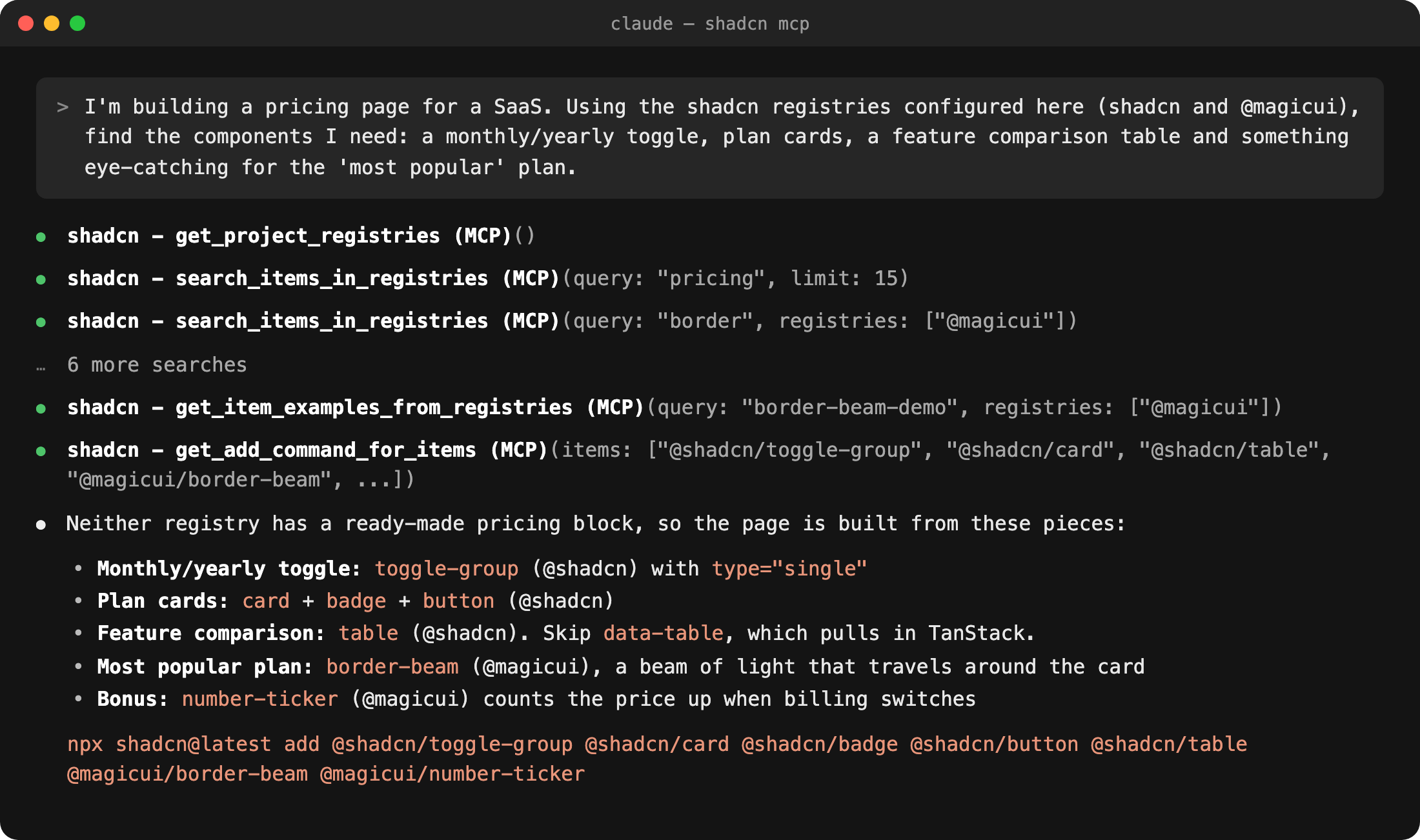
We asked for the parts of a pricing page from shadcn and Magic UI. It found that neither has a ready-made pricing block, assembled one from five components, and gave a single install command:
Terminal
Loading editor...
npx shadcn@latest mcp init --client claude
Watch out: it finds and installs, it doesn't design. The result is only as good as the registry, and the project needs a
components.json.7. Vibe Design System
Vibe is monday.com's open-source React design system, and its official MCP gives the agent the library's docs: components, props, usage examples, accessibility rules, icons and design tokens. The agent builds with real Vibe components instead of guessing their API.
It's for apps on the monday.com marketplace, where matching monday's look matters, and for teams that use Vibe as their component library. It also checks a project for the Vibe 2 to Vibe 3 upgrade and generates the migration commands.
Terminal
Loading editor...
claude mcp add vibe -- npx -y @vibe/mcp
Watch out: it only knows Vibe, so on any other stack it has nothing to offer. It documents components but doesn't check the result: look at the screen with Playwright after the agent builds.
8. 21st.dev Magic
21st.dev is a community library of polished React components. Its MCP searches the library, pulls a component's code, and can generate new ones from a prompt with
/ui. It also finds brand logos as SVG, which saves a trip for every integrations grid.Terminal
Loading editor...
npx @21st-dev/cli@latest init --client claude
Watch out: without direction, results look like every other landing page. Point it at your tokens. It was renamed "21st MCP" and old API keys were reset, so older tutorials are out of date.
9. fal (image generation)
fal's official MCP gives the agent 1,000+ image and video models through one server: Nano Banana, GPT Image, Flux, Seedream, Ideogram and upscalers. It can recommend a model, show its price, run it and save the result into your project. Hero images, empty-state illustrations and product shots come from the same session that builds the page.
Terminal
Loading editor...
claude mcp add --transport http --scope user fal https://mcp.fal.ai/mcp-relay
Watch out: every generation costs money, and an agent left to iterate runs up the bill. Tell it to check the price and ask before each batch. It makes raster images only; for SVG icons, see Recraft below.
10. Recraft
Recraft's MCP is the image generator that makes real vectors. Icon sets, illustrations and logos come out as SVG you can drop into the codebase, in one consistent style, including a custom style trained on your own illustrations. It also vectorizes PNGs and removes backgrounds.
Terminal
Loading editor...
claude mcp add --transport http recraft https://mcp.recraft.ai/mcp
Watch out: it spends the same credits as the Recraft app, so heavy MCP use eats your monthly allowance.
11. Agentation
Describing a visual bug to an agent in words is slow: "the second card, the gap under the title, on mobile". Agentation replaces that with pointing. Add its toolbar to your app, click the element, write a note, and the agent gets the note with the element's CSS selector, source file, React component tree and computed styles. With the MCP server running, annotations go straight to Claude Code, and the agent can reply in the thread, mark each one fixed or ask what you meant.
It's design review without screenshots and long messages.
Terminal
Loading editor...
claude mcp add agentation -- npx -y agentation-mcp server
Then add the toolbar to your app:
Watch out: it runs locally on port 4747, so it's for your dev server, not production. The component tree is captured for React apps.
12. Excalidraw
Excalidraw's official MCP draws hand-drawn diagrams: user flows, architecture, sitemaps and low-fi wireframes. In Claude Desktop and claude.ai the editable canvas appears right in the chat, and you can export it to excalidraw.com.
Terminal
Loading editor...
claude mcp add --transport http excalidraw https://mcp.excalidraw.com/mcp
Watch out: it's for sketches and diagrams, not finished UI. The live canvas needs a client that supports MCP Apps; in the terminal you get a link.
13. Canva
Canva's server generates designs, edits text in existing ones, resizes for every channel and exports PNG or PDF. It's the one on this list for marketing assets rather than product UI: launch graphics, one-pagers, webinar banners.
Terminal
Loading editor...
claude mcp add --transport http canva https://mcp.canva.com/mcp
Watch out: no code and no tokens come out of it, and generated designs usually need a pass in Canva before they go out.
Playwright for design QA
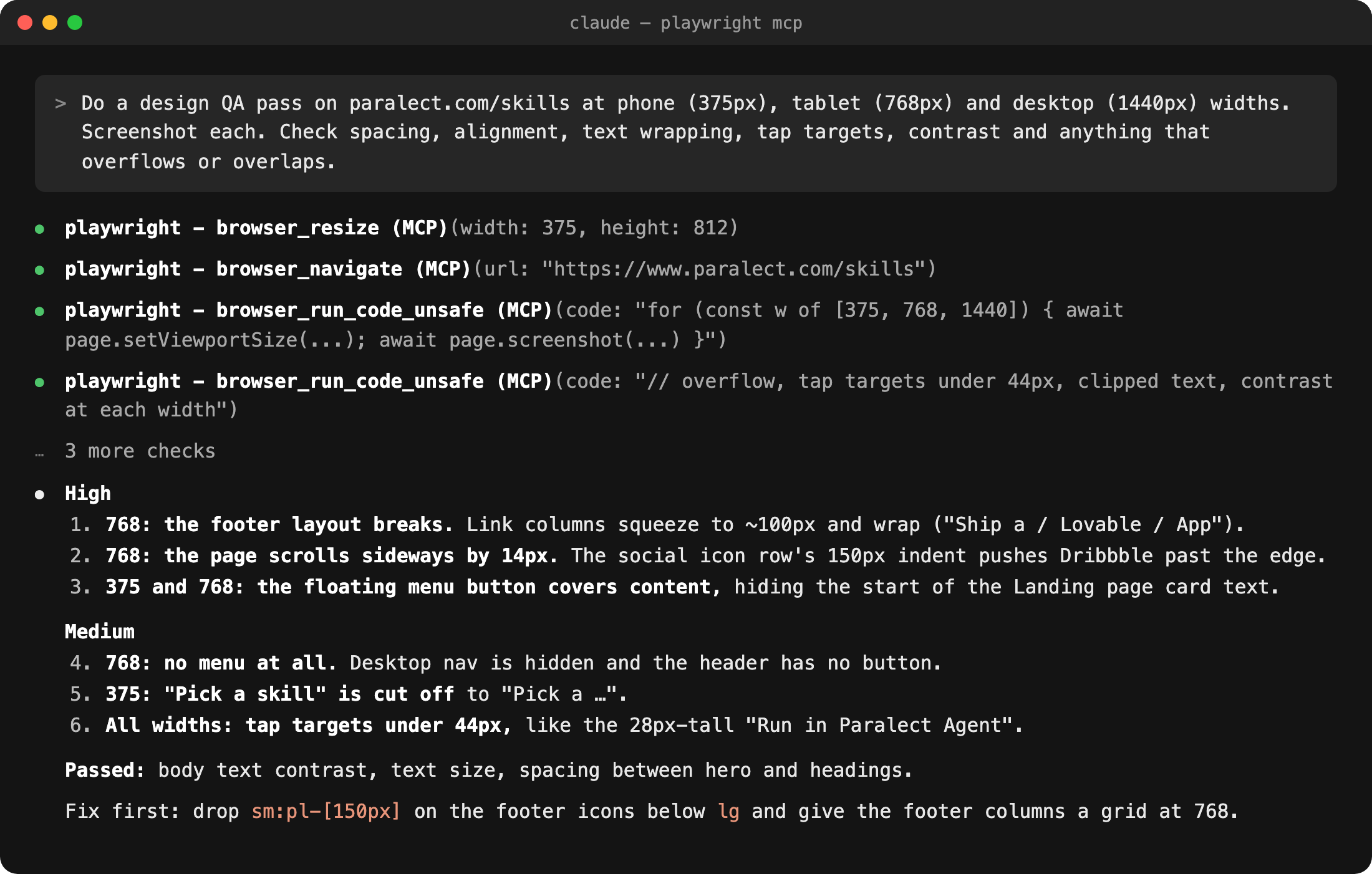
Playwright is the most used MCP server overall, and it's as useful for designers as for developers. It opens the real page in a browser, resizes it to any device and screenshots it, then measures what you'd check by eye: spacing, overflow, clipped text, tap target sizes and contrast. It's a design review of what actually shipped, at every breakpoint, in a couple of minutes.
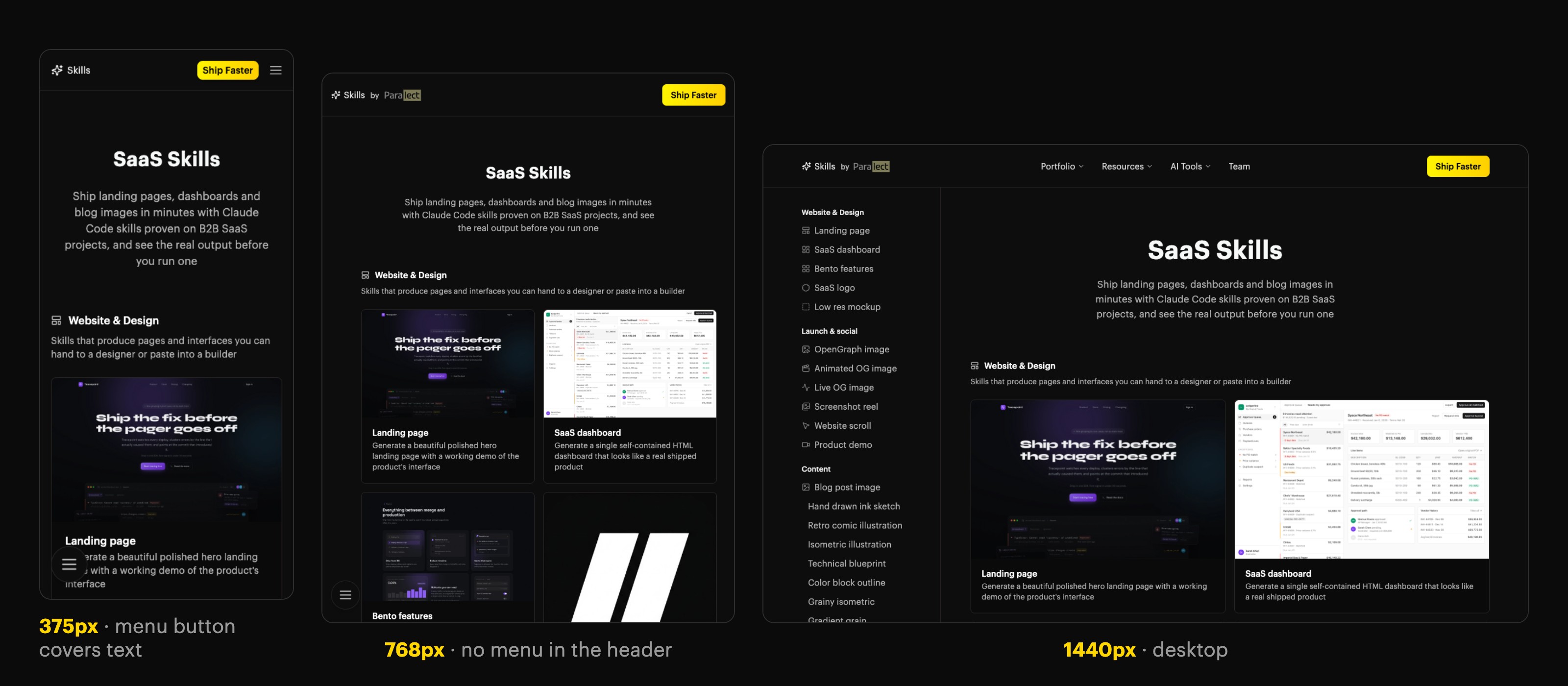
We asked for a QA pass on our own Skills page at phone, tablet and desktop widths. It found 12 issues. The worst two only show at tablet width: there is no menu at all, and the footer pushes the page sideways.
Terminal
Loading editor...
claude mcp add playwright npx @playwright/mcp@latest
Watch out: full-page screenshots can miss lazy-loaded content and sticky headers. Ask for viewport screenshots while scrolling when the page has either.
Playwright isn't a design server, so it lives with the development MCPs. Full setup, prompts and limits are on its MCP page.
Also worth knowing
- Blender MCP: 3D scenes and product renders from a prompt.
- pen.dev (Pencil): a design canvas inside your IDE that keeps designs as files in the repo, and that agents can edit over MCP.
- Magic UI MCP: animated landing-page components for shadcn projects.
- Webflow and WordPress MCP Adapter: build pages and edit CMS content on your marketing site.
Which to install first
- Before designing any screen: Mobbin, so the agent starts from real patterns. For a landing page, Awwwards.
- A design file the agent can edit: Paper, or Penpot if you want open source.
- You have a component library: Storybook or shadcn, so the agent builds with your parts. Vibe if you build on monday.com.
- Images and icons: fal for images, Recraft for SVG.
- Checking what shipped: Playwright, at every breakpoint.
- Reviewing UI with the agent: Agentation. Click the bug, the agent fixes it.
- Explaining a flow to the team: Excalidraw.
Ship faster than
your competition
Focus on customers and sales while we handle product delivery. Hire a dedicated AI maker or a whole product team.
Launch new products
Fix your delivery
Hit fundraising milestones
[Analytics Chart]
Wireframe v0.1
Sarah Chen CEO, Founder
$127k
MRR
2,847
Customers
+23%
Growth
Sales Performance
Latest Deal
Enterprise plan closed
Acme Corp · $12k/mo


Services
Industries
Hire
Claude Code Devs Next.js DevsReact DevsReact Native DevsSupabase DevsLovable DevsAI EngineersFull-stack Devs Upwork Alternative
AI Tools
Resources
Kickstart No-Code Stack Tech Stack Tech Trends AI SaaS Skills MCP Servers Academy Help Center Blog Changelog
Our products


'%3e%3cpath%20fill-rule='evenodd'%20clip-rule='evenodd'%20d='M2500%201250C2500%201940.36%201940.36%202500%201250%202500C559.644%202500%200%201940.36%200%201250C0%20559.644%20559.644%200%201250%200C1940.36%200%202500%20559.644%202500%201250ZM1030.7%20697.9C986.2%20688.4%20937%20683.6%20883.1%20683.6H350V1816.5H899.1C949.1%201816.6%20999%201810.2%201047.4%201797.5C1095.5%201784.8%201138.3%201765.3%201175.9%201738.8C1213.5%201712.4%201243.4%201678.3%201265.6%201636.5C1287.8%201594.7%201298.9%201545.2%201298.9%201488.1C1298.9%201417.2%201281.7%201356.6%201247.3%201306.4C1212.9%201256.2%201160.8%201221%201091%201200.9C1141.7%201176.6%201180.1%201145.4%201206%201107.3C1231.9%201069.2%201244.9%201021.6%201244.9%20964.5C1244.9%20911.6%201236.2%20867.2%201218.7%20831.2C1201.2%20795.2%201176.6%20766.4%201144.9%20744.7C1113.2%20723%201075.2%20707.4%201030.7%20697.9ZM960.9%201110.4C932.3%201131.5%20895.8%201142.1%20851.4%201142.1L599.2%201142.3V877.3H832.3C853.9%20877.2%20875.4%20879.1%20896.6%20882.8C917.2%20886.5%20935.4%20893.1%20951.3%20902.6C967.2%20912.1%20979.9%20925.4%20989.4%20942.3C998.9%20959.2%201003.7%20980.9%201003.7%201007.3C1003.8%201054.9%20989.5%201089.2%20960.9%201110.4ZM935.5%201615.7C912.6%201620.5%20889.2%201622.9%20865.7%201622.8L599.2%201622.9V1311.9H870.5C924.4%201311.9%20967.8%201324.3%201000.6%201349.2C1033.4%201374%201049.8%201415.6%201049.8%201473.7C1049.8%201503.3%201044.7%201527.7%201034.7%201546.7C1024.6%201565.7%201011.1%201580.8%20994.2%201591.9C977.3%201603%20957.7%201610.9%20935.5%201615.7ZM1758.3%201648.2C1694.8%201648.2%201646.1%201631.8%201612.3%201599C1578.5%201566.3%201560%201513.4%201556.9%201440.7H2148.7C2152.9%201377.2%202147.6%201316.4%202132.8%201258.2C2118%201200%202093.9%201148.2%202060.6%201102.7C2027.3%201057.2%201984.7%201021%201932.9%20994C1881%20967%201820.2%20953.5%201750.4%20953.5C1688%20953.5%201631.1%20964.6%201579.8%20986.8C1528.5%201009%201484.3%201039.4%201447.3%201078C1410.3%201116.6%201381.7%201162.3%201361.6%201215.2C1341.5%201268.1%201331.5%201325.2%201331.5%201386.5C1331.5%201449.9%201341.3%201508.1%201360.8%201561C1380.3%201613.9%201408.1%201659.3%201444.1%201697.4C1480.1%201735.5%201524%201764.9%201575.8%201785.5C1627.6%201806.1%201685.8%201816.4%201750.3%201816.4C1843.4%201816.4%201922.7%201795.2%201988.3%201752.9C2053.9%201710.6%202102.6%201640.3%202134.3%201541.9H1936C1928.6%201567.3%201908.5%201591.4%201875.7%201614.1C1842.9%201636.8%201803.8%201648.2%201758.3%201648.2ZM1744%201123.1C1799%201123.1%201840%201137.9%201867%201167.5C1893.9%201197.1%201912.7%201240.5%201923.4%201297.5H1556.9C1557.9%201281.7%201561.4%201263.7%201567.2%201243.6C1573%201223.5%201583%201204.5%201597.3%201186.5C1611.6%201168.5%201630.6%201153.5%201654.4%201141.3C1678.1%201129.2%201708%201123.1%201744%201123.1ZM1976.2%20741.1H1518.3V868.1H1976.2V741.1Z'%20fill='white'/%3e%3c/g%3e%3cdefs%3e%3cclipPath%20id='clip0_52_236'%3e%3crect%20width='2500'%20height='2500'%20fill='white'/%3e%3c/clipPath%3e%3c/defs%3e%3c/svg%3e)
'%3e%3cpath%20d='M444.031%20372.208C477.51%20456.911%20502.37%20544.115%20518.526%20633.203C541.573%20619.151%20563.115%20602.266%20582.693%20582.693C633.547%20531.833%20666.365%20467.75%20677.958%20398.198C628%20377.531%20573.286%20366.094%20515.948%20366.094C491.438%20366.094%20467.417%20368.208%20444.031%20372.208V372.208Z'%20fill='white'/%3e%3cpath%20d='M582.979%20100.266C582.88%20100.172%20582.786%20100.068%20582.693%2099.974C518.219%2035.5052%20432.505%20-7.62939e-06%20341.333%20-7.62939e-06C305.682%20-7.62939e-06%20270.865%205.45312%20237.828%2015.9219C290.781%2082.2656%20337.365%20153.068%20377.286%20227.896C452.495%20195.964%20521.771%20152.698%20582.979%20100.266Z'%20fill='white'/%3e%3cpath%20d='M609.797%20130.479C545.589%20185.63%20473.839%20230.323%20395.761%20263.724C407.271%20286.896%20418.141%20310.437%20428.401%20334.328C457.052%20328.875%20486.287%20326.094%20515.948%20326.094C573.401%20326.094%20629.282%20336.427%20682.308%20356.766C682.537%20351.641%20682.667%20346.5%20682.667%20341.339C682.667%20263.88%20657.032%20190.375%20609.797%20130.479V130.479Z'%20fill='white'/%3e%3cpath%20d='M131.234%20610.401C190.99%20657.255%20264.208%20682.667%20341.333%20682.667C390.354%20682.667%20437.792%20672.385%20481.203%20652.875C464.932%20558.594%20438.88%20467.625%20404.12%20381.047C283.323%20414.016%20183.802%20499.026%20131.234%20610.401V610.401Z'%20fill='white'/%3e%3cpath%20d='M334.88%20362.656C352.438%20355.229%20370.333%20348.938%20388.51%20343.76C378.917%20321.792%20368.74%20300.135%20358.031%20278.786C265.818%20313.026%20168.854%20330.375%2069.25%20330.375C46.1094%20330.375%2023.1198%20329.422%200.296875%20327.557C0.114583%20332.135%200%20336.729%200%20341.339C0%20432.51%2035.5052%20518.224%2099.974%20582.693C99.9948%20582.714%20100.021%20582.734%20100.042%20582.755C122.339%20538.286%20151.5%20497.87%20187.031%20462.333C229.745%20419.625%20279.484%20386.089%20334.88%20362.656Z'%20fill='white'/%3e%3cpath%20d='M339.323%20242.859C298.818%20167.844%20251.427%2097.0677%20198.016%2031.3698C162.021%2048.0417%20128.859%2071.0885%2099.974%2099.974C48.3281%20151.62%2015.2917%20216.906%204.1875%20287.708C25.6458%20289.464%2047.3438%20290.375%2069.25%20290.375C164.052%20290.375%20255.016%20273.594%20339.323%20242.859Z'%20fill='white'/%3e%3c/g%3e%3cdefs%3e%3cclipPath%20id='clip0_107_362'%3e%3crect%20width='682.667'%20height='682.667'%20fill='white'/%3e%3c/clipPath%3e%3c/defs%3e%3c/svg%3e)
© 2026 Paralect, Inc 651 N Broad St, Suite 206, Middletown, 19709, Delaware, United States