Top MCP servers for development
The 13 most popular MCP servers for coding agents, with a real run of each in Claude Code, the install command and prompts to try
A coding agent can write code, but it can't see what the code does. It doesn't know what your page looks like, which library version you're on, why CI failed or what broke in production last night. These 13 MCP servers fill those gaps.
We ranked them by GitHub stars, weekly downloads and search interest (October 2026), and ran the ones that don't need an account in Claude Code on real projects.
| # | MCP | What your agent can do with it | Popularity |
|---|---|---|---|
| 1 | Click through your app in a real browser | 38K ★, 6.5M npm/week | |
| 2 | Log in and fill forms on sites with no API | 118K ★ | |
| 3 | Read current docs for any library | 63K ★, 1.1M npm/week | |
| 4 | Read the console, network and performance traces | 53K ★, 1.1M npm/week | |
| 5 | Check Core Web Vitals with Lighthouse and CrUX | 70 ★ | |
| 6 | Read and write PRs, issues and CI logs | 34K ★ | |
| 7 | Navigate and edit code by symbol, like an IDE | 30K ★ | |
| 8 | Read production errors and their stack traces | 96K npm/week | |
| 9 | Read deploy logs and runtime errors | 43K visits/week | |
| 10 | Inspect Workers, KV, R2 and D1, render pages | 4K ★ | |
| 11 | Query the database, write migrations, check RLS | 154K visits/week | |
| 12 | Branch Postgres and test migrations before main | 650 ★ | |
| 13 | Draw diagrams of your code that actually render | Official, hosted |
💡
Every server here installs with one command:
claude mcp add . Type /mcp in Claude Code to check that it's connected and to sign in to hosted servers. Cursor and Codex take the same command or URL in their MCP settings.1. Playwright
Playwright MCP gives the agent a real browser. It opens pages, clicks, fills forms, takes screenshots and reads the console. It's the most used MCP server there is, and the fastest way to make an agent check its own work.
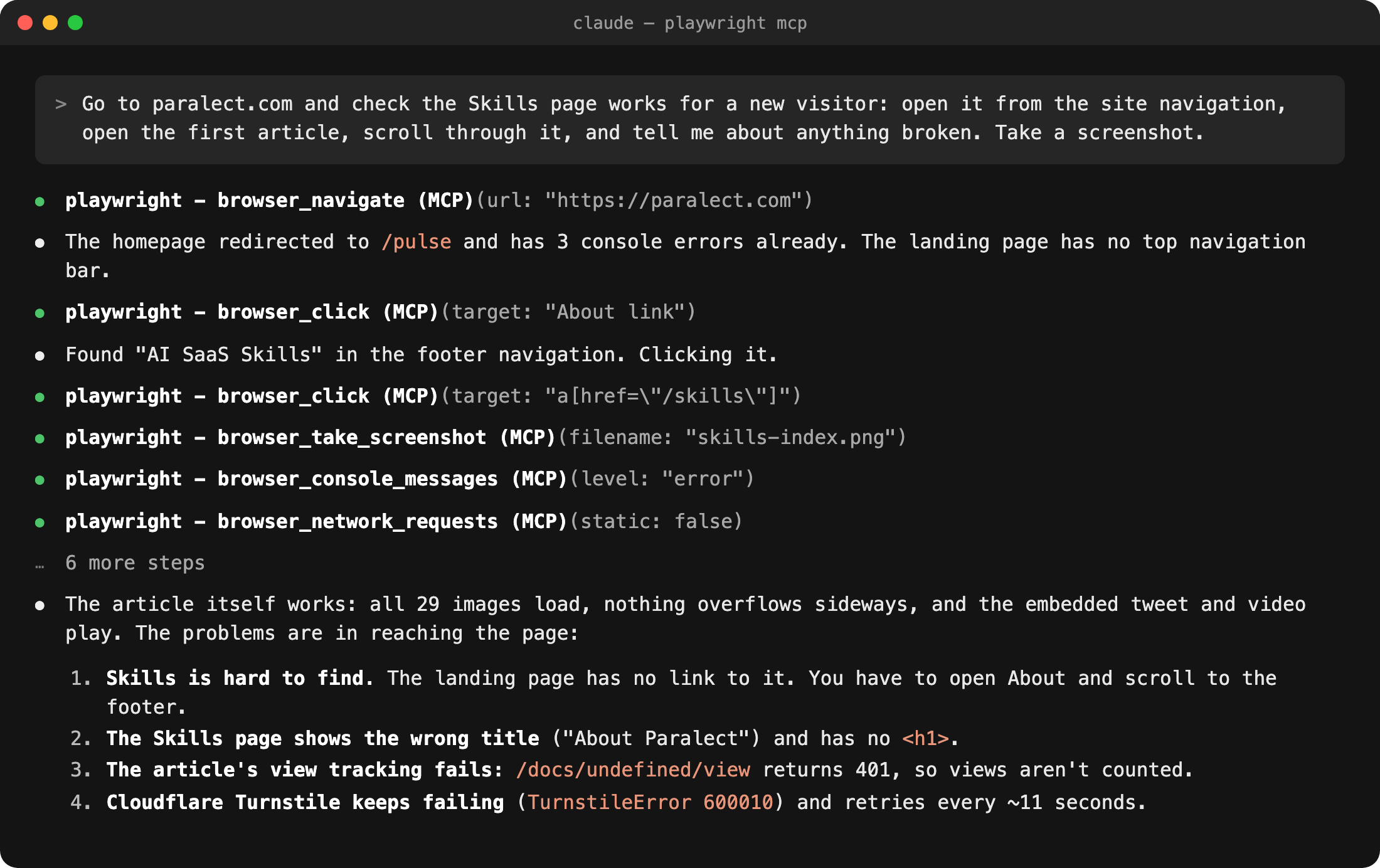
We asked it to check paralect.com the way a new visitor would. It couldn't find the Skills page from the homepage, so it went through About and found the link in the footer. Then it reported four real problems, including a view counter that has been failing silently:
Terminal
Loading editor...
claude mcp add playwright npx @playwright/mcp@latest
Watch out: it loads about 40 tools into context. For long sessions, Microsoft now recommends its playwright-cli with skills, which uses fewer tokens.
2. Browser Use
Browser Use is an open-source agent framework. Its cloud MCP runs a real browser in the cloud that logs in, fills forms, clicks through flows and downloads files, on sites with no API.
You hand it a task in plain English, like "download last month's invoice from the supplier portal", and it runs the session for you. For testing your own app locally, Playwright is the better fit.
Terminal
Loading editor...
claude mcp add -t http -H "x-browser-use-api-key: YOUR_API_KEY" browser-use https://api.browser-use.com/v3/mcp
Watch out: runs take from tens of seconds to minutes, and it bills on usage: a $1 signup credit, then model cost plus 20%. Any page it visits can try to instruct it, so don't give it accounts it doesn't need.
3. Context7
The model's knowledge stops at its training date, so it writes code for last year's API. Context7 fetches the current docs for the exact library and version you use. It has only two tools: find the library, then query its docs.
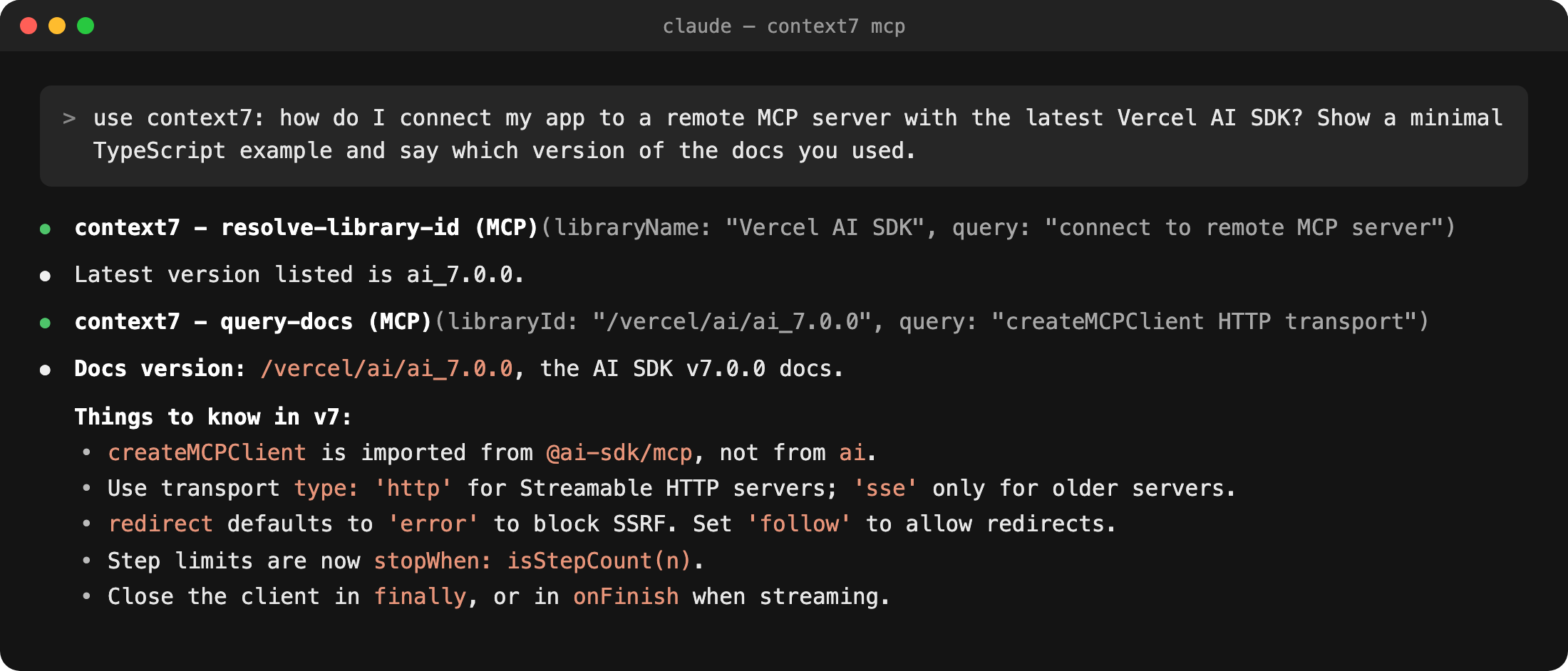
We asked how to connect to a remote MCP server with the Vercel AI SDK. Context7 found v7.0.0 and caught three changes that would break code written from memory: a new package, a new transport option and a new step-limit API.
Terminal
Loading editor...
claude mcp add --transport http context7 https://mcp.context7.com/mcp
Watch out: the agent often won't call it unless you say "use context7" or add a rule to
CLAUDE.md. A free API key from context7.com raises the rate limits.4. Chrome DevTools
Playwright clicks through the app; Chrome DevTools MCP tells you why it's slow or broken. It's Google's official server and gives the agent the DevTools panels: console, network, performance traces, Lighthouse and device emulation.
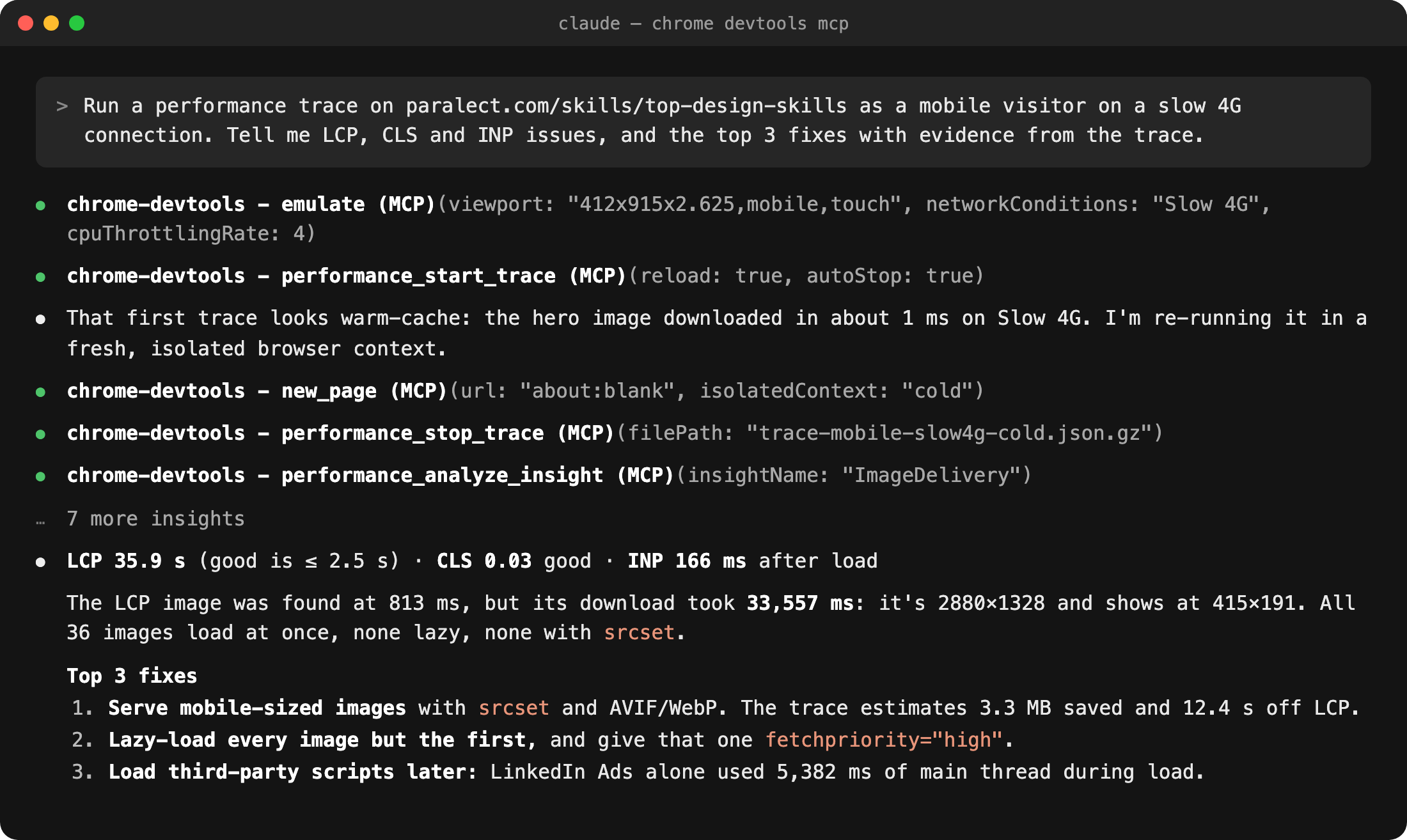
We traced our own design-skills article as a phone on slow 4G. The agent noticed its first trace used cached files and re-ran it in a clean browser. Then it found an LCP of 35.9 seconds and explained exactly why: a 2880px image shown at 415px, downloading alongside 35 others.
Terminal
Loading editor...
claude mcp add chrome-devtools npx chrome-devtools-mcp@latest
Watch out: it sends usage statistics to Google by default. Add
--no-usage-statistics to opt out, and --slim if you only need the basics.5. PageSpeed Insights
PageSpeed Insights MCP wraps Google's PageSpeed Insights API. It runs Lighthouse on any public URL and pulls real-user Core Web Vitals from the Chrome UX Report. It's a community server by ruslanlap, not Google's.
Chrome DevTools debugs a page on your machine; PageSpeed checks what real users see. Run it after a deploy, compare against a saved baseline or a competitor's page, and triage up to 10 pages at once.
Terminal
Loading editor...
claude mcp add pagespeed -e GOOGLE_API_KEY=your-key -- npx -y pagespeed-insights-mcp
Watch out: it needs a Google API key with the PageSpeed Insights API enabled, and it only tests public URLs. Lighthouse scores vary between runs, so compare several before you call a change a regression.
6. GitHub
GitHub's official server lets the agent read and write repos, issues, pull requests, reviews and Actions logs, in your repo or anyone's.
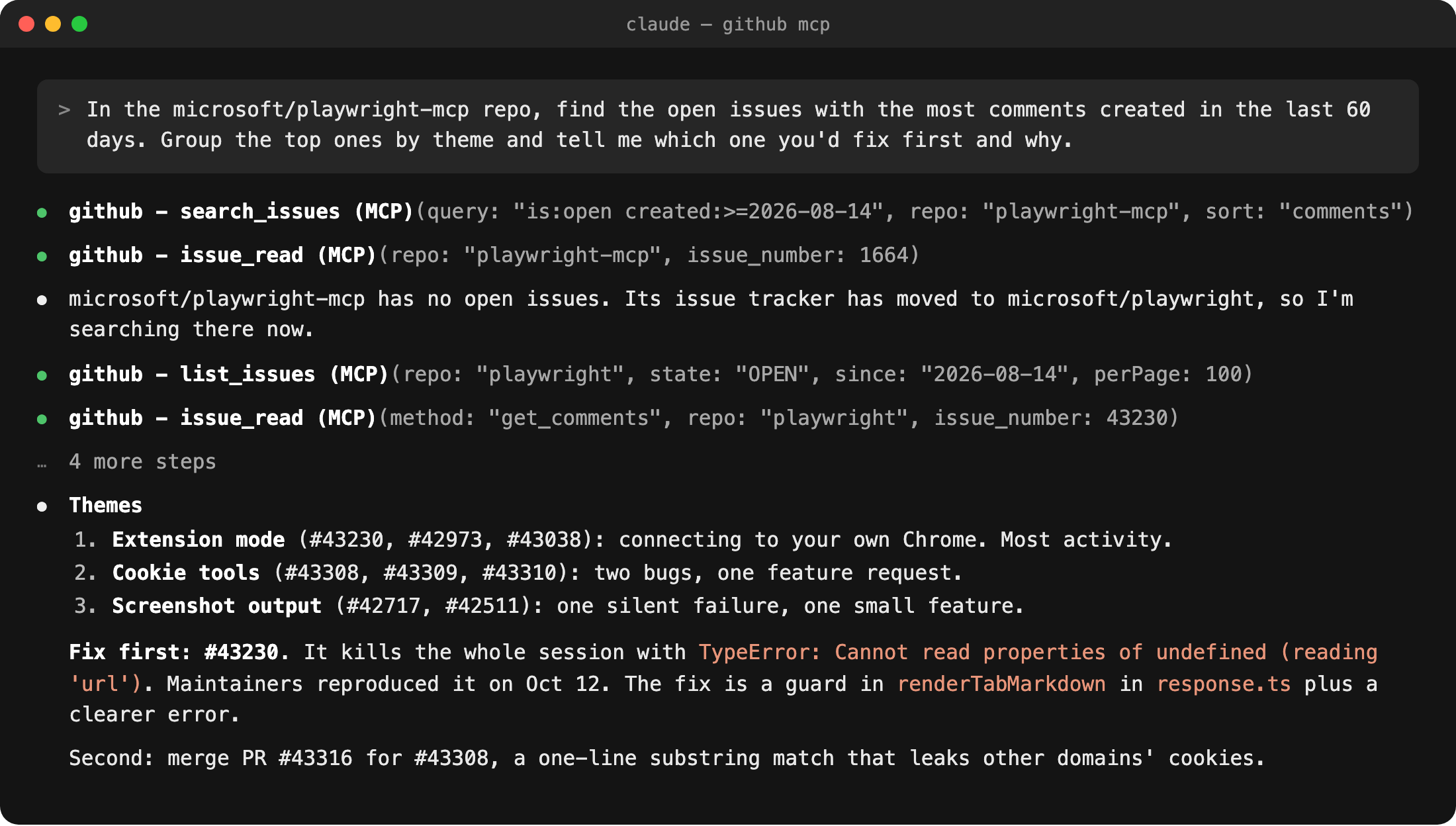
We asked it to find the most-discussed recent issues in Playwright MCP. The repo turned out to have none: issues had moved to the main Playwright repo. The agent noticed, searched there instead, grouped the issues into three themes and picked the one to fix first, with the exact function to change.
Terminal
Loading editor...
claude mcp add --transport http github https://api.githubcopilot.com/mcp \
  --header "Authorization: Bearer YOUR_GITHUB_TOKEN"
Watch out: on your own repos, the
gh CLI does most of this with no tools loaded into context. GitHub MCP pays off for reviews, searches across repos and teammates without gh. For read-only access, use https://api.githubcopilot.com/mcp/readonly.7. Serena
Out of the box, an agent finds code with text search and edits it by replacing lines. Serena gives it the tools an IDE has: find a symbol, find everything that references it, rename it everywhere, replace a function body. It runs real language servers, so it understands 40+ languages.
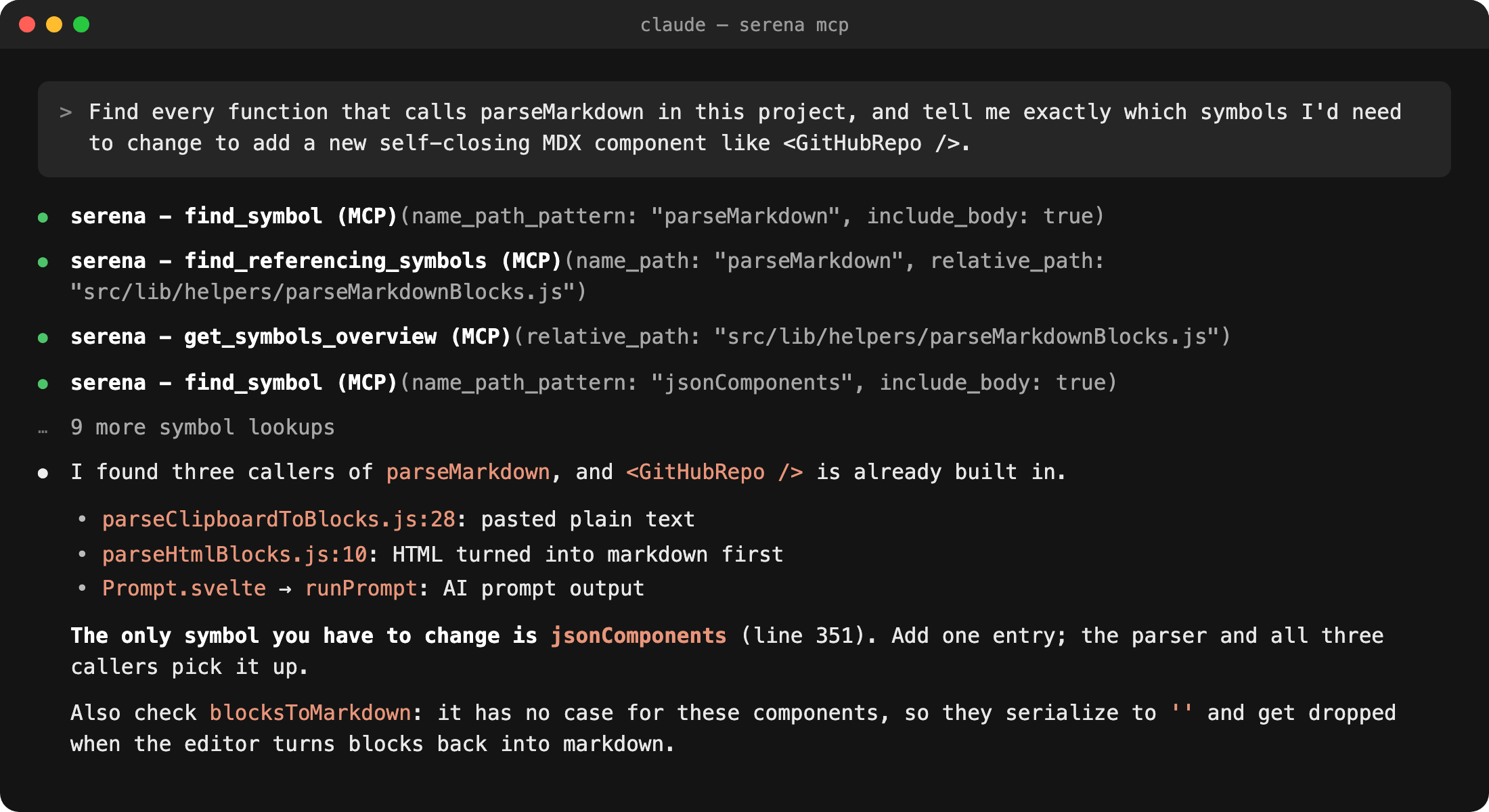
We pointed it at the editor package that renders these articles and asked what it takes to add a new MDX component. Serena followed the references instead of grepping, found the three callers and named the one object to change. It also caught a side effect: the new component would vanish when the editor converts blocks back to markdown.
Terminal
Loading editor...
uv tool install -p 3.13 serena-agent && serena setup claude-code
Watch out: it pays off on large codebases. On a small repo, it's extra startup time for what grep already does.
8. Sentry
Sentry's server brings production errors into the session: the issue, the stack trace, the release it started in and Seer's root-cause analysis. The agent reads the error and fixes the code in the same place.
Terminal
Loading editor...
claude mcp add --transport http sentry https://mcp.sentry.dev/mcp
Watch out: scope it to one project with
https://mcp.sentry.dev/mcp/your-org/your-project so the agent doesn't wander across all your projects.9. Vercel
Vercel's hosted server shows the agent your deployments, build logs and runtime errors, and it can open protected preview URLs. "The preview failed, fix it" becomes one prompt.
Terminal
Loading editor...
claude mcp add --transport http vercel https://mcp.vercel.com
Watch out: it has 200+ tools, including deploys and billing, with the same access as your account. Keep tool approval on. On Next.js 16, also add next-devtools-mcp for the dev server's live errors and routes.
10. Cloudflare
Cloudflare's main hosted server covers its whole API in Code Mode. The agent writes JavaScript to search and call about 2,500 endpoints, from Workers, KV, R2 and D1 to DNS and firewall rules, for about 1,000 tokens of tool definitions.
Ask what's deployed, read a Worker's settings or check a D1 table without opening the dashboard. A separate Browser Run server turns any page into markdown, a screenshot or a PDF.
Terminal
Loading editor...
claude mcp add --transport http cloudflare-api https://mcp.cloudflare.com/mcp
Watch out:
execute can change and delete production resources. Grant read-only permissions when you sign in unless the agent must deploy. Add Browser Run the same way with https://browser.mcp.cloudflare.com/mcp.11. Supabase
Supabase's hosted server lets the agent see your real schema, run SQL, write migrations, check security advisors, read logs and regenerate TypeScript types. It ends the loop of pasting table definitions into chat.
Terminal
Loading editor...
claude mcp add --transport http supabase "https://mcp.supabase.com/mcp?project_ref=YOUR_REF&read_only=true"
Watch out: point it at a dev project or a branch, not production. Supabase itself recommends
read_only=true and approving every tool call, because data in the database can carry prompt injections.12. Neon
Neon is serverless Postgres that branches like Git. Its official hosted server creates projects and branches, runs SQL, reads schemas and tests a migration on a temporary branch before it reaches main.
Spin up a database, try a schema change on a branch and tune slow queries without leaving the session. If you want auth, storage and RLS checks in one place, Supabase covers more.
Terminal
Loading editor...
claude mcp add --transport http neon https://mcp.neon.tech/mcp
Watch out: Neon says the server is for development and testing only, so don't connect it to production data. Uncheck "Allow writes" at sign-in for read-only access. The free plan caps branches at 10 per project.
13. Mermaid
The official Mermaid server, from the team behind Mermaid Chart, turns your code into diagrams that actually render. Agents write Mermaid well but often break the syntax; this server checks it, renders it and returns an SVG, a PNG and a link to edit.
Use it to document how a system works: a request flowing through services, an ER diagram of your tables, the states an order goes through.
Terminal
Loading editor...
claude mcp add --transport http mermaid https://mcp.mermaid.ai/mcp
Watch out: every call needs sign-in, though a free account is enough. For a local server with no account, use mcp-mermaid.
MCP or CLI?
Several servers here wrap a product that already has a CLI, and coding agents use CLIs well. Here's when each wins:
| Use the MCP when | Use the CLI when |
|---|---|
| The agent needs to see something: a page, a trace, a doc | The agent only needs to run a command |
| You want sign-in once, with no tokens in your shell | The CLI is already installed and signed in |
| The tool has no CLI: Playwright, Context7, Serena | gh, supabase, vercel, sentry cover the job |
| Teammates use Claude Desktop or Cursor too | You want fewer tools taking up context |
Which to install first
- Everyone: Playwright and Context7. The agent checks its own work and stops writing outdated code.
- Frontend: add Chrome DevTools for performance and console errors, and PageSpeed Insights to check real-user Core Web Vitals after a deploy.
- Your stack: Sentry, plus Vercel or Cloudflare for wherever you deploy, and Supabase or Neon for wherever your database lives. Start read-only.
- Sites with no API: Browser Use, for portals you have to log in to and click through.
- Large codebase: Serena.
- Documenting how it works: Mermaid, for diagrams generated from the code.
- Skip GitHub MCP if
ghis installed and you work on your own repos.
Ship faster than
your competition
Focus on customers and sales while we handle product delivery. Hire a dedicated AI maker or a whole product team.
Launch new products
Fix your delivery
Hit fundraising milestones
[Analytics Chart]
Wireframe v0.1
Sarah Chen CEO, Founder
$127k
MRR
2,847
Customers
+23%
Growth
Sales Performance
Latest Deal
Enterprise plan closed
Acme Corp · $12k/mo


Services
Industries
Hire
Claude Code Devs Next.js DevsReact DevsReact Native DevsSupabase DevsLovable DevsAI EngineersFull-stack Devs Upwork Alternative
AI Tools
Resources
Kickstart No-Code Stack Tech Stack Tech Trends AI SaaS Skills MCP Servers Academy Help Center Blog Changelog
Our products


'%3e%3cpath%20fill-rule='evenodd'%20clip-rule='evenodd'%20d='M2500%201250C2500%201940.36%201940.36%202500%201250%202500C559.644%202500%200%201940.36%200%201250C0%20559.644%20559.644%200%201250%200C1940.36%200%202500%20559.644%202500%201250ZM1030.7%20697.9C986.2%20688.4%20937%20683.6%20883.1%20683.6H350V1816.5H899.1C949.1%201816.6%20999%201810.2%201047.4%201797.5C1095.5%201784.8%201138.3%201765.3%201175.9%201738.8C1213.5%201712.4%201243.4%201678.3%201265.6%201636.5C1287.8%201594.7%201298.9%201545.2%201298.9%201488.1C1298.9%201417.2%201281.7%201356.6%201247.3%201306.4C1212.9%201256.2%201160.8%201221%201091%201200.9C1141.7%201176.6%201180.1%201145.4%201206%201107.3C1231.9%201069.2%201244.9%201021.6%201244.9%20964.5C1244.9%20911.6%201236.2%20867.2%201218.7%20831.2C1201.2%20795.2%201176.6%20766.4%201144.9%20744.7C1113.2%20723%201075.2%20707.4%201030.7%20697.9ZM960.9%201110.4C932.3%201131.5%20895.8%201142.1%20851.4%201142.1L599.2%201142.3V877.3H832.3C853.9%20877.2%20875.4%20879.1%20896.6%20882.8C917.2%20886.5%20935.4%20893.1%20951.3%20902.6C967.2%20912.1%20979.9%20925.4%20989.4%20942.3C998.9%20959.2%201003.7%20980.9%201003.7%201007.3C1003.8%201054.9%20989.5%201089.2%20960.9%201110.4ZM935.5%201615.7C912.6%201620.5%20889.2%201622.9%20865.7%201622.8L599.2%201622.9V1311.9H870.5C924.4%201311.9%20967.8%201324.3%201000.6%201349.2C1033.4%201374%201049.8%201415.6%201049.8%201473.7C1049.8%201503.3%201044.7%201527.7%201034.7%201546.7C1024.6%201565.7%201011.1%201580.8%20994.2%201591.9C977.3%201603%20957.7%201610.9%20935.5%201615.7ZM1758.3%201648.2C1694.8%201648.2%201646.1%201631.8%201612.3%201599C1578.5%201566.3%201560%201513.4%201556.9%201440.7H2148.7C2152.9%201377.2%202147.6%201316.4%202132.8%201258.2C2118%201200%202093.9%201148.2%202060.6%201102.7C2027.3%201057.2%201984.7%201021%201932.9%20994C1881%20967%201820.2%20953.5%201750.4%20953.5C1688%20953.5%201631.1%20964.6%201579.8%20986.8C1528.5%201009%201484.3%201039.4%201447.3%201078C1410.3%201116.6%201381.7%201162.3%201361.6%201215.2C1341.5%201268.1%201331.5%201325.2%201331.5%201386.5C1331.5%201449.9%201341.3%201508.1%201360.8%201561C1380.3%201613.9%201408.1%201659.3%201444.1%201697.4C1480.1%201735.5%201524%201764.9%201575.8%201785.5C1627.6%201806.1%201685.8%201816.4%201750.3%201816.4C1843.4%201816.4%201922.7%201795.2%201988.3%201752.9C2053.9%201710.6%202102.6%201640.3%202134.3%201541.9H1936C1928.6%201567.3%201908.5%201591.4%201875.7%201614.1C1842.9%201636.8%201803.8%201648.2%201758.3%201648.2ZM1744%201123.1C1799%201123.1%201840%201137.9%201867%201167.5C1893.9%201197.1%201912.7%201240.5%201923.4%201297.5H1556.9C1557.9%201281.7%201561.4%201263.7%201567.2%201243.6C1573%201223.5%201583%201204.5%201597.3%201186.5C1611.6%201168.5%201630.6%201153.5%201654.4%201141.3C1678.1%201129.2%201708%201123.1%201744%201123.1ZM1976.2%20741.1H1518.3V868.1H1976.2V741.1Z'%20fill='white'/%3e%3c/g%3e%3cdefs%3e%3cclipPath%20id='clip0_52_236'%3e%3crect%20width='2500'%20height='2500'%20fill='white'/%3e%3c/clipPath%3e%3c/defs%3e%3c/svg%3e)
'%3e%3cpath%20d='M444.031%20372.208C477.51%20456.911%20502.37%20544.115%20518.526%20633.203C541.573%20619.151%20563.115%20602.266%20582.693%20582.693C633.547%20531.833%20666.365%20467.75%20677.958%20398.198C628%20377.531%20573.286%20366.094%20515.948%20366.094C491.438%20366.094%20467.417%20368.208%20444.031%20372.208V372.208Z'%20fill='white'/%3e%3cpath%20d='M582.979%20100.266C582.88%20100.172%20582.786%20100.068%20582.693%2099.974C518.219%2035.5052%20432.505%20-7.62939e-06%20341.333%20-7.62939e-06C305.682%20-7.62939e-06%20270.865%205.45312%20237.828%2015.9219C290.781%2082.2656%20337.365%20153.068%20377.286%20227.896C452.495%20195.964%20521.771%20152.698%20582.979%20100.266Z'%20fill='white'/%3e%3cpath%20d='M609.797%20130.479C545.589%20185.63%20473.839%20230.323%20395.761%20263.724C407.271%20286.896%20418.141%20310.437%20428.401%20334.328C457.052%20328.875%20486.287%20326.094%20515.948%20326.094C573.401%20326.094%20629.282%20336.427%20682.308%20356.766C682.537%20351.641%20682.667%20346.5%20682.667%20341.339C682.667%20263.88%20657.032%20190.375%20609.797%20130.479V130.479Z'%20fill='white'/%3e%3cpath%20d='M131.234%20610.401C190.99%20657.255%20264.208%20682.667%20341.333%20682.667C390.354%20682.667%20437.792%20672.385%20481.203%20652.875C464.932%20558.594%20438.88%20467.625%20404.12%20381.047C283.323%20414.016%20183.802%20499.026%20131.234%20610.401V610.401Z'%20fill='white'/%3e%3cpath%20d='M334.88%20362.656C352.438%20355.229%20370.333%20348.938%20388.51%20343.76C378.917%20321.792%20368.74%20300.135%20358.031%20278.786C265.818%20313.026%20168.854%20330.375%2069.25%20330.375C46.1094%20330.375%2023.1198%20329.422%200.296875%20327.557C0.114583%20332.135%200%20336.729%200%20341.339C0%20432.51%2035.5052%20518.224%2099.974%20582.693C99.9948%20582.714%20100.021%20582.734%20100.042%20582.755C122.339%20538.286%20151.5%20497.87%20187.031%20462.333C229.745%20419.625%20279.484%20386.089%20334.88%20362.656Z'%20fill='white'/%3e%3cpath%20d='M339.323%20242.859C298.818%20167.844%20251.427%2097.0677%20198.016%2031.3698C162.021%2048.0417%20128.859%2071.0885%2099.974%2099.974C48.3281%20151.62%2015.2917%20216.906%204.1875%20287.708C25.6458%20289.464%2047.3438%20290.375%2069.25%20290.375C164.052%20290.375%20255.016%20273.594%20339.323%20242.859Z'%20fill='white'/%3e%3c/g%3e%3cdefs%3e%3cclipPath%20id='clip0_107_362'%3e%3crect%20width='682.667'%20height='682.667'%20fill='white'/%3e%3c/clipPath%3e%3c/defs%3e%3c/svg%3e)
© 2026 Paralect, Inc 651 N Broad St, Suite 206, Middletown, 19709, Delaware, United States