
The model's knowledge stops at its training date, so it writes code for last year's API. Context7, built by Upstash, fetches the current docs for the exact library and version you use and puts them into the agent's context.
It has only two tools: find the library, then query its docs. That keeps it light on context, so it's an easy server to leave on all the time. Together with Playwright, it's the first server most developers should install.
Find the library
resolve-library-id maps a name like Next.js to a Context7 library ID
Query the docs
query-docs returns docs and code examples for your exact question
Version aware
Pulls the docs for the version you use, not the one the model remembers
Two tools only
Adds almost nothing to context, so it can stay on
A real run
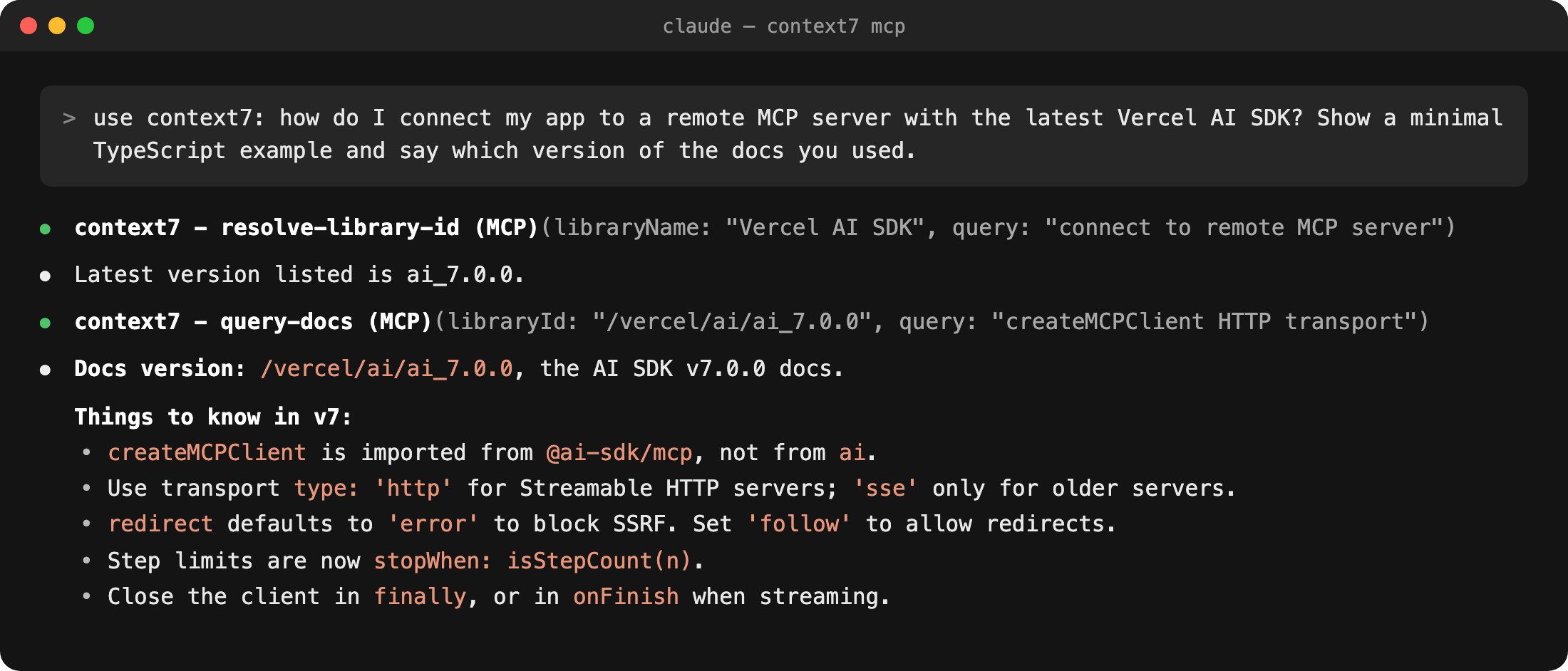
We asked how to connect to a remote MCP server with the Vercel AI SDK. Context7 found v7.0.0 and caught three changes that would break code written from memory: a new package, a new transport option and a new step-limit API.
Prompts to try
When to use
- You work with libraries that change fast, like Next.js, Tailwind or AI SDKs
- The agent keeps writing code for an old API
- You want current docs with almost no context cost
When not to use
- You need to understand your own codebase: use Serena
- You need to search the open web, not library docs: use Exa or Perplexity
- You use a private or niche library that Context7 hasn't indexed
Watch out
- The agent often won't call it unless you say "use context7" or add a rule to
CLAUDE.md.
- Without an API key you hit lower rate limits. The key is free.
Install
Terminal
Loading editor...
claude mcp add --transport http context7 https://mcp.context7.com/mcp
Cursor, Codex and other clients take the same URL. For higher rate limits, get a free API key at context7.com/dashboard and pass it as an
Authorization: Bearer YOUR_API_KEY header.More in Top MCP servers for development.


