
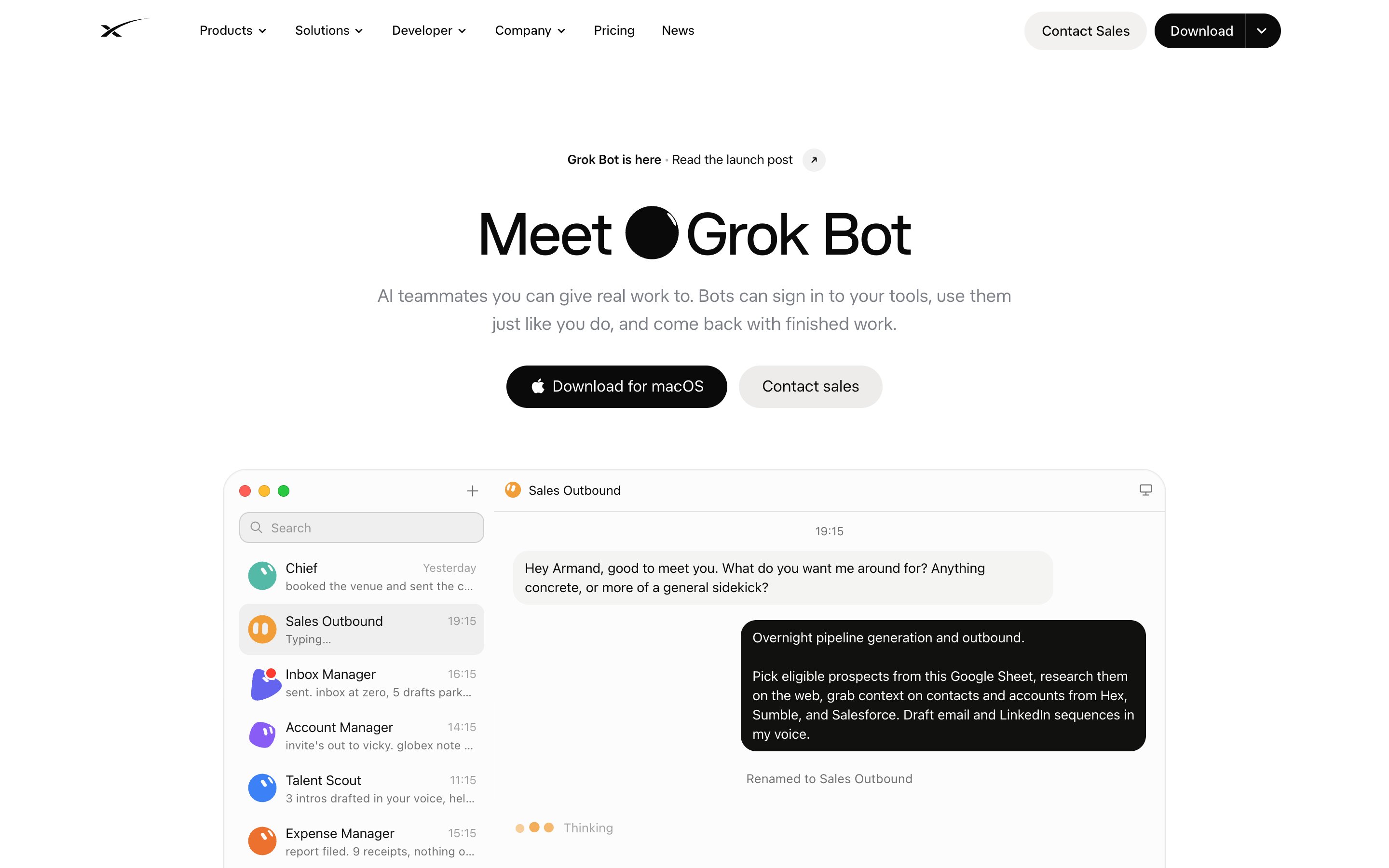
Grok Bot is an app where you hire AI teammates. Each one, called a Bot, gets a name and a job: "Sales Outbound", "Inbox Manager", "Expense Manager". You message it like a colleague in a chat app, on your laptop or phone. It goes off and does the work on its own cloud computer, signs in to your tools, and comes back when it's done or when it needs your OK.
It's made by SpaceXSI, the company formerly called xAI, and built together with Cursor, which is now part of SpaceX. The early beta opened on August 11, 2026. By mid-September it had about 418,000 weekly users, according to Bloomberg.
The regular Grok is a chatbot: you ask, it answers. Grok Bot is a different product. You hand it a task and close the laptop.
Max Rohowsky's walkthrough is the quickest way to see the whole setup:
How it works
There are 4 things to understand.
Bots. A Bot is one teammate with one job, its own chat and its own memory. You can have as many as your plan allows. The app shows them in a sidebar like a messenger: who's working, who finished, who's waiting for you.
The computer. Your account gets one persistent cloud machine with Chrome, a file system and a terminal. All your Bots share it, each on its own screen. That's what lets a Bot keep working at 3 a.m. and lets it use websites that have no API: it just opens them and clicks, like you would.
Connectors. For tools that do have an API, you install a connector from the Marketplace once and every Bot can use it. Some connectors take several accounts, so 1 Bot can work across 4 Gmail inboxes and 7 Slack workspaces. MCP servers, plugins and skills from Cursor work too.
Approvals. When a Bot is about to send, publish, buy or delete something, it stops and shows you a card: Allow once, Always allow or Deny. Passwords, 2-factor codes and CAPTCHAs always come back to you.
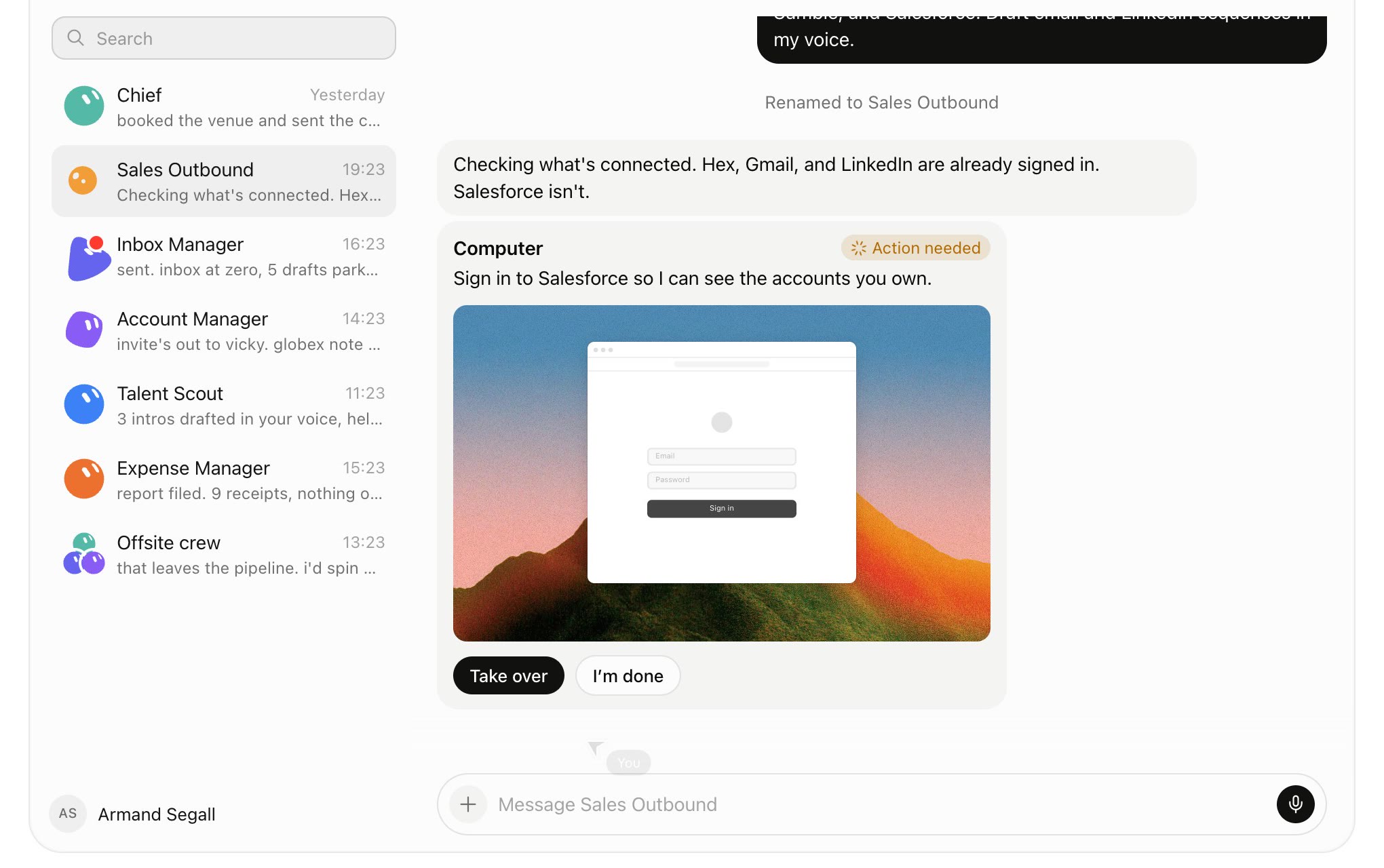
Above, the Sales Outbound Bot found that Salesforce isn't connected yet. It shows its own screen with the login page and hands control to you. You sign in once, press I'm done, and the session stays on the Bot's computer for every Bot to use.
Set it up in 10 minutes
- Download the app from x.ai/bot. It runs on macOS, Windows and Linux, with iPhone and Android apps that sync your chats. There is no web version.
- Sign in with your Cursor account. Since October 12, Grok, Cursor and X Premium are 1 plan, the X Subscription, and Grok Bot comes with Premium ($30/mo) and up. If you still pay for SuperGrok, Cursor or X Premium separately, you can merge them at cursor.com/unify. Linking accounts is permanent, so pick the right one.
- Create your first Bot with one clear job. A good first prompt: "You're my inbox manager. Every morning, sort my Gmail, archive newsletters, and draft replies to anything from customers. Don't send anything without asking me."
- Connect the apps it asks for under Connect apps in the sidebar.
- Let it run once while you watch, approve what it asks, then correct it in plain words. It remembers.
- Connect 1Password if you use it. Bots can then use the logins you share with them without you pasting passwords into chat.
Start with 1 Bot and 1 boring job you do every week. People who start with a "do everything" Bot get vague results and burn through usage.
What people use it for
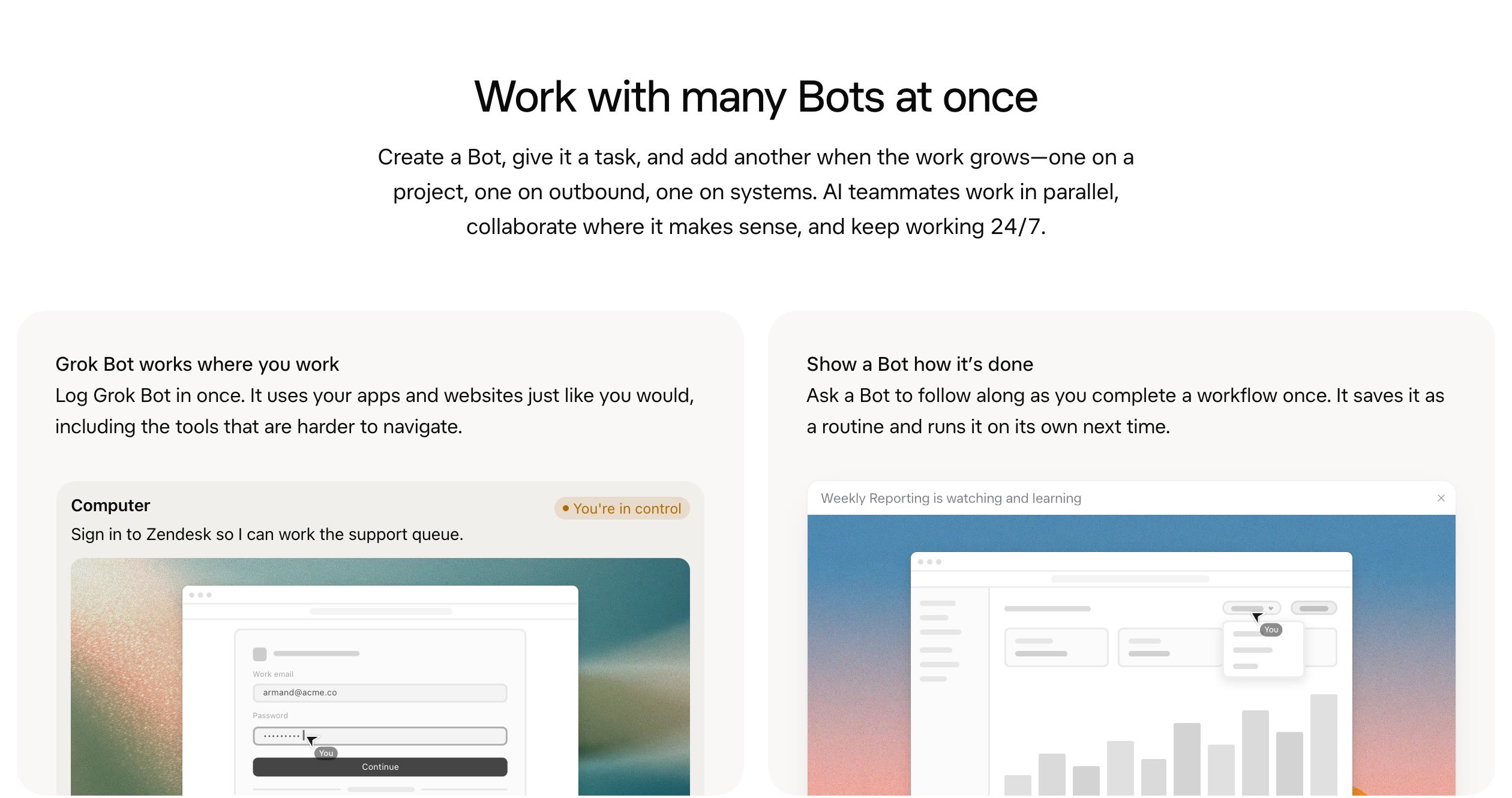
SpaceXSI says its own team first used Bots for sales, marketing, office operations and bug fixes. The templates in the app follow the same lines: Sales Outbound, Talent Scout, Paid Media, Expense Manager, Product Performance, Bug Reproduction, Account Health and Chief of Staff.
1. Sales outbound overnight
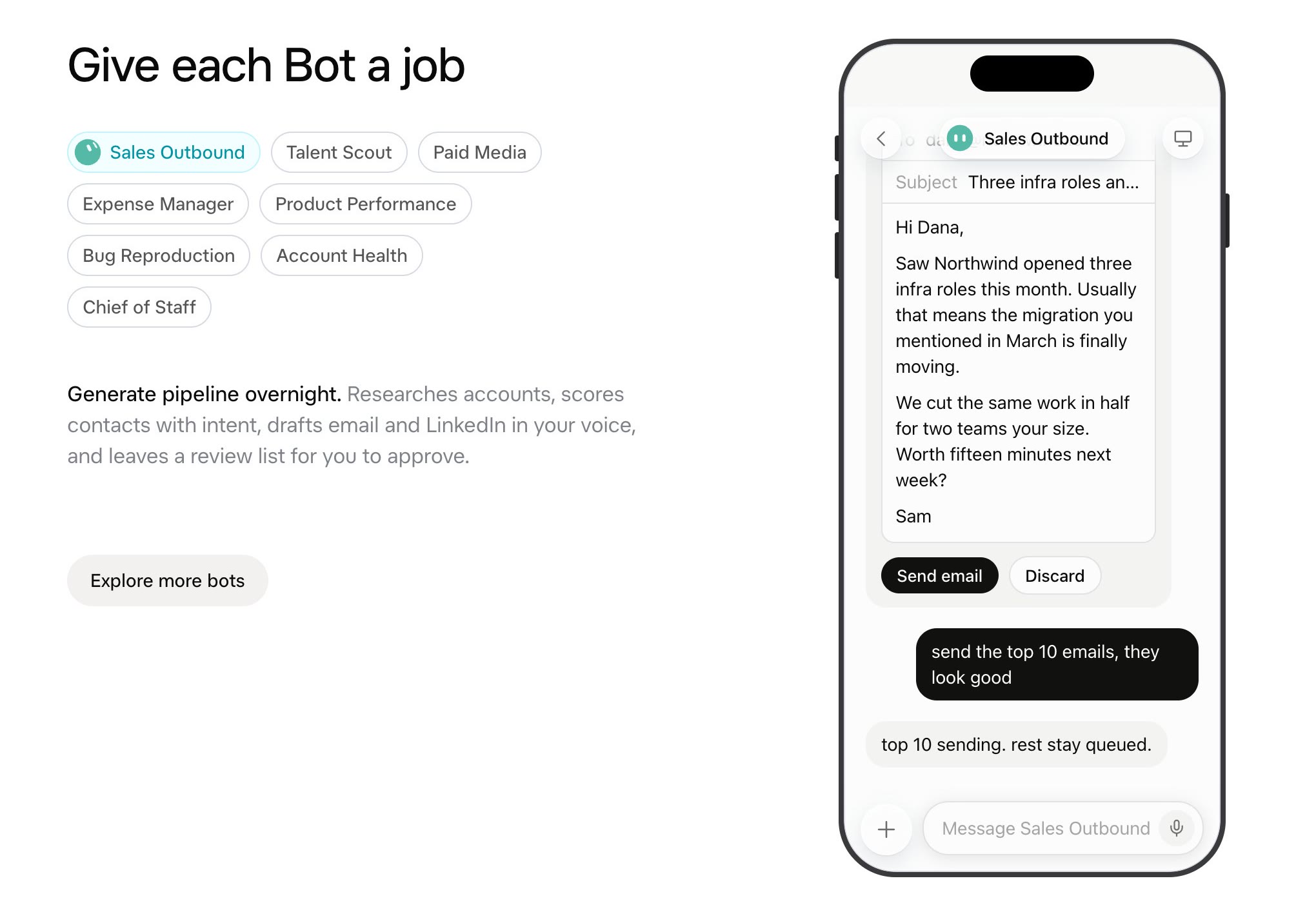
You give it a Google Sheet of prospects. It researches each company on the web, pulls context from your CRM and data tools, scores the contacts and drafts emails and LinkedIn messages in your voice. In the morning you get a review list and send the ones you like with 1 tap.
2. Inbox, calendar and expenses
An Inbox Manager that gets you to inbox zero and leaves drafts for you to check. An Expense Manager that pulls invoices out of Gmail, files receipts and tells you what's missing. Claire Vo's first Bot was a family manager for her personal email and calendar, made from 1 prompt.
3. CRM and support busywork
Logging call notes into the CRM, keeping account records current, working a Zendesk queue. These are the jobs where the "sign in and click" part matters: plenty of internal tools have no API.
4. Bug reproduction for dev teams
A Bot reproduces a reported bug in the browser, files a ticket with steps and screenshots, and hands the fix to Cursor's coding agents, which open a pull request and send back a video of the fix. If you want a coding agent in the terminal, that's a separate product, Grok Build.
5. Reports on a schedule
Show a Bot how you build your weekly report once. It records you (up to 10 minutes), turns it into a reviewable skill, and runs it every Monday from then on.
6. A partnerships or sales inbox across channels
Moritz Kremb, who runs a content business, has a Partnerships Bot that scans his email every day for sponsorship requests, plus DMs on X and a creator marketplace. It checks each brand against his criteria, sums up the new pitches and drafts replies by his rules. For now it waits for his approval before sending. His plan is to let it negotiate on its own and only come back when money is about to change hands.
The same setup works for any inbound that arrives in more than 1 place: sales leads, support, recruiting.
7. An X digest instead of doom scrolling
Bots can now search and read X directly (more below). Ask for a few digests a day of what the accounts you follow are talking about, a scan for every mention of your product, and a list of posts where someone asks for what you sell so you can reply.
8. SEO work every week
Have a Bot write an SEO plan for your site, then add a weekly routine that works through it: research, new comparison pages, fixes. It builds the pages through Cursor, sends you a screenshot and a Vercel preview link, and records a short video demo if you ask. Keep "ask me before merging" on until you trust the output.
9. Experiments you'd never have time for
Moritz also gave a Bot a paper-trading account on Alpaca, which has an API, and let it research, open and close trades on its own, posting every trade to the chat. Paper money only. It's a good way to test how far you can trust a Bot with autonomy before anything real is at stake.
You can also just call your Bot. One user on X described a 30-minute voice call where the Bot answered about 20 emails, planned the week's calendar, wrote a proposal, ordered lunch, booked and paid for a hotel and arranged a cab to the airport.
What's new in October 2026
Grok Bot changes almost every week. The updates that matter most this month:
1 subscription for Grok, Cursor and X (October 12). The X Subscription replaces SuperGrok, Cursor plans and X Premium for new customers. Every paid tier includes X Premium features, and Grok usage is 1 shared pool across the Grok apps, X and Cursor. Existing subscribers can keep their old plans or switch with a prorated refund. More in Pricing.
Other companies' models (October 6). Grok Bot now picks the model per task, and that includes Claude Opus 5.5. Testers say it makes fewer mistakes and runs faster since. More in Which model runs it.
Its own email address. A Bot can claim an address like
yourname@mail.grokbot.com, so it can sign up for services, get receipts and send mail from its own inbox instead of yours. Ask your Bot to set it up, or tag @bot on X. It then shows up under Connect apps → Show all plugins. You get 1 address per account; changing it means giving up the old one.Native X access. Bots can search, read and monitor public posts on X for free, with nothing to set up. Your private side of X (DMs, message requests, bookmarks, your home timeline) still goes through the paid X API, with $99 of free credits the first time. Watch out: a digest built on your home timeline uses the API and burns credits fast. Tell the Bot to check a list of accounts through public access instead.
Deeper Cursor integration. Bots hand coding tasks to Cursor, manage pull requests through the GitHub and Origin plugins and send video demos of what they built. A Bot can message a Cursor project, Cursor's new "1 lead agent with sub-agents" thread, which runs agents in the cloud and on your own machine. You can also tell a Bot which model its coding agents should use. Moritz uses Opus 5.5 for any page with design, because other models' layouts "lack something".
Routines, memory and group chats
Routines run on a schedule or a trigger, like a new Slack message or a GitHub notification. Each Bot can own up to 50.
Teach by demo is the standout feature. Instead of writing instructions, you do the task in the Bot's browser and it watches. It's still rolling out and isn't on mobile yet.
Memory builds up as you work. Bots remember your corrections, your writing style and who approves what, and they share what they learn.
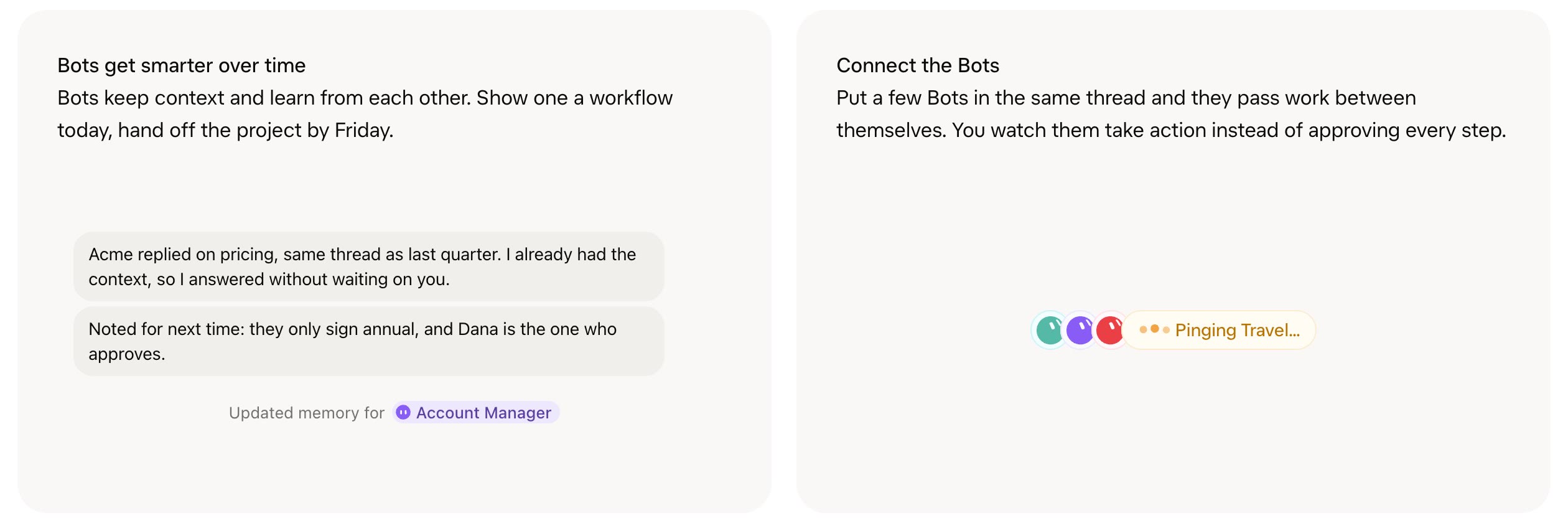
Group chats put 2 to 6 Bots in one thread so they can pass work to each other. A "Chief of Staff" Bot that coordinates the others is something you set up yourself; Matt Shumer said it "worked out of the box".
Team Bots (since September 28) let you publish 1 Bot to your whole team, in the app or in Slack. Everyone gets a private chat and the Bot acts with that person's own access.
Proactive Bots (since October 2): your starred Bot suggests work it could take on before you ask.
In late September SpaceXSI also added read-only bank, card and investment accounts through Plaid, so a Bot can answer questions about your spending. Grok doesn't receive your bank login.
Pricing
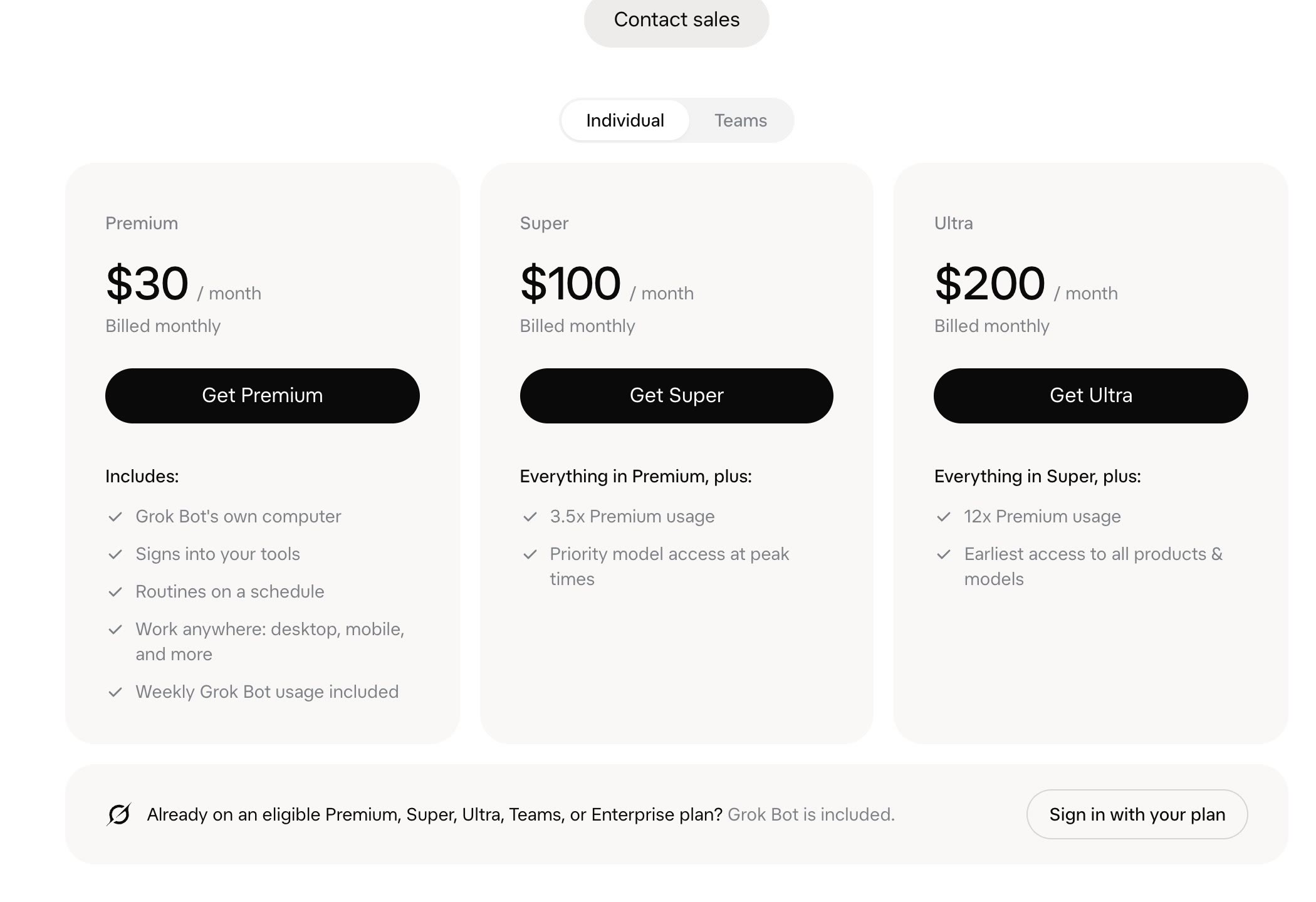
There's no separate Grok Bot subscription. Since October 12 it comes with the X Subscription, 1 plan for Grok, Cursor and X Premium:
| Plan | Price | What you get |
|---|---|---|
| Free | $0 | Grok chat, a starter Cursor allowance, standard X. No Grok Bot |
| Plus | $8/mo | More Grok and Cursor usage, X checkmark. No Grok Bot |
| Premium | $30/mo | Grok Bot, SuperGrok, Cursor Pro and X Premium+ (was $90 as 3 plans) |
| Super | $100/mo | Everything in Premium with about 3.5x the usage |
| Ultra | $200/mo | Everything in Premium with about 12x the usage, earliest access |
| Teams | Same prices per seat | Team Bots, SSO, admin controls, shared billing |
| Enterprise | Custom | 1 shared usage pool for Grok and Cursor |
Annual billing is $300 a year for Premium and $1,000 for Super.
A few things that catch people out:
- Old plans still work, but can be the better deal. If you already pay for SuperGrok, Cursor Pro, Pro+, Ultra or Cursor Teams, Grok Bot is included and you don't have to switch. On the new plans, other companies' models like Claude Opus are billed at their API list price, while the old Cursor plans give you that usage below list price. If you lean on Opus for coding, do the math before you switch.
- Usage is shared. On the X Subscription, Grok, Cursor and Grok Bot draw from the same weekly pool. A busy Bot leaves less for your coding.
- Routines add up. A Bot that checks something every 15 minutes uses usage every 15 minutes. You can set a monthly on-demand limit, but it's not a hard stop: a running Bot can finish past it.
- On Cursor Teams it's on for everyone by default, with no switch to turn it off.
- Free trial: a usage credit that lasts up to 7 days, not on Android.
Which model runs it
You can't choose for the Bot itself. Cursor routes each request to a model on the backend. The Bot can't tell you which one is answering, but usage analytics in your account show which model handled each request, and billing follows it. The house models are Grok 4.6 and 4.7, and SpaceXSI trained 4.7 on the Grok Bot harness specifically.
On October 6 Elon Musk posted that Grok Bot would use "the best back end model for any given task", naming Claude Opus 5.5, Midjourney and Suno. Users noticed the difference within days: fewer wrong answers, more checking the code before answering, faster replies. Early testers like Matt Shumer had said the router "wasn't great" at first.
What you can choose is the model for coding work a Bot hands to Cursor. Just tell the Bot, for example: "When you build new pages, run your coding agents on Opus 5.5."
Grok Bot vs Claude
People ask this a lot, partly because Grok Bot may route some work to Claude. They're built for different jobs.
| | Grok Bot | Claude Cowork | Claude Code |
|---|---|---|---|
| What it is | A team of named Bots that run all the time | Claude doing a task for you on files and apps | A coding agent in your terminal or IDE |
| Where it runs | 1 persistent cloud computer per account | A fresh cloud sandbox per task (Pro and Max, since Oct 6) | Your machine, or Claude's cloud |
| Who it's for | Ops, sales, founders, anyone with recurring busywork | Knowledge work: documents, research, spreadsheets | Developers |
| Remembers between tasks | Yes, per Bot and shared | Through projects and memory | Through CLAUDE.md and project files |
| Sites with no API | Yes, it signs in and clicks | Through Claude in Chrome | Through browser tools you add |
| Pick the model | No | Yes | Yes |
| In Slack | Team Bots | Claude Tag (Team and Enterprise) | Through integrations |
| Starts at | $30/mo (X Premium) | Claude Pro | Claude Pro |
The short version:
- Grok Bot is a staff of assistants. Each one has a standing job, a memory and a computer that never shuts down. It's built for the work that repeats: every morning, every new lead, every new invoice.
- Claude Cowork is a very capable colleague you give a task to. Each task gets a clean, temporary sandbox that is thrown away at the end. That's safer, but nothing carries over on the machine between tasks, and there's no ongoing identity doing the same job every day.
- Claude Code is for writing software. If your task is "build or fix this app", use it (or Codex), not Grok Bot.
- Claude Tag is the closest thing Anthropic has to a team Bot: 1 Claude that lives in a Slack channel, picks up tasks when someone types @Claude and can follow up on its own.
Claire Vo's take after a week: "The biggest pro of GrokBot is that it just works." The downside is the flip side of that: you can't tune the model or the setup, so for tinkering Claire still prefers self-hosted OpenClaw agents.
Safety: what to watch
- Bots aren't a security boundary. All your Bots share 1 computer, so any sign-in is available to every Bot until it expires. Don't give a "research" Bot a computer that's logged in to your bank and assume it can't touch it.
- Keep approvals on for sending messages, publishing, purchases and deleting data. SpaceXSI recommends the same. Auto-review has a model check actions before they run, but it adds to approvals; it doesn't replace them.
- Approvals from routines expire after about 10 minutes. If you miss one, the step doesn't happen.
- Stop now doesn't undo. It halts the Bot; emails already sent stay sent.
- Sites can block it. Some websites block automated browsers.
- Privacy follows your Cursor settings. Accounts on Legacy Privacy Mode have to switch before using Grok Bot.
Grok Bot alternatives
- ChatGPT dots: OpenAI's always-on agents, launched September 29. Strongest when your work already lives in ChatGPT and Codex, with 4,000+ app connectors. Pro and Business Premium only, not in the EU or UK.
- Meta Muse: Meta's personal agent for life admin: email, calendar, shopping, bookings, school forms. Free tier, works in WhatsApp. Best for personal use, US only.
- Claude Cowork and Claude Tag: Anthropic's take, with per-task sandboxes and a shared Slack teammate.
- Lindy: no-code AI teammates for business workflows, with more control over each step.
- OpenClaw and Hermes: open, self-hosted agents if you want to run and tune everything yourself.
For a side-by-side of the big 3, see Grok Bot vs dots vs Muse.
More videos
FAQ
What is Grok Bot?
An app from SpaceXSI (formerly xAI) and Cursor where you create AI teammates called Bots. Each Bot has a job, a memory and access to a shared cloud computer, so it can sign in to your apps and work while you're offline.
Is Grok Bot the same as Grok?
No. Grok is the chatbot in X and the Grok app. Grok Bot is a separate app with separate App Store and Google Play listings. The phone links in x.ai's main menu open Grok, not Grok Bot.
How much does Grok Bot cost?
It's included in the X Subscription from Premium ($30/mo) up, with Super at $100 and Ultra at $200 for more usage. Existing SuperGrok and Cursor Pro, Pro+, Ultra and Teams subscribers get it too. Usage beyond the weekly allowance is billed at token cost.
Does Grok Bot use Claude?
For some tasks, yes. Since October 6 the router picks the best model for each task, including Claude Opus 5.5. You can't choose the Bot's model yourself, but usage analytics show which one ran, and you can tell a Bot which model its Cursor coding agents should use.
Does Grok Bot have its own email address?
Yes. Ask your Bot to claim one like
yourname@mail.grokbot.com. Each account gets 1 address.Can Grok Bot read X?
Yes. It searches and reads public posts on X for free. Your DMs, bookmarks and home timeline go through the X API, which costs credits.
Can Grok Bot write code?
It hands coding to Cursor's cloud agents, and it can reproduce bugs and file tickets. For hands-on coding, Claude Code, Codex or Cursor are the better tools.
Is it safe to give Grok Bot my accounts?
Treat it like a new hire with your logins. Keep approvals on for anything that sends, buys or deletes, and don't sign the shared computer in to accounts that no Bot needs.


Ship faster than your competition
Focus on customers and sales while we handle product delivery. Hire a dedicated AI maker or a whole product team.
Launch new products
Fix your delivery
Hit fundraising milestones


'%3e%3cpath%20fill-rule='evenodd'%20clip-rule='evenodd'%20d='M2500%201250C2500%201940.36%201940.36%202500%201250%202500C559.644%202500%200%201940.36%200%201250C0%20559.644%20559.644%200%201250%200C1940.36%200%202500%20559.644%202500%201250ZM1030.7%20697.9C986.2%20688.4%20937%20683.6%20883.1%20683.6H350V1816.5H899.1C949.1%201816.6%20999%201810.2%201047.4%201797.5C1095.5%201784.8%201138.3%201765.3%201175.9%201738.8C1213.5%201712.4%201243.4%201678.3%201265.6%201636.5C1287.8%201594.7%201298.9%201545.2%201298.9%201488.1C1298.9%201417.2%201281.7%201356.6%201247.3%201306.4C1212.9%201256.2%201160.8%201221%201091%201200.9C1141.7%201176.6%201180.1%201145.4%201206%201107.3C1231.9%201069.2%201244.9%201021.6%201244.9%20964.5C1244.9%20911.6%201236.2%20867.2%201218.7%20831.2C1201.2%20795.2%201176.6%20766.4%201144.9%20744.7C1113.2%20723%201075.2%20707.4%201030.7%20697.9ZM960.9%201110.4C932.3%201131.5%20895.8%201142.1%20851.4%201142.1L599.2%201142.3V877.3H832.3C853.9%20877.2%20875.4%20879.1%20896.6%20882.8C917.2%20886.5%20935.4%20893.1%20951.3%20902.6C967.2%20912.1%20979.9%20925.4%20989.4%20942.3C998.9%20959.2%201003.7%20980.9%201003.7%201007.3C1003.8%201054.9%20989.5%201089.2%20960.9%201110.4ZM935.5%201615.7C912.6%201620.5%20889.2%201622.9%20865.7%201622.8L599.2%201622.9V1311.9H870.5C924.4%201311.9%20967.8%201324.3%201000.6%201349.2C1033.4%201374%201049.8%201415.6%201049.8%201473.7C1049.8%201503.3%201044.7%201527.7%201034.7%201546.7C1024.6%201565.7%201011.1%201580.8%20994.2%201591.9C977.3%201603%20957.7%201610.9%20935.5%201615.7ZM1758.3%201648.2C1694.8%201648.2%201646.1%201631.8%201612.3%201599C1578.5%201566.3%201560%201513.4%201556.9%201440.7H2148.7C2152.9%201377.2%202147.6%201316.4%202132.8%201258.2C2118%201200%202093.9%201148.2%202060.6%201102.7C2027.3%201057.2%201984.7%201021%201932.9%20994C1881%20967%201820.2%20953.5%201750.4%20953.5C1688%20953.5%201631.1%20964.6%201579.8%20986.8C1528.5%201009%201484.3%201039.4%201447.3%201078C1410.3%201116.6%201381.7%201162.3%201361.6%201215.2C1341.5%201268.1%201331.5%201325.2%201331.5%201386.5C1331.5%201449.9%201341.3%201508.1%201360.8%201561C1380.3%201613.9%201408.1%201659.3%201444.1%201697.4C1480.1%201735.5%201524%201764.9%201575.8%201785.5C1627.6%201806.1%201685.8%201816.4%201750.3%201816.4C1843.4%201816.4%201922.7%201795.2%201988.3%201752.9C2053.9%201710.6%202102.6%201640.3%202134.3%201541.9H1936C1928.6%201567.3%201908.5%201591.4%201875.7%201614.1C1842.9%201636.8%201803.8%201648.2%201758.3%201648.2ZM1744%201123.1C1799%201123.1%201840%201137.9%201867%201167.5C1893.9%201197.1%201912.7%201240.5%201923.4%201297.5H1556.9C1557.9%201281.7%201561.4%201263.7%201567.2%201243.6C1573%201223.5%201583%201204.5%201597.3%201186.5C1611.6%201168.5%201630.6%201153.5%201654.4%201141.3C1678.1%201129.2%201708%201123.1%201744%201123.1ZM1976.2%20741.1H1518.3V868.1H1976.2V741.1Z'%20fill='white'/%3e%3c/g%3e%3cdefs%3e%3cclipPath%20id='clip0_52_236'%3e%3crect%20width='2500'%20height='2500'%20fill='white'/%3e%3c/clipPath%3e%3c/defs%3e%3c/svg%3e)
'%3e%3cpath%20d='M444.031%20372.208C477.51%20456.911%20502.37%20544.115%20518.526%20633.203C541.573%20619.151%20563.115%20602.266%20582.693%20582.693C633.547%20531.833%20666.365%20467.75%20677.958%20398.198C628%20377.531%20573.286%20366.094%20515.948%20366.094C491.438%20366.094%20467.417%20368.208%20444.031%20372.208V372.208Z'%20fill='white'/%3e%3cpath%20d='M582.979%20100.266C582.88%20100.172%20582.786%20100.068%20582.693%2099.974C518.219%2035.5052%20432.505%20-7.62939e-06%20341.333%20-7.62939e-06C305.682%20-7.62939e-06%20270.865%205.45312%20237.828%2015.9219C290.781%2082.2656%20337.365%20153.068%20377.286%20227.896C452.495%20195.964%20521.771%20152.698%20582.979%20100.266Z'%20fill='white'/%3e%3cpath%20d='M609.797%20130.479C545.589%20185.63%20473.839%20230.323%20395.761%20263.724C407.271%20286.896%20418.141%20310.437%20428.401%20334.328C457.052%20328.875%20486.287%20326.094%20515.948%20326.094C573.401%20326.094%20629.282%20336.427%20682.308%20356.766C682.537%20351.641%20682.667%20346.5%20682.667%20341.339C682.667%20263.88%20657.032%20190.375%20609.797%20130.479V130.479Z'%20fill='white'/%3e%3cpath%20d='M131.234%20610.401C190.99%20657.255%20264.208%20682.667%20341.333%20682.667C390.354%20682.667%20437.792%20672.385%20481.203%20652.875C464.932%20558.594%20438.88%20467.625%20404.12%20381.047C283.323%20414.016%20183.802%20499.026%20131.234%20610.401V610.401Z'%20fill='white'/%3e%3cpath%20d='M334.88%20362.656C352.438%20355.229%20370.333%20348.938%20388.51%20343.76C378.917%20321.792%20368.74%20300.135%20358.031%20278.786C265.818%20313.026%20168.854%20330.375%2069.25%20330.375C46.1094%20330.375%2023.1198%20329.422%200.296875%20327.557C0.114583%20332.135%200%20336.729%200%20341.339C0%20432.51%2035.5052%20518.224%2099.974%20582.693C99.9948%20582.714%20100.021%20582.734%20100.042%20582.755C122.339%20538.286%20151.5%20497.87%20187.031%20462.333C229.745%20419.625%20279.484%20386.089%20334.88%20362.656Z'%20fill='white'/%3e%3cpath%20d='M339.323%20242.859C298.818%20167.844%20251.427%2097.0677%20198.016%2031.3698C162.021%2048.0417%20128.859%2071.0885%2099.974%2099.974C48.3281%20151.62%2015.2917%20216.906%204.1875%20287.708C25.6458%20289.464%2047.3438%20290.375%2069.25%20290.375C164.052%20290.375%20255.016%20273.594%20339.323%20242.859Z'%20fill='white'/%3e%3c/g%3e%3cdefs%3e%3cclipPath%20id='clip0_107_362'%3e%3crect%20width='682.667'%20height='682.667'%20fill='white'/%3e%3c/clipPath%3e%3c/defs%3e%3c/svg%3e)