
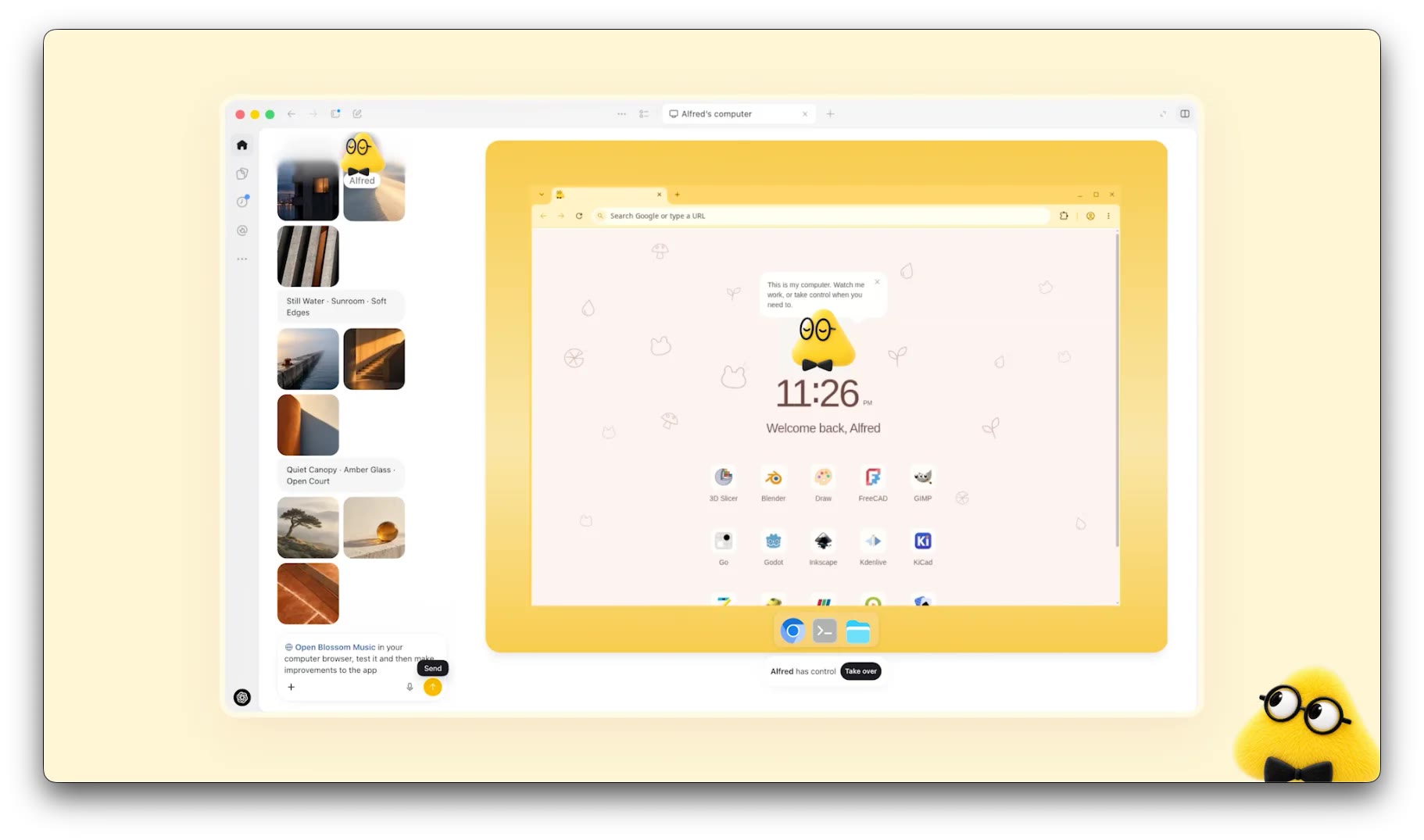
Dots are OpenAI's always-on agents, built into ChatGPT. You get a "primary dot", give it a name, and tell it what you're working toward. It keeps going after you close the app: researching, drafting, fixing, booking, and checking in only when it needs your approval or a judgment call.
OpenAI announced dots at DevDay on September 29, 2026. They run on GPT-6 Astra. On screen they're fuzzy cartoon characters, a bit like a mascot that happens to have a computer.
What a dot can do
- Its own computer and browser. Each dot has a cloud computer, so it works while your laptop is off. You can open it at any time and watch, or take over.
- 4,000+ apps. Dots use the same connectors and plugins as ChatGPT: calendar, Google Drive, Slack, Microsoft Teams and the rest. Connecting an app doesn't give a dot blanket permission inside it.
- Your laptop, if you allow it. Local access is off by default. Turn it on in the ChatGPT desktop app and the dot can work with your local files, run code and fall back to your own browser.
- Code through Codex. A dot can write and test code, scan for vulnerabilities and send you pull requests with videos of the change.
- Memory. It learns your preferences and standards from feedback, and carries context across ChatGPT, Slack and Teams.
- Proactive research. It gathers information from sources you've allowed and saves private notes before you ask. This mode can only suggest next steps. It can't send messages, change data or use the computer on its own.
How people use it
OpenAI's examples are a mix of work and life:
- Update a website using designs you've already approved
- Pull the latest numbers into a board deck
- Turn meeting notes into a list of technical changes
- Fix a calendar conflict or rebook a vendor
- Register the kids for after-school programs the moment sign-ups open
For developers, the clearest case is a dot that watches customer feedback, picks out the small requests and bugs, builds and tests the fixes, and leaves you PRs to review while you work on the next big feature.
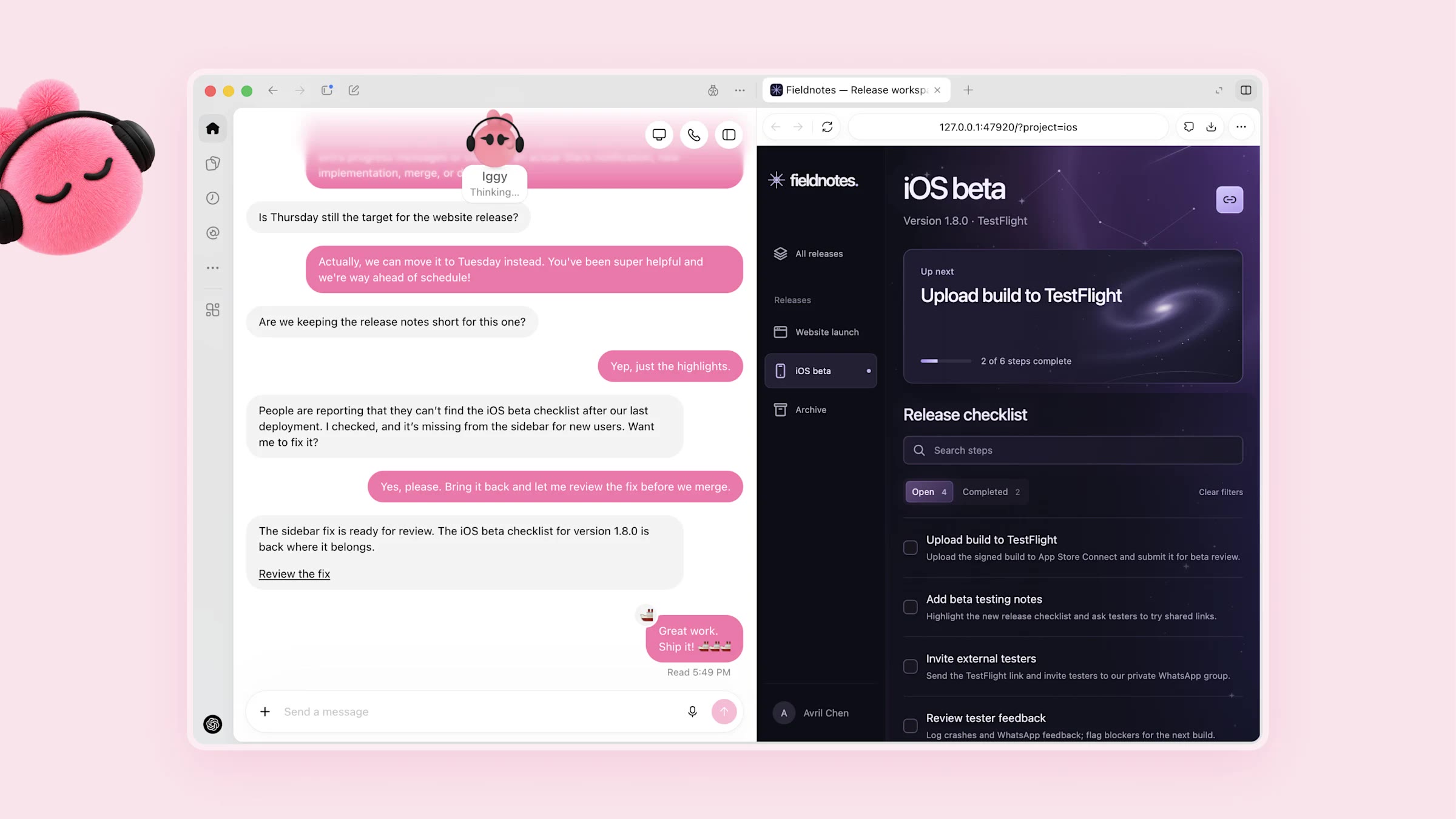
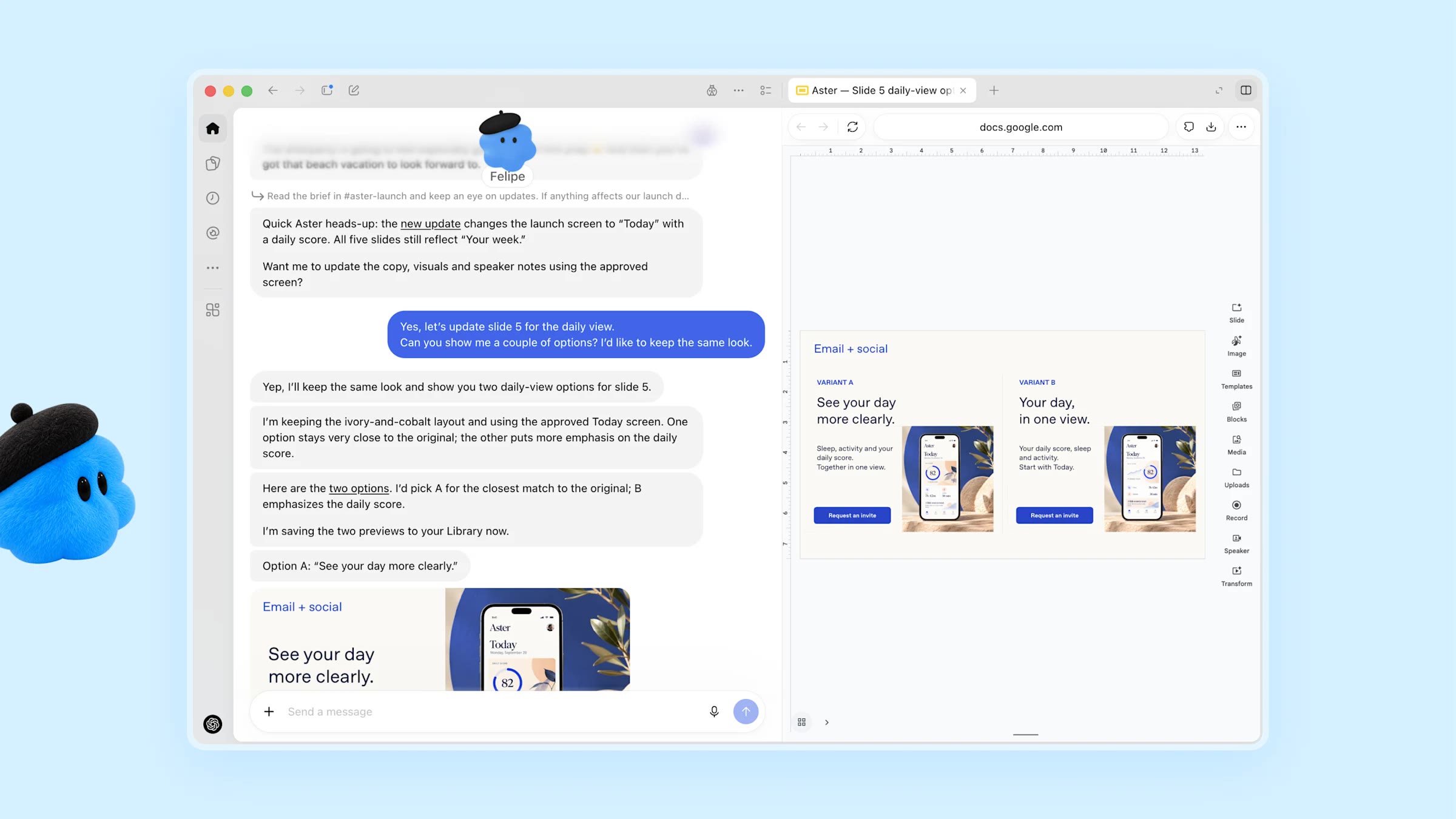
Another example from OpenAI: a dot keeps a launch deck up to date when the product changes, and shows 2 options for the new slide before touching it.
Where you talk to it
- ChatGPT on desktop, web and mobile, by text or voice call
- Slack and Microsoft Teams, where the dot posts under its own name but only you can give it orders
- Text messages: coming soon
Approvals and limits
- Changing a password or moving money: you do it yourself, the dot can't
- Permanent deletion or installing software: may need your approval every time
- Repeated low-risk actions: you can pre-approve them
- Websites can block agents, and tasks can fail. OpenAI says to check consequential work.
At launch you get 1 dot per person, created in ChatGPT on desktop or the desktop website. OpenAI plans "specialist dots" with their own identity, credentials and tools for teams, and is working with Microsoft on Agent 365 security controls for companies.
Pricing and availability
- ChatGPT Pro and Business Premium, plus selected Enterprise plans (in beta, an admin has to turn it on). NBC News puts Pro at $100 to $500 a month.
- Chatting with your dot is included. Work it does in ChatGPT or Codex threads uses your token allowance.
- Roughly the first month of usage doesn't count against your plan. Long-term pricing isn't set yet.
- Not available in the EEA, Switzerland or the UK for personal Pro accounts at launch.
Sam Altman called it a "premium product" because each dot needs a lot of compute, and said OpenAI hopes to offer a cheaper version later.
The concerns
The launch didn't go smoothly. At the DevDay keynote a voice chat didn't start and a dot didn't respond to a live request. In the same weeks OpenAI apologized for internal agents that accessed nonpublic data on an Australian government website, and held back GPT-6.1 Astra because it didn't consistently stay within scope. OpenAI says those were internal models, not the product you get.
Dots alternatives
- Grok Bot: SpaceXSI and Cursor's team of Bots on a shared cloud computer. Several Bots with separate jobs, teach-by-demo routines, from $30 a month.
- Meta Muse: a personal agent for email, calendar, shopping and bookings, with a free tier and WhatsApp access. US only.
- Claude Cowork and Claude Tag: Anthropic's task agent with per-task cloud sandboxes, and a shared Claude teammate in Slack.
Compare all 3 in Grok Bot vs dots vs Muse.
More videos
FAQ
What are OpenAI dots?
Always-on AI agents inside ChatGPT. Each dot has its own cloud computer and browser, connects to your apps and keeps working toward your goals after you close ChatGPT.
How much do dots cost?
They come with ChatGPT Pro and Business Premium, and some Enterprise plans. There's no separate price yet, and roughly the first month of usage is free of plan limits.
Can I use dots in Europe?
Not on personal Pro accounts at launch. The EEA, Switzerland and the UK are excluded.
Dots vs Codex: what's the difference?
Codex is OpenAI's coding agent. A dot is a general agent that can hand coding work to Codex, but also handles email, calendars, documents and websites.


Ship faster than your competition
Focus on customers and sales while we handle product delivery. Hire a dedicated AI maker or a whole product team.
Launch new products
Fix your delivery
Hit fundraising milestones


'%3e%3cpath%20fill-rule='evenodd'%20clip-rule='evenodd'%20d='M2500%201250C2500%201940.36%201940.36%202500%201250%202500C559.644%202500%200%201940.36%200%201250C0%20559.644%20559.644%200%201250%200C1940.36%200%202500%20559.644%202500%201250ZM1030.7%20697.9C986.2%20688.4%20937%20683.6%20883.1%20683.6H350V1816.5H899.1C949.1%201816.6%20999%201810.2%201047.4%201797.5C1095.5%201784.8%201138.3%201765.3%201175.9%201738.8C1213.5%201712.4%201243.4%201678.3%201265.6%201636.5C1287.8%201594.7%201298.9%201545.2%201298.9%201488.1C1298.9%201417.2%201281.7%201356.6%201247.3%201306.4C1212.9%201256.2%201160.8%201221%201091%201200.9C1141.7%201176.6%201180.1%201145.4%201206%201107.3C1231.9%201069.2%201244.9%201021.6%201244.9%20964.5C1244.9%20911.6%201236.2%20867.2%201218.7%20831.2C1201.2%20795.2%201176.6%20766.4%201144.9%20744.7C1113.2%20723%201075.2%20707.4%201030.7%20697.9ZM960.9%201110.4C932.3%201131.5%20895.8%201142.1%20851.4%201142.1L599.2%201142.3V877.3H832.3C853.9%20877.2%20875.4%20879.1%20896.6%20882.8C917.2%20886.5%20935.4%20893.1%20951.3%20902.6C967.2%20912.1%20979.9%20925.4%20989.4%20942.3C998.9%20959.2%201003.7%20980.9%201003.7%201007.3C1003.8%201054.9%20989.5%201089.2%20960.9%201110.4ZM935.5%201615.7C912.6%201620.5%20889.2%201622.9%20865.7%201622.8L599.2%201622.9V1311.9H870.5C924.4%201311.9%20967.8%201324.3%201000.6%201349.2C1033.4%201374%201049.8%201415.6%201049.8%201473.7C1049.8%201503.3%201044.7%201527.7%201034.7%201546.7C1024.6%201565.7%201011.1%201580.8%20994.2%201591.9C977.3%201603%20957.7%201610.9%20935.5%201615.7ZM1758.3%201648.2C1694.8%201648.2%201646.1%201631.8%201612.3%201599C1578.5%201566.3%201560%201513.4%201556.9%201440.7H2148.7C2152.9%201377.2%202147.6%201316.4%202132.8%201258.2C2118%201200%202093.9%201148.2%202060.6%201102.7C2027.3%201057.2%201984.7%201021%201932.9%20994C1881%20967%201820.2%20953.5%201750.4%20953.5C1688%20953.5%201631.1%20964.6%201579.8%20986.8C1528.5%201009%201484.3%201039.4%201447.3%201078C1410.3%201116.6%201381.7%201162.3%201361.6%201215.2C1341.5%201268.1%201331.5%201325.2%201331.5%201386.5C1331.5%201449.9%201341.3%201508.1%201360.8%201561C1380.3%201613.9%201408.1%201659.3%201444.1%201697.4C1480.1%201735.5%201524%201764.9%201575.8%201785.5C1627.6%201806.1%201685.8%201816.4%201750.3%201816.4C1843.4%201816.4%201922.7%201795.2%201988.3%201752.9C2053.9%201710.6%202102.6%201640.3%202134.3%201541.9H1936C1928.6%201567.3%201908.5%201591.4%201875.7%201614.1C1842.9%201636.8%201803.8%201648.2%201758.3%201648.2ZM1744%201123.1C1799%201123.1%201840%201137.9%201867%201167.5C1893.9%201197.1%201912.7%201240.5%201923.4%201297.5H1556.9C1557.9%201281.7%201561.4%201263.7%201567.2%201243.6C1573%201223.5%201583%201204.5%201597.3%201186.5C1611.6%201168.5%201630.6%201153.5%201654.4%201141.3C1678.1%201129.2%201708%201123.1%201744%201123.1ZM1976.2%20741.1H1518.3V868.1H1976.2V741.1Z'%20fill='white'/%3e%3c/g%3e%3cdefs%3e%3cclipPath%20id='clip0_52_236'%3e%3crect%20width='2500'%20height='2500'%20fill='white'/%3e%3c/clipPath%3e%3c/defs%3e%3c/svg%3e)
'%3e%3cpath%20d='M444.031%20372.208C477.51%20456.911%20502.37%20544.115%20518.526%20633.203C541.573%20619.151%20563.115%20602.266%20582.693%20582.693C633.547%20531.833%20666.365%20467.75%20677.958%20398.198C628%20377.531%20573.286%20366.094%20515.948%20366.094C491.438%20366.094%20467.417%20368.208%20444.031%20372.208V372.208Z'%20fill='white'/%3e%3cpath%20d='M582.979%20100.266C582.88%20100.172%20582.786%20100.068%20582.693%2099.974C518.219%2035.5052%20432.505%20-7.62939e-06%20341.333%20-7.62939e-06C305.682%20-7.62939e-06%20270.865%205.45312%20237.828%2015.9219C290.781%2082.2656%20337.365%20153.068%20377.286%20227.896C452.495%20195.964%20521.771%20152.698%20582.979%20100.266Z'%20fill='white'/%3e%3cpath%20d='M609.797%20130.479C545.589%20185.63%20473.839%20230.323%20395.761%20263.724C407.271%20286.896%20418.141%20310.437%20428.401%20334.328C457.052%20328.875%20486.287%20326.094%20515.948%20326.094C573.401%20326.094%20629.282%20336.427%20682.308%20356.766C682.537%20351.641%20682.667%20346.5%20682.667%20341.339C682.667%20263.88%20657.032%20190.375%20609.797%20130.479V130.479Z'%20fill='white'/%3e%3cpath%20d='M131.234%20610.401C190.99%20657.255%20264.208%20682.667%20341.333%20682.667C390.354%20682.667%20437.792%20672.385%20481.203%20652.875C464.932%20558.594%20438.88%20467.625%20404.12%20381.047C283.323%20414.016%20183.802%20499.026%20131.234%20610.401V610.401Z'%20fill='white'/%3e%3cpath%20d='M334.88%20362.656C352.438%20355.229%20370.333%20348.938%20388.51%20343.76C378.917%20321.792%20368.74%20300.135%20358.031%20278.786C265.818%20313.026%20168.854%20330.375%2069.25%20330.375C46.1094%20330.375%2023.1198%20329.422%200.296875%20327.557C0.114583%20332.135%200%20336.729%200%20341.339C0%20432.51%2035.5052%20518.224%2099.974%20582.693C99.9948%20582.714%20100.021%20582.734%20100.042%20582.755C122.339%20538.286%20151.5%20497.87%20187.031%20462.333C229.745%20419.625%20279.484%20386.089%20334.88%20362.656Z'%20fill='white'/%3e%3cpath%20d='M339.323%20242.859C298.818%20167.844%20251.427%2097.0677%20198.016%2031.3698C162.021%2048.0417%20128.859%2071.0885%2099.974%2099.974C48.3281%20151.62%2015.2917%20216.906%204.1875%20287.708C25.6458%20289.464%2047.3438%20290.375%2069.25%20290.375C164.052%20290.375%20255.016%20273.594%20339.323%20242.859Z'%20fill='white'/%3e%3c/g%3e%3cdefs%3e%3cclipPath%20id='clip0_107_362'%3e%3crect%20width='682.667'%20height='682.667'%20fill='white'/%3e%3c/clipPath%3e%3c/defs%3e%3c/svg%3e)