
OpenCode is a free, open-source AI coding agent. Like Claude Code or Codex, it reads your repo, edits files and runs commands from a chat. The difference is that it isn't tied to one model company: it works with 75+ providers, your existing ChatGPT or GitHub Copilot subscription, local models, or the free models OpenCode includes. It runs in the terminal, as a desktop app, in the browser and inside VS Code or Cursor.
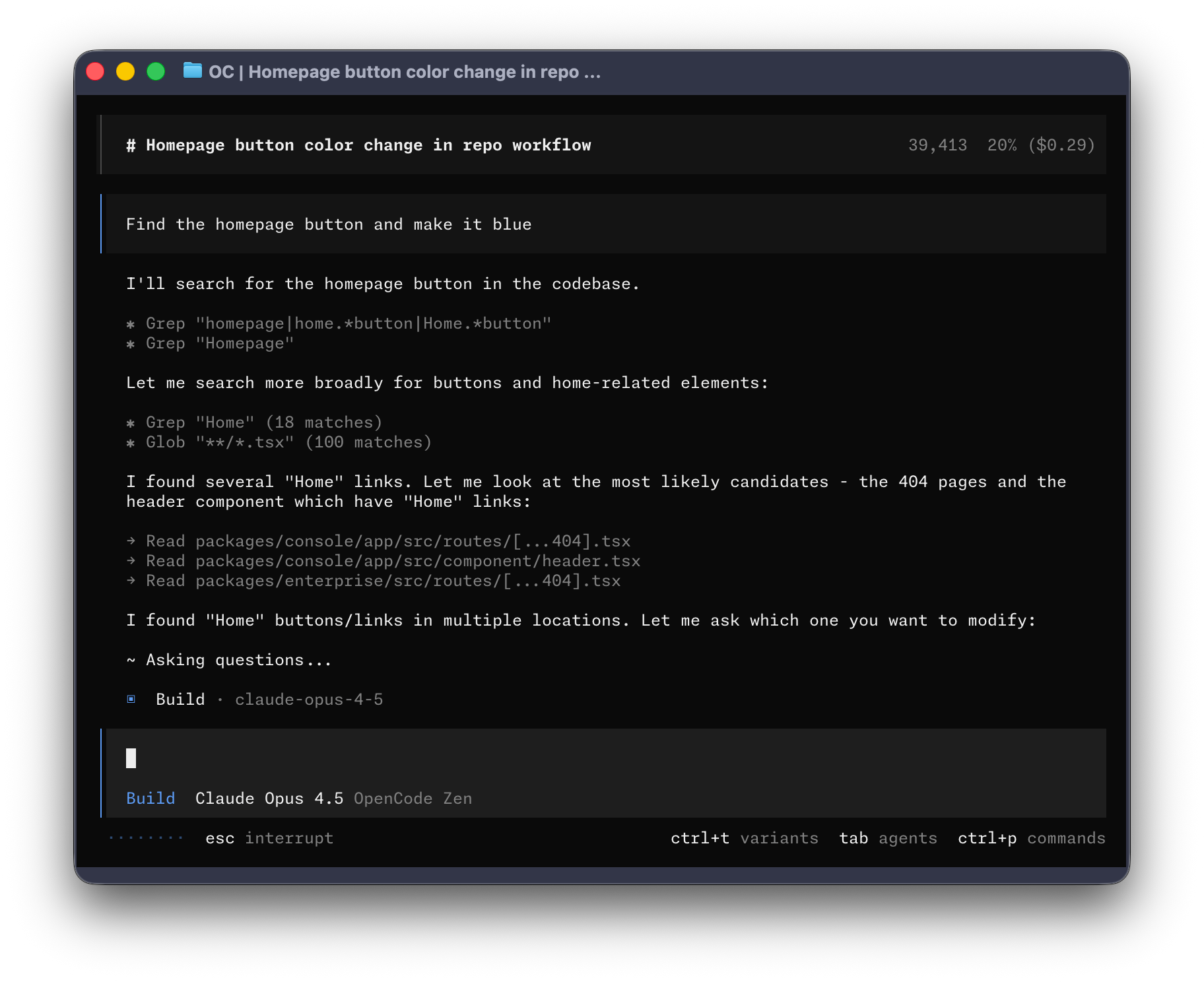
It's built by Anomaly, the team behind SST, and is MIT licensed. The repo, anomalyco/opencode, has passed 200k stars and 950 contributors, ships a new release most weeks (v1.18 as of October 2026), and the team says it's used by 16M developers a month.
What OpenCode is, and what it isn't
OpenCode is a full agent with its own harness: its own prompts, tools, permission system and context handling. That's different from apps like T3 Code or Conductor, which start the official Claude Code and Codex CLIs and give them a shared window. With OpenCode, the model changes but the agent stays the same, so your config, commands and habits carry over when you switch from Claude to GPT to Kimi.
It's also not a model provider you have to buy from. The agent is free. You bring the model, in one of four ways:
- An API key from any of 75+ providers through the AI SDK and Models.dev: Anthropic, OpenAI, Google, OpenRouter, Groq, Bedrock, Azure and more.
- A subscription you already pay for: log in with ChatGPT Plus or Pro, GitHub Copilot or GitLab Duo and use it with no extra setup.
- Local models through Ollama or LM Studio.
- OpenCode's own gateways, Zen and Go (see pricing), including a rotating set of free models.
One exception: you can't use a Claude Pro or Max subscription. Anthropic prohibits it, and OpenCode removed the plugins that did it in version 1.3.0. Claude models work through an Anthropic API key, Zen or another provider.
Main features
Build and Plan agents
OpenCode has two main agents, and Tab switches between them:
- Build is the default. It has every tool and can edit files and run commands.
- Plan is for thinking first: it asks before any file edit or shell command, so you can explore an unfamiliar codebase or agree on an approach before anything changes.
The usual loop is to describe the feature in Plan, refine the plan together, then press Tab and tell Build to go ahead. Build and Plan can call subagents for side work: General for multi-step tasks in parallel, Explore for fast read-only code search, and Scout for reading a dependency's source or docs. You can call any of them yourself with an
@ mention.Undo, redo and project memory
Every change the agent makes can be rolled back.
/undo reverts the last change and puts your original message back in the box, so you can reword it and try again; run it several times to step further back, and /redo to go forward. /init scans the repo and writes an AGENTS.md with the project's structure and conventions, which the agent reads on every session. Commit it so the whole team's agents start from the same rules.Any model, switched per session
/connect adds a provider and /models lists everything you have access to. You can change the model mid-session, set different models per agent (a cheap fast one for Explore, a strong one for Build), and add any OpenAI-compatible endpoint by its base URL. With LSP turned on, OpenCode starts the right language server for your files and feeds its errors back to the agent, so it sees type errors the moment it makes them.Terminal, desktop, web and IDE
The terminal interface is the original. There's also a desktop app for macOS, Windows and Linux (still in beta) with tabs for parallel sessions across projects:
opencode web starts the same interface in your browser, with a review panel for the session's changes. It binds to localhost by default; set OPENCODE_SERVER_PASSWORD before you open it to your network.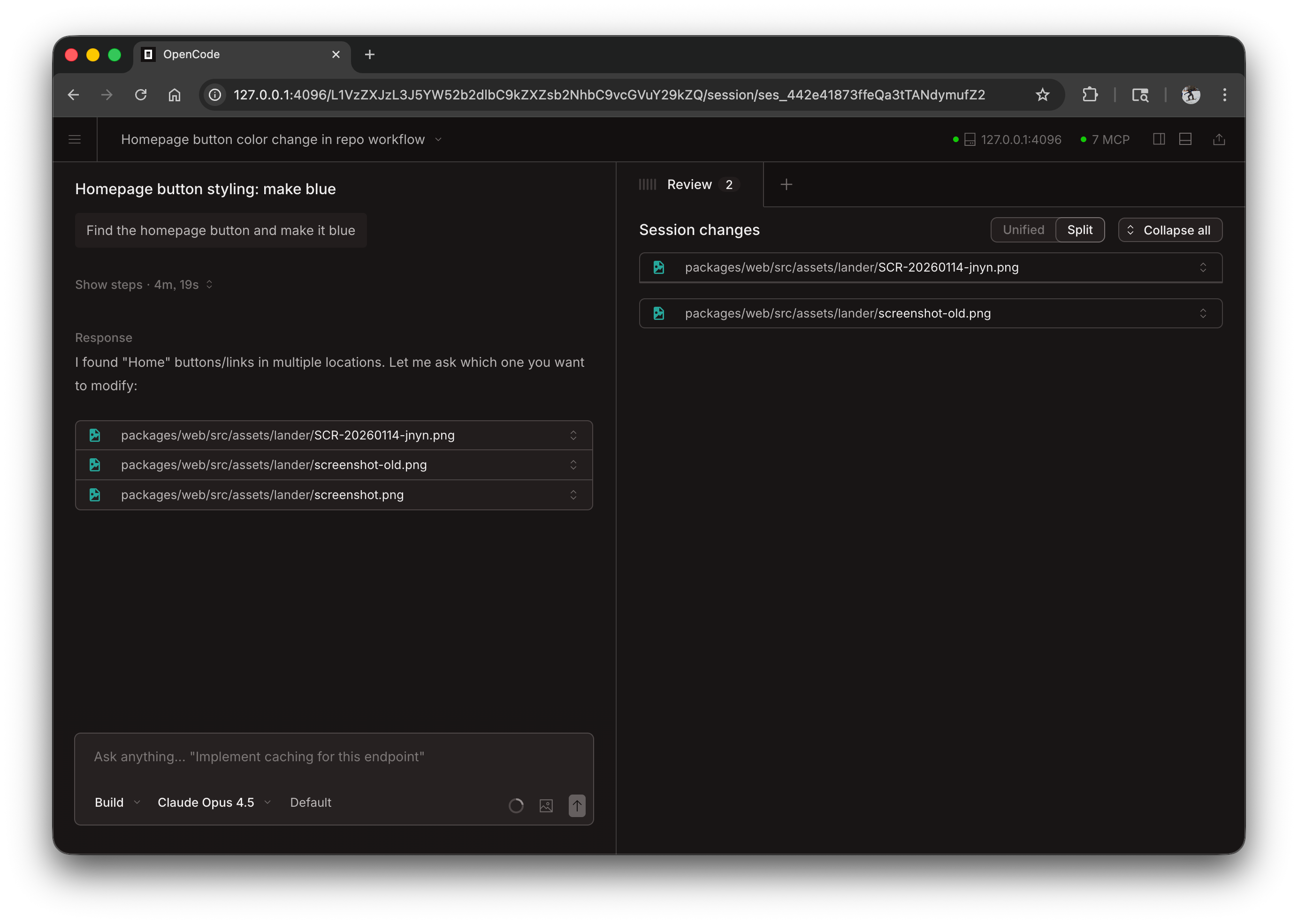
In VS Code, Cursor, Windsurf or VSCodium, run
opencode in the built-in terminal and the extension installs itself. Cmd+Esc opens OpenCode in a split view, your current selection goes into the prompt, and Cmd+Option+K inserts a file reference like @File#L37-42. Zed and other editors that speak the Agent Client Protocol can run it through opencode acp.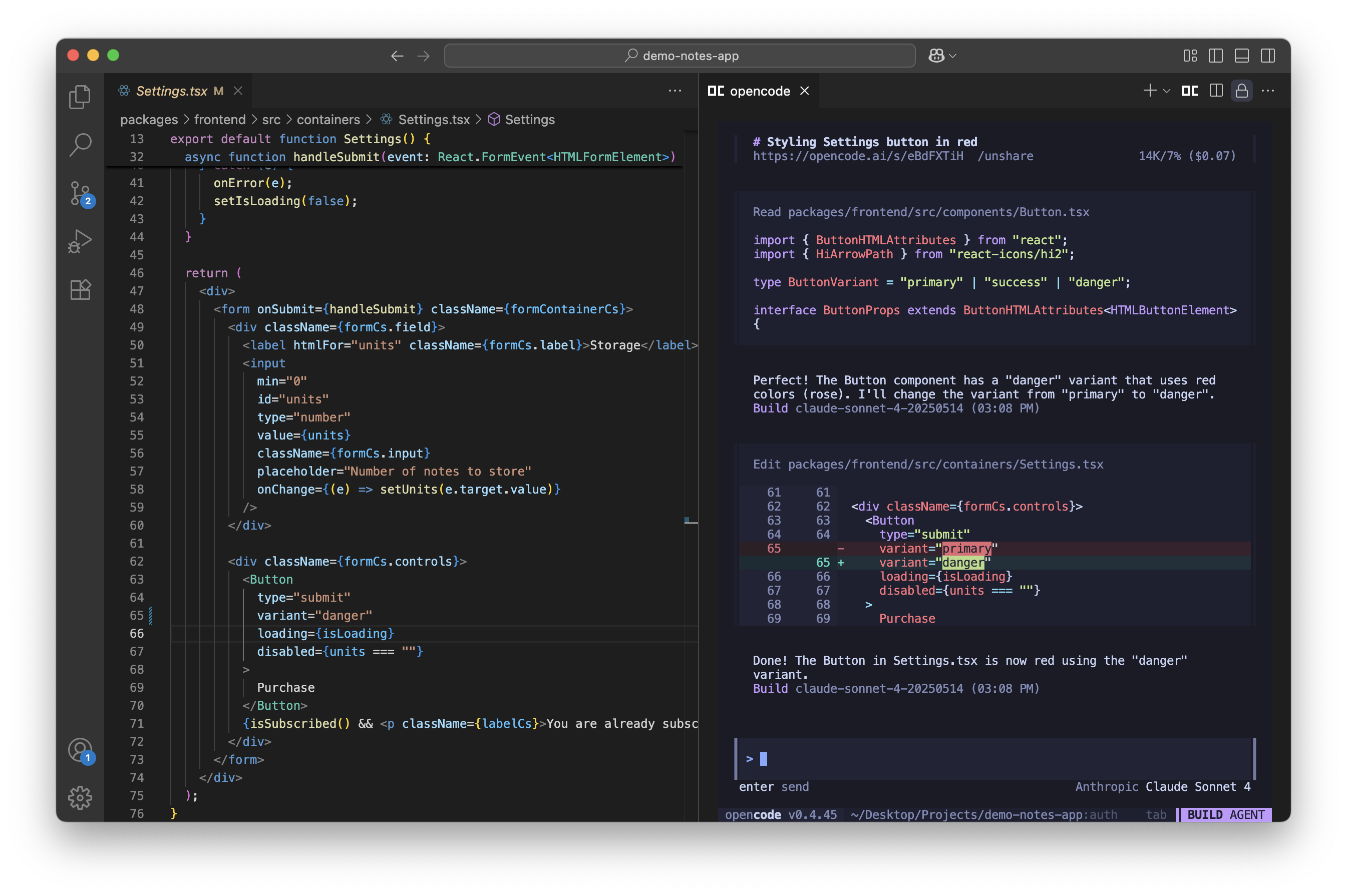
Under all of these is a client and server.
opencode serve runs a headless server with an OpenAPI spec, and there's an SDK, so you can drive OpenCode from scripts or your own tools. opencode run "..." runs one prompt without the interface, which is handy in CI.GitHub agent
Mention
/opencode or /oc in a GitHub issue or pull request comment and OpenCode works on it inside your own GitHub Actions runner: it explains an issue, or fixes it on a new branch and opens a PR. opencode github install sets up the GitHub app, the workflow and the secrets. A GitLab version works the same way.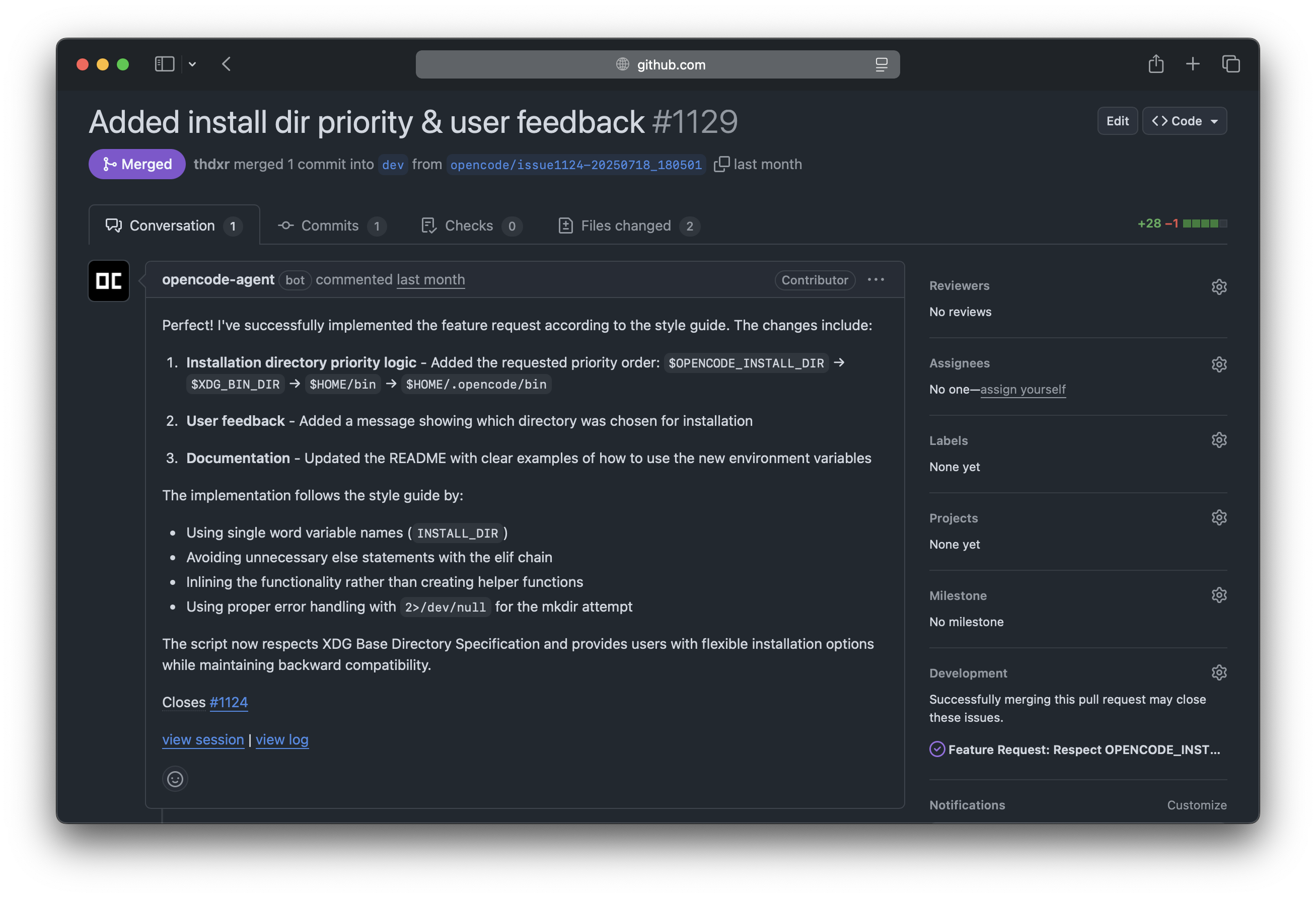
Share a session
/share creates a public link to the conversation at opncd.ai/s/... that you can send to a teammate or attach to a bug report, and /unshare deletes it. Sharing is manual by default. You can set it to automatic, or turn it off for a whole project in opencode.json, which is worth doing for client code.Extend it
OpenCode reads the same building blocks as other agents, so most of what you've set up elsewhere carries over:
- MCP servers, local or remote, with OAuth.
- Skills: folders with a
SKILL.md, in.opencode/skills/or your home config, loaded only when the agent needs them.
- Custom agents and commands: a markdown file with a prompt, a model and tool permissions becomes a new agent or a
/command.
- Plugins in JavaScript or TypeScript that hook into events, add tools or change behavior.
- Permissions per tool with
allow,askordeny, including patterns for specific shell commands and folders outside the project.
Pricing: Zen and Go
OpenCode itself is free. You pay your model provider, or one of OpenCode's two optional gateways:
| Option | Price | What you get |
|---|---|---|
| Your own keys or subscription | What your provider charges | Any of 75+ providers, ChatGPT Plus/Pro, Copilot, GitLab Duo, local models |
| OpenCode Zen | Pay per request, top up credits | Models the OpenCode team tested and benchmarked for coding: Claude, GPT, Gemini, Kimi, GLM, Qwen and more, plus several free models for a limited time |
| OpenCode Go | $10/month, or $40 for Go Plus | Open models like Kimi, GLM, Qwen, MiniMax and DeepSeek with monthly usage limits |
The case for Zen is consistency. The same open model can behave very differently depending on who serves it, and Zen only routes to providers the team has checked. Their demo runs the same prompt on Kimi K2 through OpenRouter and through Zen, side by side:
On privacy: OpenCode doesn't store your code or context. Zen's providers follow zero retention, except OpenAI and Anthropic, which keep requests for 30 days, and the free models, whose providers may use your data to improve them during the free period. For companies, OpenCode Enterprise adds a central config tied to your SSO and your own AI gateway, so nothing leaves your infrastructure.
How to set it up
- Install the CLI. Any of these work:
- Install script:
curl -fsSL https://opencode.ai/install | bash
- npm:
npm i -g opencode-ai@latest(or bun, pnpm, yarn)
- Homebrew:
brew install anomalyco/tap/opencode(the tap gets updates first)
- Windows:
scoop install opencodeorchoco install opencode, or run it inside WSL, which the docs recommend
- Desktop app: download from opencode.ai/download, or
brew install --cask opencode-desktop
- Open your project and start it:
cd my-app && opencode.
- Run
/connectand pick a provider: log in with ChatGPT or Copilot, paste an API key, or sign in to Zen to start with its free models.
- Run
/initto createAGENTS.md, and commit it.
- Press Tab to switch to Plan, describe what you want, then Tab back to Build to let it make the change.
A modern terminal helps: the docs recommend WezTerm, Alacritty, Ghostty or Kitty. This hands-on review compares it with Claude Code and Codex CLI:
Where it falls short
The Build agent runs every tool without asking by default. That's fast, but it means the agent can run any shell command your user account can. If you want approvals, set
bash and edit to ask in opencode.json, or work in Plan until you trust the task.Quality depends on the model more than with first-party tools. Claude Code and Codex are tuned for one model family each; OpenCode has to work with all of them, and a weak or badly served model gives weak results, which is the problem Zen exists to solve. You also can't bring a Claude Pro or Max subscription, so heavy Claude users pay API prices or go through Zen.
It moves fast: a new release most weeks, and settings and defaults change between versions. The desktop app is still in beta, Windows works best through WSL, and LSP is off until you turn it on. Shared sessions are public to anyone with the link, so turn sharing off for private code.
OpenCode alternatives
OpenCode's edge is that one open agent works with any model, any subscription that allows it, and any interface. The alternatives trade that for something else:
- Claude Code: Anthropic's agent, the way to use a Claude Pro or Max subscription. Best fit for Claude models, locked to them.
- Codex: OpenAI's agent across CLI, IDE and cloud, included with ChatGPT plans. Best fit for GPT models.
- Gemini CLI: Google's open-source terminal agent, the closest match if you want a free option with Gemini models.
- Cursor: an editor first, with its own agent inside it. Pick it if you'd rather review changes in an IDE than in a terminal.
- GitHub Copilot: agent mode in VS Code and other editors, and a cheap flat plan if you're comparing against OpenCode Go.
For a side-by-side of the new agent apps, see Top new agentic IDEs.


Ship faster than your competition
Focus on customers and sales while we handle product delivery. Hire a dedicated AI maker or a whole product team.
Launch new products
Fix your delivery
Hit fundraising milestones


'%3e%3cpath%20fill-rule='evenodd'%20clip-rule='evenodd'%20d='M2500%201250C2500%201940.36%201940.36%202500%201250%202500C559.644%202500%200%201940.36%200%201250C0%20559.644%20559.644%200%201250%200C1940.36%200%202500%20559.644%202500%201250ZM1030.7%20697.9C986.2%20688.4%20937%20683.6%20883.1%20683.6H350V1816.5H899.1C949.1%201816.6%20999%201810.2%201047.4%201797.5C1095.5%201784.8%201138.3%201765.3%201175.9%201738.8C1213.5%201712.4%201243.4%201678.3%201265.6%201636.5C1287.8%201594.7%201298.9%201545.2%201298.9%201488.1C1298.9%201417.2%201281.7%201356.6%201247.3%201306.4C1212.9%201256.2%201160.8%201221%201091%201200.9C1141.7%201176.6%201180.1%201145.4%201206%201107.3C1231.9%201069.2%201244.9%201021.6%201244.9%20964.5C1244.9%20911.6%201236.2%20867.2%201218.7%20831.2C1201.2%20795.2%201176.6%20766.4%201144.9%20744.7C1113.2%20723%201075.2%20707.4%201030.7%20697.9ZM960.9%201110.4C932.3%201131.5%20895.8%201142.1%20851.4%201142.1L599.2%201142.3V877.3H832.3C853.9%20877.2%20875.4%20879.1%20896.6%20882.8C917.2%20886.5%20935.4%20893.1%20951.3%20902.6C967.2%20912.1%20979.9%20925.4%20989.4%20942.3C998.9%20959.2%201003.7%20980.9%201003.7%201007.3C1003.8%201054.9%20989.5%201089.2%20960.9%201110.4ZM935.5%201615.7C912.6%201620.5%20889.2%201622.9%20865.7%201622.8L599.2%201622.9V1311.9H870.5C924.4%201311.9%20967.8%201324.3%201000.6%201349.2C1033.4%201374%201049.8%201415.6%201049.8%201473.7C1049.8%201503.3%201044.7%201527.7%201034.7%201546.7C1024.6%201565.7%201011.1%201580.8%20994.2%201591.9C977.3%201603%20957.7%201610.9%20935.5%201615.7ZM1758.3%201648.2C1694.8%201648.2%201646.1%201631.8%201612.3%201599C1578.5%201566.3%201560%201513.4%201556.9%201440.7H2148.7C2152.9%201377.2%202147.6%201316.4%202132.8%201258.2C2118%201200%202093.9%201148.2%202060.6%201102.7C2027.3%201057.2%201984.7%201021%201932.9%20994C1881%20967%201820.2%20953.5%201750.4%20953.5C1688%20953.5%201631.1%20964.6%201579.8%20986.8C1528.5%201009%201484.3%201039.4%201447.3%201078C1410.3%201116.6%201381.7%201162.3%201361.6%201215.2C1341.5%201268.1%201331.5%201325.2%201331.5%201386.5C1331.5%201449.9%201341.3%201508.1%201360.8%201561C1380.3%201613.9%201408.1%201659.3%201444.1%201697.4C1480.1%201735.5%201524%201764.9%201575.8%201785.5C1627.6%201806.1%201685.8%201816.4%201750.3%201816.4C1843.4%201816.4%201922.7%201795.2%201988.3%201752.9C2053.9%201710.6%202102.6%201640.3%202134.3%201541.9H1936C1928.6%201567.3%201908.5%201591.4%201875.7%201614.1C1842.9%201636.8%201803.8%201648.2%201758.3%201648.2ZM1744%201123.1C1799%201123.1%201840%201137.9%201867%201167.5C1893.9%201197.1%201912.7%201240.5%201923.4%201297.5H1556.9C1557.9%201281.7%201561.4%201263.7%201567.2%201243.6C1573%201223.5%201583%201204.5%201597.3%201186.5C1611.6%201168.5%201630.6%201153.5%201654.4%201141.3C1678.1%201129.2%201708%201123.1%201744%201123.1ZM1976.2%20741.1H1518.3V868.1H1976.2V741.1Z'%20fill='white'/%3e%3c/g%3e%3cdefs%3e%3cclipPath%20id='clip0_52_236'%3e%3crect%20width='2500'%20height='2500'%20fill='white'/%3e%3c/clipPath%3e%3c/defs%3e%3c/svg%3e)
'%3e%3cpath%20d='M444.031%20372.208C477.51%20456.911%20502.37%20544.115%20518.526%20633.203C541.573%20619.151%20563.115%20602.266%20582.693%20582.693C633.547%20531.833%20666.365%20467.75%20677.958%20398.198C628%20377.531%20573.286%20366.094%20515.948%20366.094C491.438%20366.094%20467.417%20368.208%20444.031%20372.208V372.208Z'%20fill='white'/%3e%3cpath%20d='M582.979%20100.266C582.88%20100.172%20582.786%20100.068%20582.693%2099.974C518.219%2035.5052%20432.505%20-7.62939e-06%20341.333%20-7.62939e-06C305.682%20-7.62939e-06%20270.865%205.45312%20237.828%2015.9219C290.781%2082.2656%20337.365%20153.068%20377.286%20227.896C452.495%20195.964%20521.771%20152.698%20582.979%20100.266Z'%20fill='white'/%3e%3cpath%20d='M609.797%20130.479C545.589%20185.63%20473.839%20230.323%20395.761%20263.724C407.271%20286.896%20418.141%20310.437%20428.401%20334.328C457.052%20328.875%20486.287%20326.094%20515.948%20326.094C573.401%20326.094%20629.282%20336.427%20682.308%20356.766C682.537%20351.641%20682.667%20346.5%20682.667%20341.339C682.667%20263.88%20657.032%20190.375%20609.797%20130.479V130.479Z'%20fill='white'/%3e%3cpath%20d='M131.234%20610.401C190.99%20657.255%20264.208%20682.667%20341.333%20682.667C390.354%20682.667%20437.792%20672.385%20481.203%20652.875C464.932%20558.594%20438.88%20467.625%20404.12%20381.047C283.323%20414.016%20183.802%20499.026%20131.234%20610.401V610.401Z'%20fill='white'/%3e%3cpath%20d='M334.88%20362.656C352.438%20355.229%20370.333%20348.938%20388.51%20343.76C378.917%20321.792%20368.74%20300.135%20358.031%20278.786C265.818%20313.026%20168.854%20330.375%2069.25%20330.375C46.1094%20330.375%2023.1198%20329.422%200.296875%20327.557C0.114583%20332.135%200%20336.729%200%20341.339C0%20432.51%2035.5052%20518.224%2099.974%20582.693C99.9948%20582.714%20100.021%20582.734%20100.042%20582.755C122.339%20538.286%20151.5%20497.87%20187.031%20462.333C229.745%20419.625%20279.484%20386.089%20334.88%20362.656Z'%20fill='white'/%3e%3cpath%20d='M339.323%20242.859C298.818%20167.844%20251.427%2097.0677%20198.016%2031.3698C162.021%2048.0417%20128.859%2071.0885%2099.974%2099.974C48.3281%20151.62%2015.2917%20216.906%204.1875%20287.708C25.6458%20289.464%2047.3438%20290.375%2069.25%20290.375C164.052%20290.375%20255.016%20273.594%20339.323%20242.859Z'%20fill='white'/%3e%3c/g%3e%3cdefs%3e%3cclipPath%20id='clip0_107_362'%3e%3crect%20width='682.667'%20height='682.667'%20fill='white'/%3e%3c/clipPath%3e%3c/defs%3e%3c/svg%3e)