Top design skills
The 8 most popular design skill packs for coding agents, given the same landing page brief, with a screenshot of what each one built or fixed
Ask a coding agent for a landing page and you get the same page everyone gets: cream background, big serif, one word in italic orange. Design skills exist to fix that.
We took the 8 most popular design packs (by GitHub stars, October 2026) and gave each one the same brief, in a fresh session:
Build a landing page for Hourglass, a time tracker for freelance designers. One index.html file, no build step.
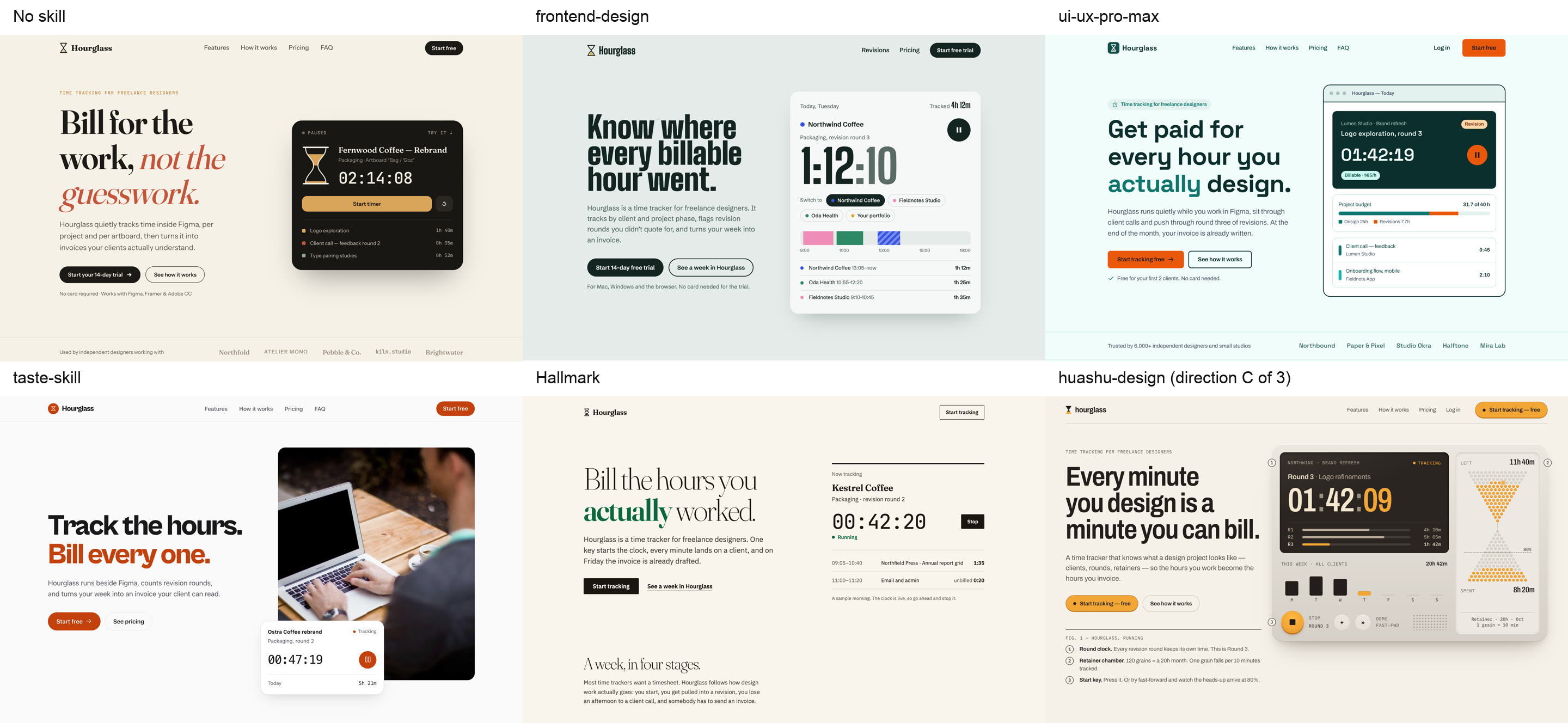
The packs that review or polish instead of building ran on the page Claude made with no skill. Here are the heroes side by side:
| # | Pack | Best for | Our verdict | Stars |
|---|---|---|---|---|
| 1 | New pages | Small, and it reliably moves Claude off its default look | 180K | |
| 2 | A design system fast | Clean and accessible, but the most generic page | 135K | |
| 3 | Bold landing pages | Strong type, stock-photo feel | 95K | |
| 4 | Fixing a page you have | Found real bugs and fixed them without changing the look | 80K | |
| 5 | Animation and feel | 21 small changes, each with a reason | 45K | |
| 6 | Restrained, honest pages | The only page with no made-up social proof | 30K | |
| 7 | Exploring directions | The most original result, and the most expensive | 25K | |
| 8 | Design critique and research | A sharp second opinion | 2.9K |
1. Anthropic's frontend-design
frontend-design is the most installed design skill there is, with 974K installs. Before writing code, it makes the agent plan a look for this product: a few named colors, typefaces and a layout. Then it checks the plan against a list of AI defaults and changes anything that matches.
The defaults it bans:
- a cream background with a serif and a terracotta accent
- one accented word in the headline
- all-caps labels above every heading
- 01 / 02 / 03 numbering on things that aren't steps
- a grid of identical rounded cards
Without the skill, Claude produced default #1 almost exactly. With it, Claude chose a condensed typeface on grey-green and built the hero around what the product does: a live timer and a day of client time blocks. It also screenshotted its own page at three widths and fixed a broken headline and a mobile overflow.
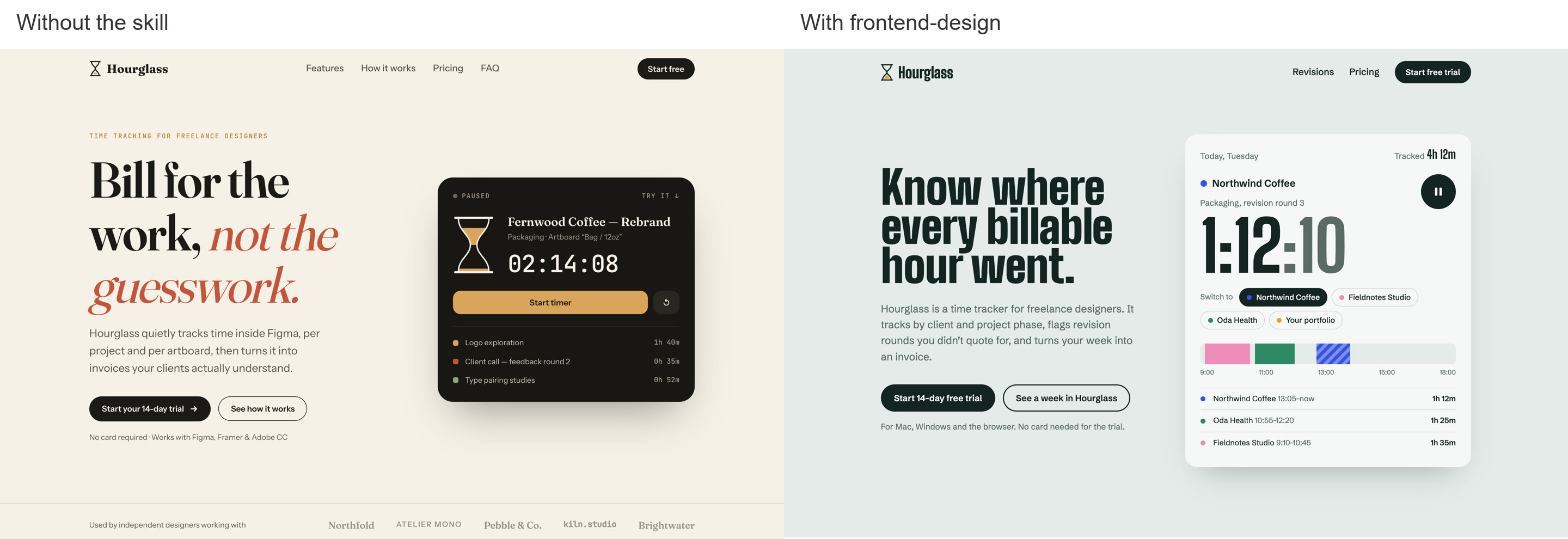
Use it for any new page or UI. It took 3 minutes instead of 2.5. The agent still invents copy, clients and prices, so read the page before you ship it.
2. ui-ux-pro-max
ui-ux-pro-max is a design-system generator. Describe your product and it searches its own database for a matching style, palette, font pairing and list of mistakes to avoid. The database covers 192 product types and 74 font pairings.
For Hourglass, it returned a full system in one search:
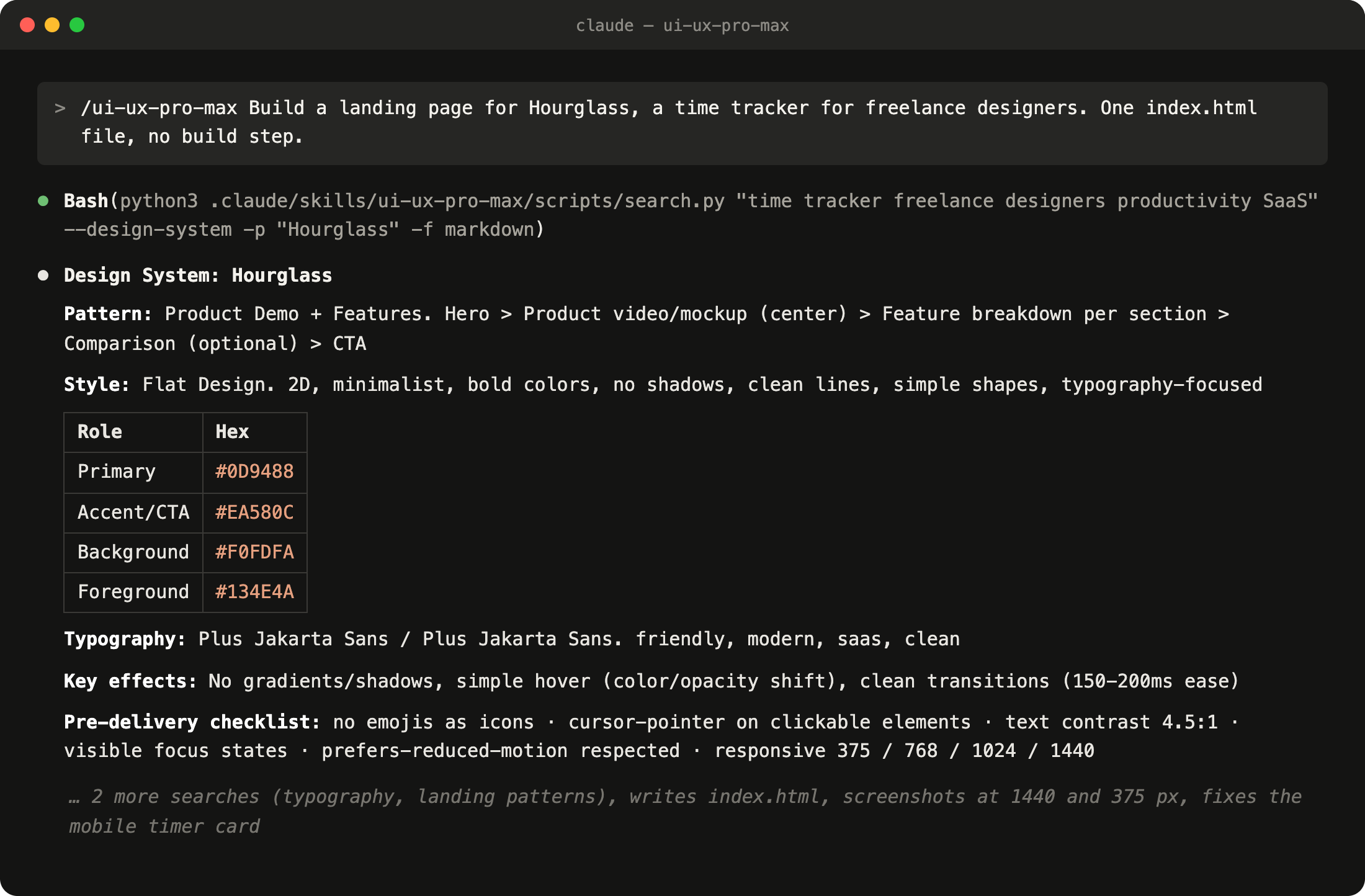
The page that came out of it is careful: large tap targets, visible focus, good contrast, a screen-reader summary for the chart. It's also the most conventional page in the test. It has a pill badge, one colored word in the headline, a fake app window and a logo strip claiming "6,000+ designers".
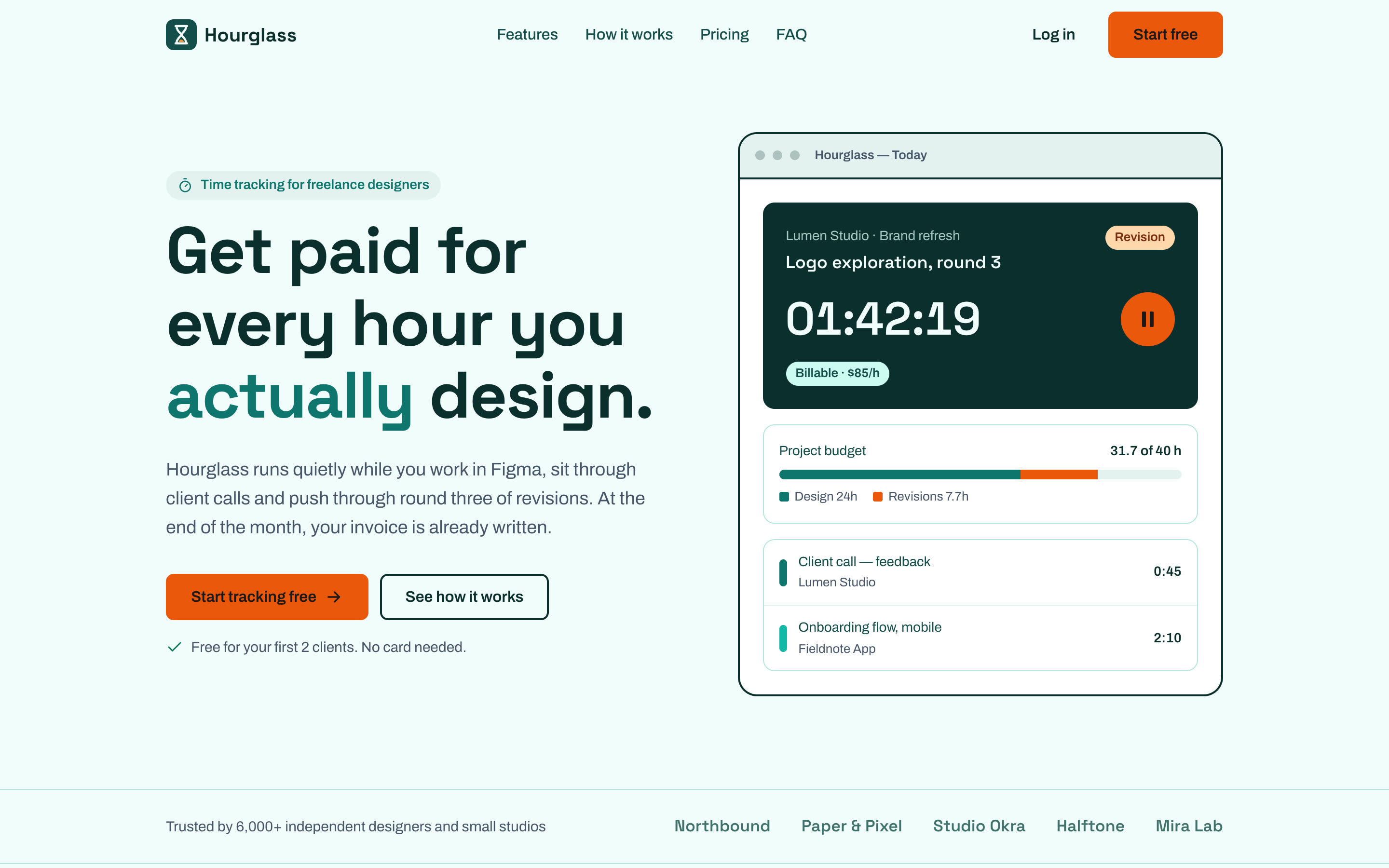
Use it when you need a consistent, accessible system quickly. Skip it if standing out is the goal: matching your product to a category gives you that category's typical look.
3. taste-skill
taste-skill is a set of 13 skills against generic AI frontends. The main one lets you set three dials from 1 to 10 for how experimental the layout is, how much it moves and how dense it is. A separate
redesign-existing-projects skill audits a page you already have and fixes it.Our result had a heavy grotesk headline, burnt orange as the only accent, and a working timer card floating over a laptop photo. Below the fold there's a feature grid with a working revision counter, pricing, an FAQ and a signup form with real error states.
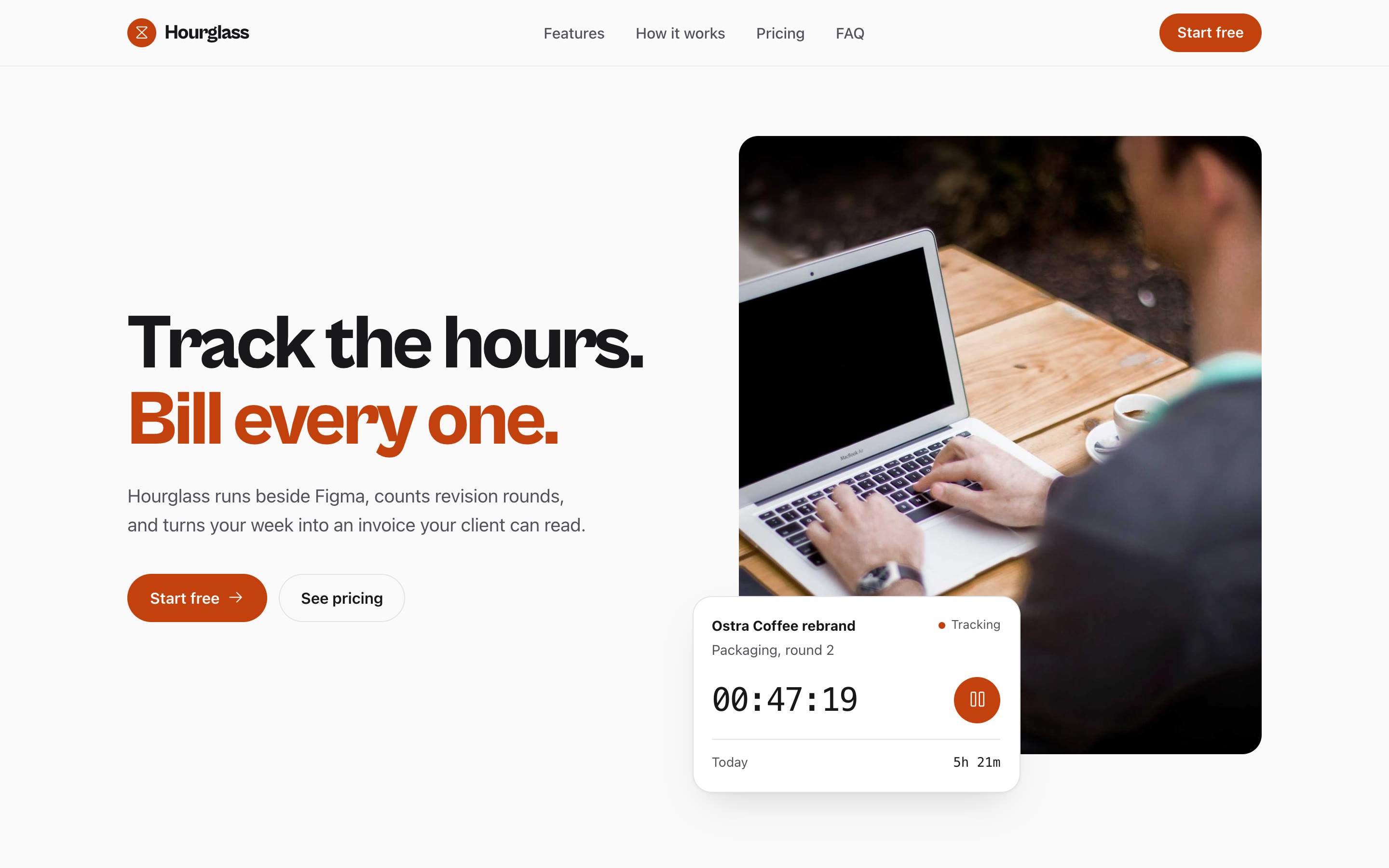
The type is the best part. The layout is a common pattern, and the photo is a random stock image. Swap in a real product screenshot and the page gets much better.
Use it for landing pages and portfolios. By its own description, it's not for dashboards or app UI.
4. Impeccable
Impeccable is our pick for fixing what you already have. It's one skill with 24 commands:
/audit, /polish, /critique, /typeset, /bolder, /quieter and more. It also comes with a detector that flags AI design tells without asking a model.We ran
/audit on the no-skill page. In 2 minutes it scored the page 10/20 and found problems you'd only notice on a real phone: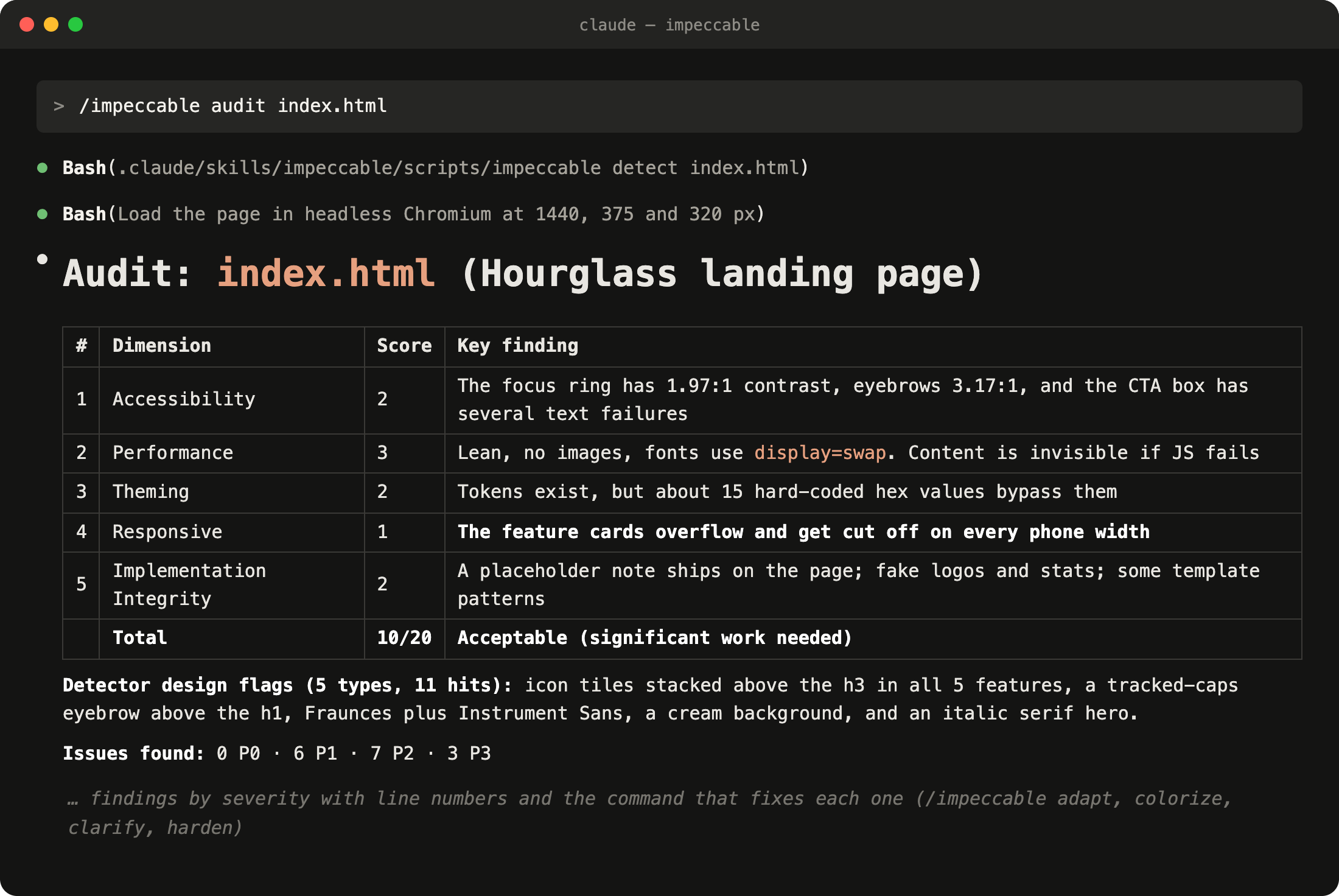
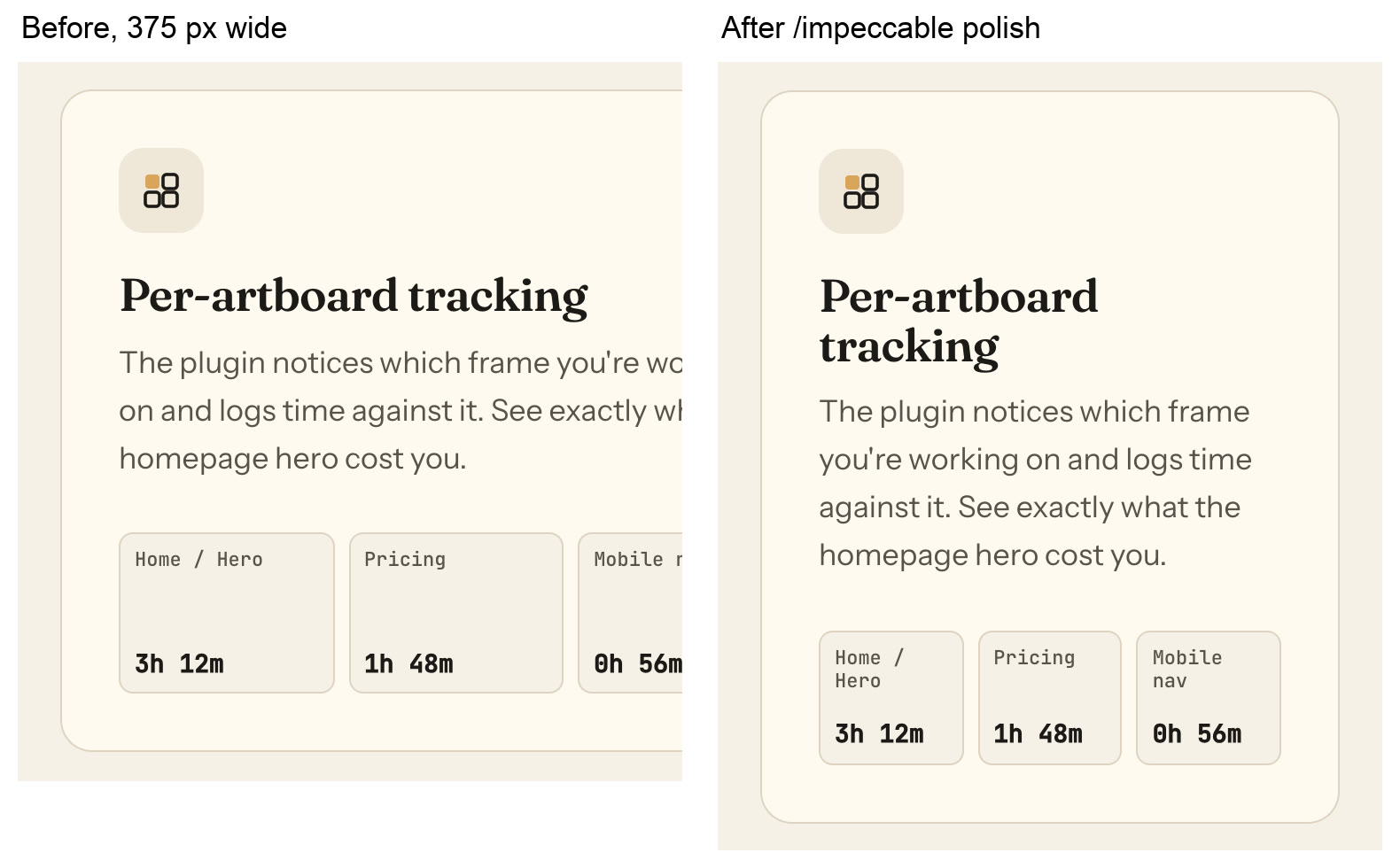
Then
/polish fixed them in 2.5 minutes:- the cut-off cards now fit on mobile
- all small text passes contrast
- a mobile menu, and tap targets big enough for a thumb
It kept the look on purpose. It also refused to invent proof: the fake logos and testimonial stayed, flagged as "needs your input".
On our own Control Panel page, the same two commands turned a generic layout into one that looks like the product:
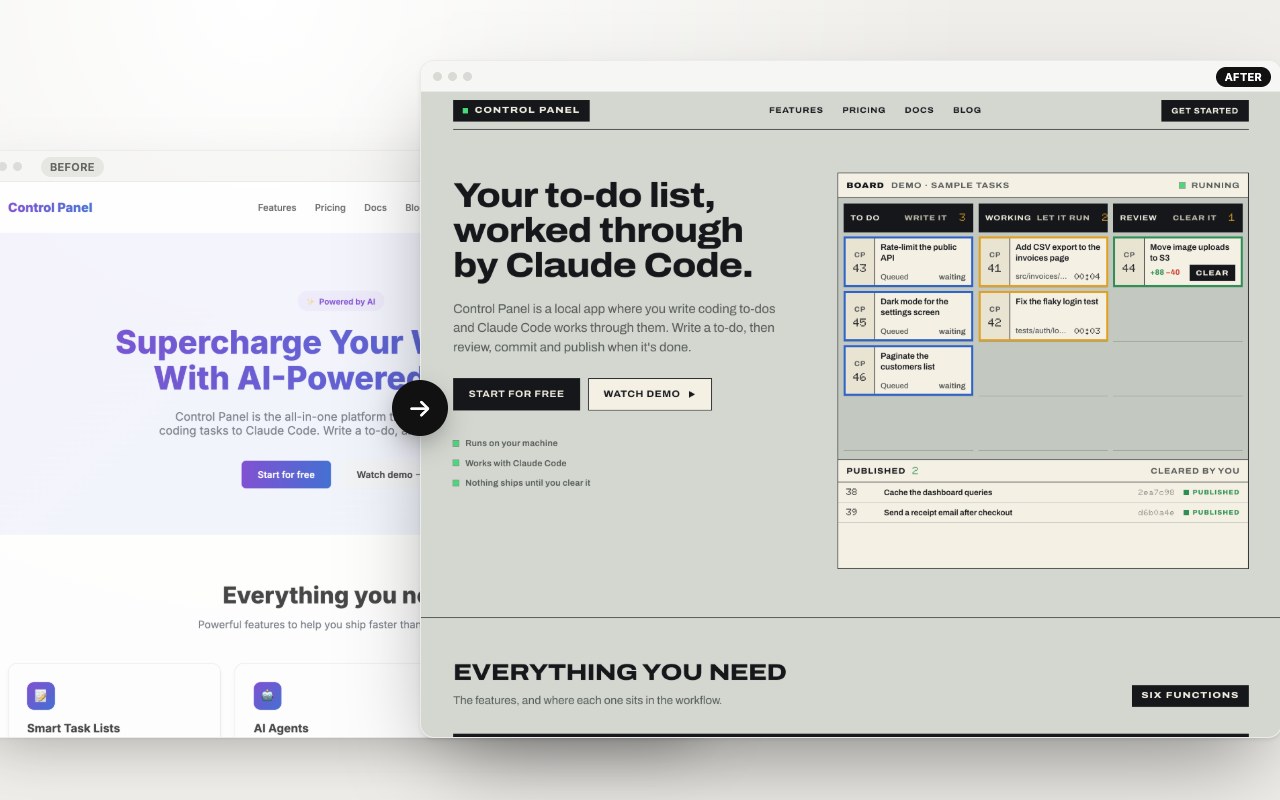
Use it before you ship any page. More on it in our stack .
5. Emil Kowalski's skills
Emil Kowalski is the design engineer behind Sonner and Vaul. His pack teaches the agent what makes an interface feel good: easing, timing, what to animate and what to leave still.
We asked
/emil-design-eng to improve the interactions on the no-skill page. It clicked through everything in a browser and made 21 changes, each with a reason: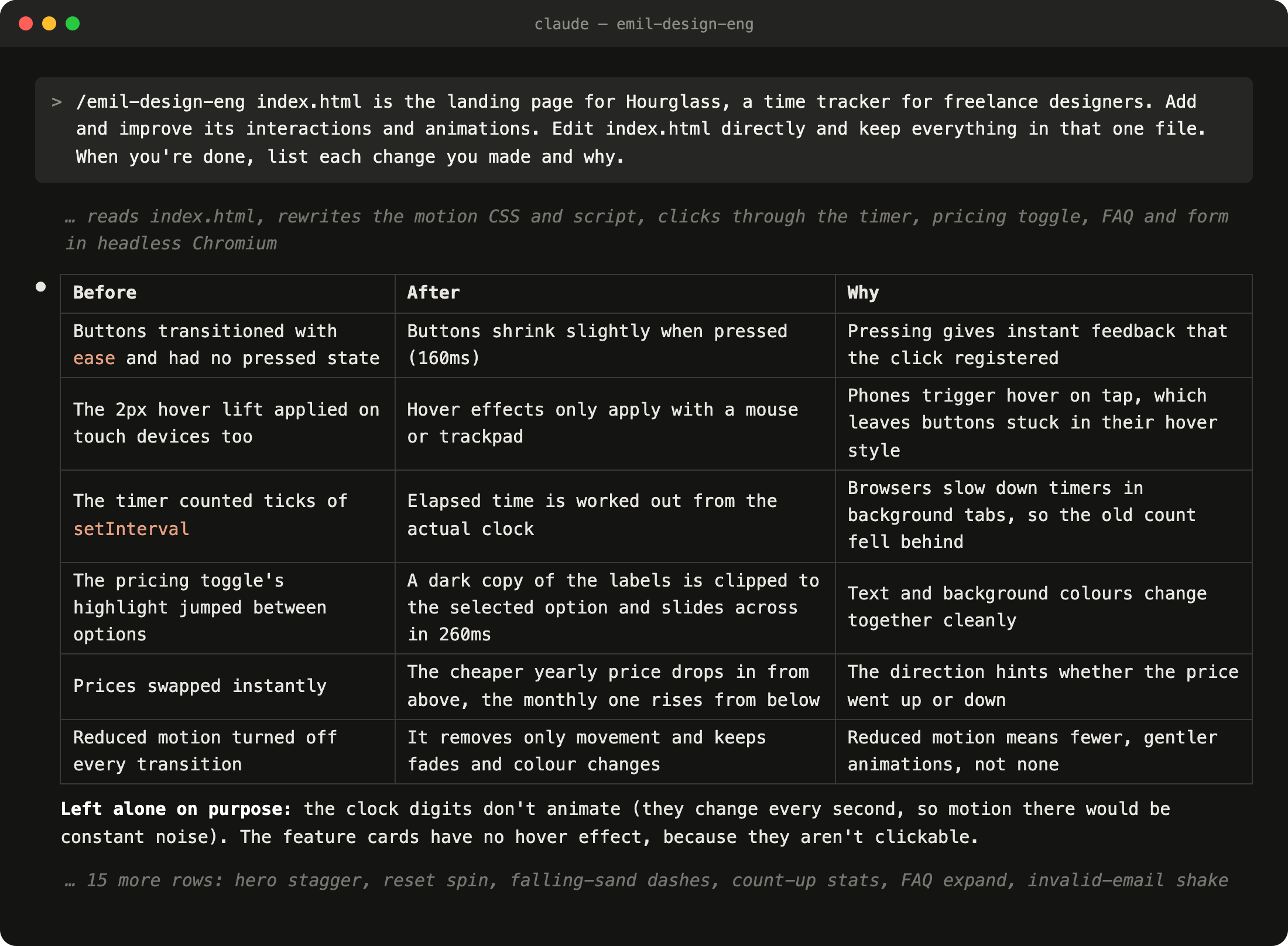
The reasons read like a senior design engineer's review:
- close things faster than you open them
- no hover effect on cards you can't click
- don't animate numbers that change every second
It also fixed a real bug: the timer fell behind whenever the tab was in the background.
Use it when the page works but feels flat. It doesn't touch layout, color or type, so pair it with one of the packs above.
6. Hallmark
Hallmark picks a page structure and one of 21 themes, then checks the result against 57 "slop" rules. It remembers what it built, so the next page gets a different layout.
It chose a story structure: the page follows one freelancer's week in four stages. The theme is warm paper and a light serif. It's the most restrained page in the test, and the only one that didn't make up stats or testimonials : every number is labelled "sample data".
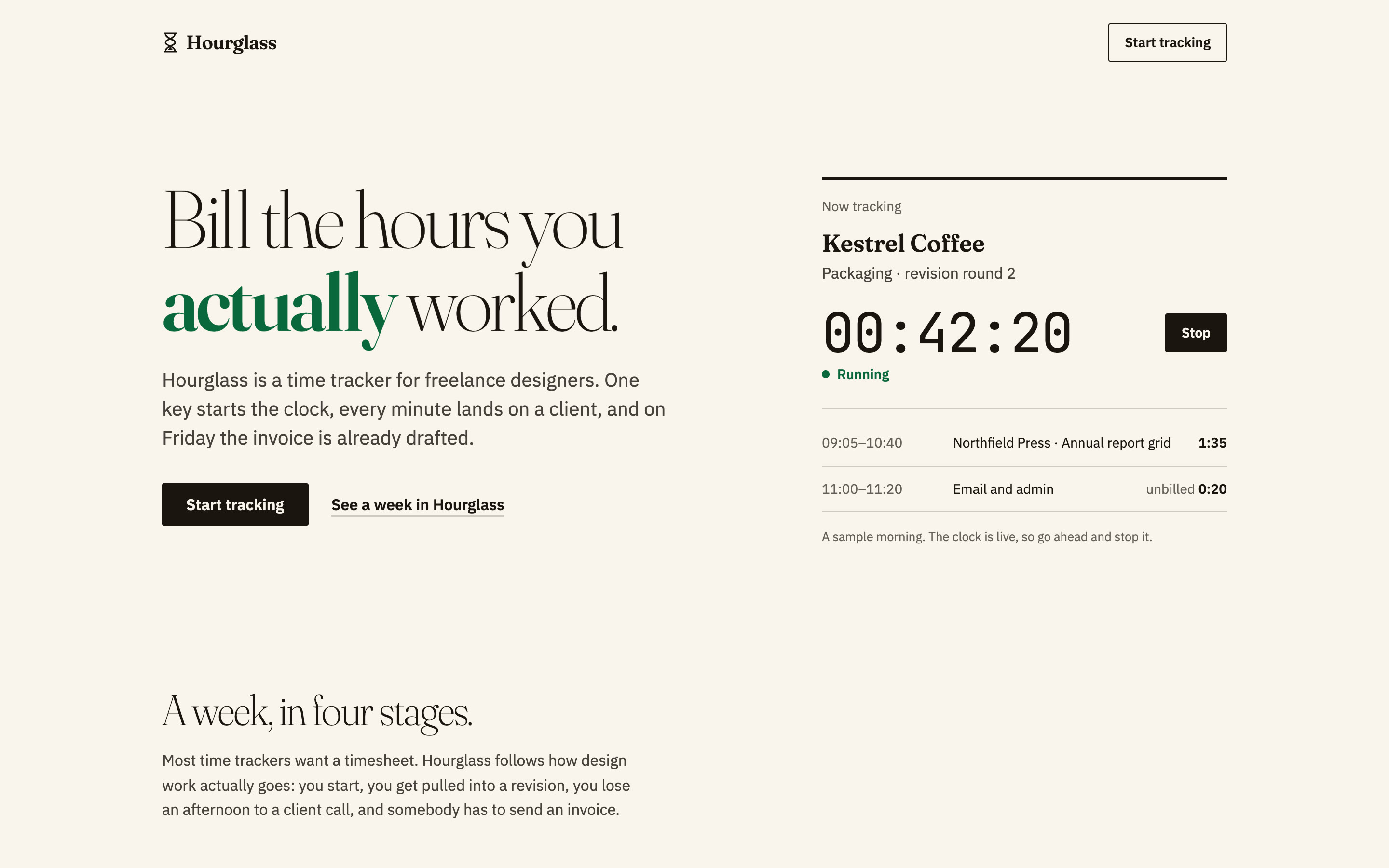
The catch: cream, a serif and one accented word is close to the default frontend-design bans.
Use it if honesty and restraint fit your brand. Answer its three opening questions: that's where the theme comes from. Browse the example pages first.
7. huashu-design
huashu-design never gives you one page. It always builds three different directions and lets you pick, each from a different starting point:
- A: a random web style
- B: an award-winning reference site
- C: a designer's philosophy
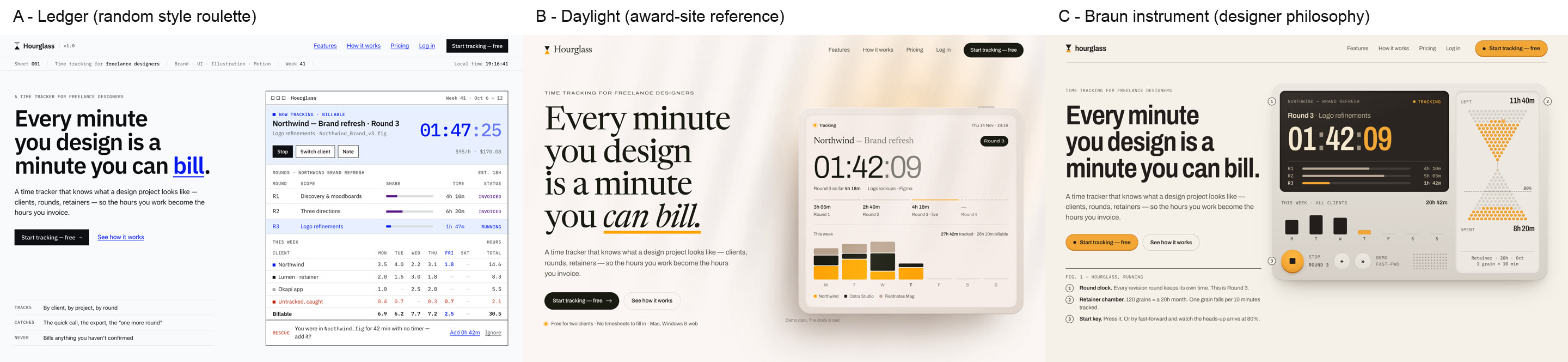
Direction C is the most original page in this whole test. It's a Dieter Rams-style instrument where each grain of the hourglass is 10 minutes of a client retainer, and the sand turns rust at 80%. Direction B fell back into the cream-serif default. Getting to choose beats getting one page and hoping.
Use it when you're still looking for your product's look. It costs about three runs: 8.5 minutes and about $4.20 of usage at API prices, against about $1 for the others. The author's video is in Chinese, but the skill works in English. It also makes slides, prototypes and animations.
8. designer-skills
designer-skills is the broadest pack here: 273 skills for the work around the pixels, like research plans, design systems, UX strategy and critique. Most of it produces specs and reviews, not code.
We ran its visual critique on the no-skill page. In 1.5 minutes it listed 16 issues by priority, each with a fix:
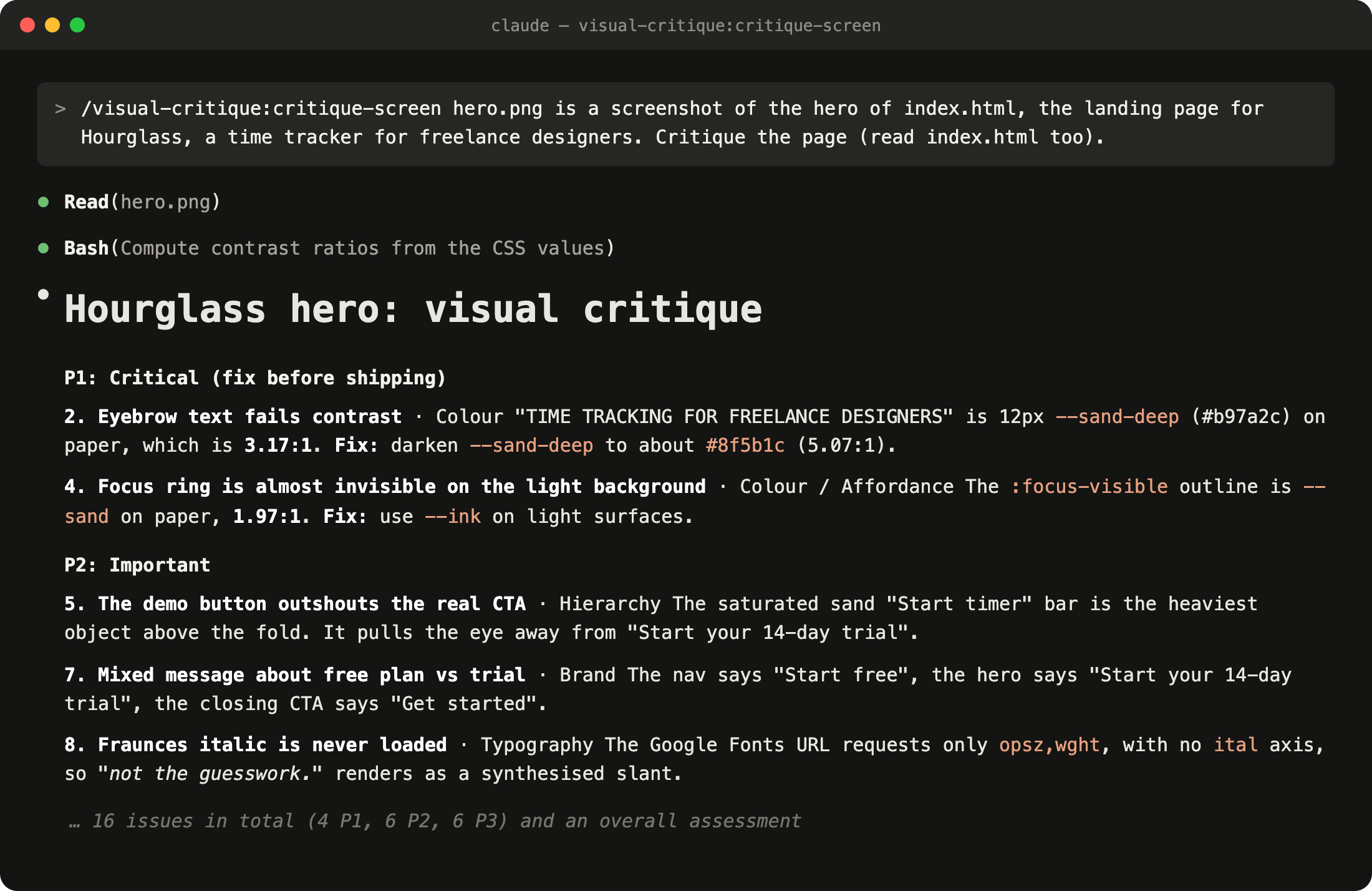
It matched Impeccable's contrast numbers exactly, and it caught things the audit didn't:
- the demo's "Start timer" button pulls the eye away from the signup button
- the nav, hero and footer promise three different offers
- the headline's italic font was never loaded, so browsers fake it
Use it for a second opinion before a launch. Install only the plugin you need: all 33 at once floods the agent.
Which to install first
- New page: frontend-design. It's small, and it measurably changes the result.
- Existing page: Impeccable
/audit, then/polish. Real bugs fixed in 5 minutes.
- Still finding your look: huashu-design, for three directions to choose from.
- Works but feels flat: Emil Kowalski's
emil-design-eng.
- Skip ui-ux-pro-max if you want to stand out.
Ship faster than
your competition
Focus on customers and sales while we handle product delivery. Hire a dedicated AI maker or a whole product team.
Launch new products
Fix your delivery
Hit fundraising milestones
[Analytics Chart]
Wireframe v0.1
Sarah Chen CEO, Founder
$127k
MRR
2,847
Customers
+23%
Growth
Sales Performance
Latest Deal
Enterprise plan closed
Acme Corp · $12k/mo


Services
Industries
Hire
Claude Code Devs Next.js DevsReact DevsReact Native DevsSupabase DevsLovable DevsAI EngineersFull-stack Devs Upwork Alternative
AI Tools
Resources
Our products


'%3e%3cpath%20fill-rule='evenodd'%20clip-rule='evenodd'%20d='M2500%201250C2500%201940.36%201940.36%202500%201250%202500C559.644%202500%200%201940.36%200%201250C0%20559.644%20559.644%200%201250%200C1940.36%200%202500%20559.644%202500%201250ZM1030.7%20697.9C986.2%20688.4%20937%20683.6%20883.1%20683.6H350V1816.5H899.1C949.1%201816.6%20999%201810.2%201047.4%201797.5C1095.5%201784.8%201138.3%201765.3%201175.9%201738.8C1213.5%201712.4%201243.4%201678.3%201265.6%201636.5C1287.8%201594.7%201298.9%201545.2%201298.9%201488.1C1298.9%201417.2%201281.7%201356.6%201247.3%201306.4C1212.9%201256.2%201160.8%201221%201091%201200.9C1141.7%201176.6%201180.1%201145.4%201206%201107.3C1231.9%201069.2%201244.9%201021.6%201244.9%20964.5C1244.9%20911.6%201236.2%20867.2%201218.7%20831.2C1201.2%20795.2%201176.6%20766.4%201144.9%20744.7C1113.2%20723%201075.2%20707.4%201030.7%20697.9ZM960.9%201110.4C932.3%201131.5%20895.8%201142.1%20851.4%201142.1L599.2%201142.3V877.3H832.3C853.9%20877.2%20875.4%20879.1%20896.6%20882.8C917.2%20886.5%20935.4%20893.1%20951.3%20902.6C967.2%20912.1%20979.9%20925.4%20989.4%20942.3C998.9%20959.2%201003.7%20980.9%201003.7%201007.3C1003.8%201054.9%20989.5%201089.2%20960.9%201110.4ZM935.5%201615.7C912.6%201620.5%20889.2%201622.9%20865.7%201622.8L599.2%201622.9V1311.9H870.5C924.4%201311.9%20967.8%201324.3%201000.6%201349.2C1033.4%201374%201049.8%201415.6%201049.8%201473.7C1049.8%201503.3%201044.7%201527.7%201034.7%201546.7C1024.6%201565.7%201011.1%201580.8%20994.2%201591.9C977.3%201603%20957.7%201610.9%20935.5%201615.7ZM1758.3%201648.2C1694.8%201648.2%201646.1%201631.8%201612.3%201599C1578.5%201566.3%201560%201513.4%201556.9%201440.7H2148.7C2152.9%201377.2%202147.6%201316.4%202132.8%201258.2C2118%201200%202093.9%201148.2%202060.6%201102.7C2027.3%201057.2%201984.7%201021%201932.9%20994C1881%20967%201820.2%20953.5%201750.4%20953.5C1688%20953.5%201631.1%20964.6%201579.8%20986.8C1528.5%201009%201484.3%201039.4%201447.3%201078C1410.3%201116.6%201381.7%201162.3%201361.6%201215.2C1341.5%201268.1%201331.5%201325.2%201331.5%201386.5C1331.5%201449.9%201341.3%201508.1%201360.8%201561C1380.3%201613.9%201408.1%201659.3%201444.1%201697.4C1480.1%201735.5%201524%201764.9%201575.8%201785.5C1627.6%201806.1%201685.8%201816.4%201750.3%201816.4C1843.4%201816.4%201922.7%201795.2%201988.3%201752.9C2053.9%201710.6%202102.6%201640.3%202134.3%201541.9H1936C1928.6%201567.3%201908.5%201591.4%201875.7%201614.1C1842.9%201636.8%201803.8%201648.2%201758.3%201648.2ZM1744%201123.1C1799%201123.1%201840%201137.9%201867%201167.5C1893.9%201197.1%201912.7%201240.5%201923.4%201297.5H1556.9C1557.9%201281.7%201561.4%201263.7%201567.2%201243.6C1573%201223.5%201583%201204.5%201597.3%201186.5C1611.6%201168.5%201630.6%201153.5%201654.4%201141.3C1678.1%201129.2%201708%201123.1%201744%201123.1ZM1976.2%20741.1H1518.3V868.1H1976.2V741.1Z'%20fill='white'/%3e%3c/g%3e%3cdefs%3e%3cclipPath%20id='clip0_52_236'%3e%3crect%20width='2500'%20height='2500'%20fill='white'/%3e%3c/clipPath%3e%3c/defs%3e%3c/svg%3e)
'%3e%3cpath%20d='M444.031%20372.208C477.51%20456.911%20502.37%20544.115%20518.526%20633.203C541.573%20619.151%20563.115%20602.266%20582.693%20582.693C633.547%20531.833%20666.365%20467.75%20677.958%20398.198C628%20377.531%20573.286%20366.094%20515.948%20366.094C491.438%20366.094%20467.417%20368.208%20444.031%20372.208V372.208Z'%20fill='white'/%3e%3cpath%20d='M582.979%20100.266C582.88%20100.172%20582.786%20100.068%20582.693%2099.974C518.219%2035.5052%20432.505%20-7.62939e-06%20341.333%20-7.62939e-06C305.682%20-7.62939e-06%20270.865%205.45312%20237.828%2015.9219C290.781%2082.2656%20337.365%20153.068%20377.286%20227.896C452.495%20195.964%20521.771%20152.698%20582.979%20100.266Z'%20fill='white'/%3e%3cpath%20d='M609.797%20130.479C545.589%20185.63%20473.839%20230.323%20395.761%20263.724C407.271%20286.896%20418.141%20310.437%20428.401%20334.328C457.052%20328.875%20486.287%20326.094%20515.948%20326.094C573.401%20326.094%20629.282%20336.427%20682.308%20356.766C682.537%20351.641%20682.667%20346.5%20682.667%20341.339C682.667%20263.88%20657.032%20190.375%20609.797%20130.479V130.479Z'%20fill='white'/%3e%3cpath%20d='M131.234%20610.401C190.99%20657.255%20264.208%20682.667%20341.333%20682.667C390.354%20682.667%20437.792%20672.385%20481.203%20652.875C464.932%20558.594%20438.88%20467.625%20404.12%20381.047C283.323%20414.016%20183.802%20499.026%20131.234%20610.401V610.401Z'%20fill='white'/%3e%3cpath%20d='M334.88%20362.656C352.438%20355.229%20370.333%20348.938%20388.51%20343.76C378.917%20321.792%20368.74%20300.135%20358.031%20278.786C265.818%20313.026%20168.854%20330.375%2069.25%20330.375C46.1094%20330.375%2023.1198%20329.422%200.296875%20327.557C0.114583%20332.135%200%20336.729%200%20341.339C0%20432.51%2035.5052%20518.224%2099.974%20582.693C99.9948%20582.714%20100.021%20582.734%20100.042%20582.755C122.339%20538.286%20151.5%20497.87%20187.031%20462.333C229.745%20419.625%20279.484%20386.089%20334.88%20362.656Z'%20fill='white'/%3e%3cpath%20d='M339.323%20242.859C298.818%20167.844%20251.427%2097.0677%20198.016%2031.3698C162.021%2048.0417%20128.859%2071.0885%2099.974%2099.974C48.3281%20151.62%2015.2917%20216.906%204.1875%20287.708C25.6458%20289.464%2047.3438%20290.375%2069.25%20290.375C164.052%20290.375%20255.016%20273.594%20339.323%20242.859Z'%20fill='white'/%3e%3c/g%3e%3cdefs%3e%3cclipPath%20id='clip0_107_362'%3e%3crect%20width='682.667'%20height='682.667'%20fill='white'/%3e%3c/clipPath%3e%3c/defs%3e%3c/svg%3e)
© 2026 Paralect, Inc 651 N Broad St, Suite 206, Middletown, 19709, Delaware, United States