How to set up an AI automation server running Codex on your ChatGPT subscription
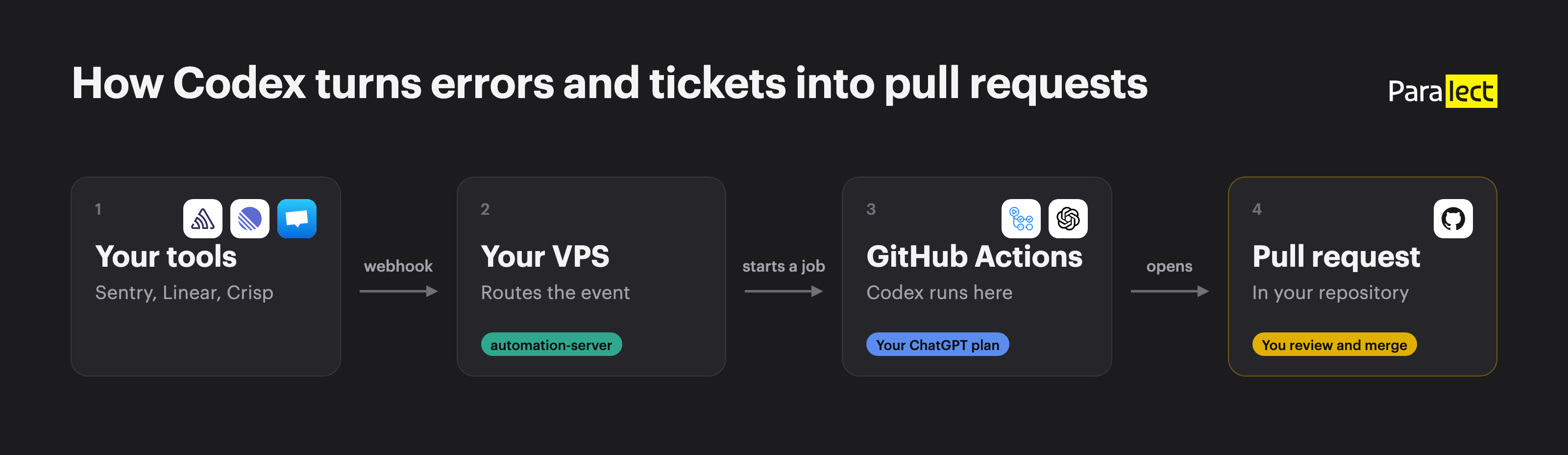
- Errors, tickets and chats turn into pull requests
- The VPS takes webhooks, GitHub Actions runs Codex
- You need a small VPS, a private repo and a ChatGPT plan
- 1. Deploy the server with 1 command
- 2. Sign in to the admin, where every token goes
- 3. Give the server a GitHub token
- 4. Log Codex in with your ChatGPT plan
- 5. Install the Codex workflows from the admin
- 6. Turn on each automation: Sentry, Linear, Crisp, PostHog, SEO, changelog
- 7. Follow every event in Runs, Logs and GitHub Actions
- 8. Vibe-code integrations for Stripe, Vercel or any webhook
- Workflow PRs skip your CI, and 4 other limits
Errors, tickets and chats turn into pull requests
| When this happens | What happens | You get |
|---|---|---|
| A new error shows up in Sentry | Opens a GitHub issue with the stack trace and breadcrumbs. You read it and start Codex on it from GitHub Actions | A draft pull request with a fix and a regression test |
| Someone adds the label codex to a Linear task | Starts a Codex run that implements the task | A pull request attached to the Linear task |
| Support tags a Crisp chat with triage | Asks an AI model whether it's a bug, a feature request, a question or spam | A private note in Crisp, and for a bug an issue or a draft fix |
| Monday comes | Pulls last week's numbers from PostHog | A report in Slack |
| You push to production | Codex reads the commits | A pull request with a changelog note |
| Every day | Codex audits your site's SEO and fixes what it can | A pull request with the fixes and a report |
The VPS takes webhooks, GitHub Actions runs Codex
- Your VPS runs the server and its admin. The server takes webhooks from Sentry, Linear and Crisp, checks their signatures and skips duplicates. It does the work that needs no code changes itself: it opens GitHub issues, triages Crisp chats with Claude and sends the weekly PostHog report on its own schedule. It logs every run.
- GitHub Actions runs Codex on GitHub's machines. Codex reads the repo, makes the change and runs your checks. A later step in the workflow pushes a branch and opens the pull request.
| Started by | When | Workflow |
|---|---|---|
| The server | A Linear task gets the label, or Crisp triage finds a bug in fix mode | linear-implement.yml, codex-issue-fix.yml |
| A repository event | A team member opens an issue or starts a run by hand, or you push to production | codex-issue-fix.yml, codex-changelog.yml |
| A schedule (cron) | Once a day | codex-seo-autopilot.yml |
.github/ or .agents/, so the agent can't rewrite its own workflow.You need a small VPS, a private repo and a ChatGPT plan
- A fresh Ubuntu or Debian VPS. 512 MB of RAM is enough with the prebuilt image (the stack idles around 80 MB). Building the image on the server needs about 1 GB.
- 2 DNS A records pointing at it: one for webhooks (
hooks.example.com), one for the admin (admin.example.com).
- A private GitHub repository that will receive the pull requests. The Codex workflows refuse to run in a public one.
- A ChatGPT plan and the Codex CLI on your laptop.
- Accounts in the tools you want to connect: Sentry, Linear, Crisp, PostHog with Slack. Crisp triage also needs an OpenRouter key.
We deploy the server on your VPS, connect GitHub, Sentry, Linear and Crisp, and log Codex in with your ChatGPT plan. You get the admin and the first pull requests.
 Set it up for me
1. Deploy the server with 1 command
Loading editor...
curl -fsSL https://raw.githubusercontent.com/paralect/automation-server/main/scripts/deploy-vps.sh | sudo bash
- installs Docker if it's missing and clones the repository to
/opt/automation-server
- asks whether to pull the prebuilt image (fast, 512 MB) or build on the server (1 GB)
- asks for your 2 domains and an email for Let's Encrypt
- asks for a GitHub repository, a GitHub token and a Sentry secret. Press Enter to skip them: you'll set them in the admin later
- generates the admin password and the secrets into
.envwith mode 600
- opens ports 80 and 443 if
ufwis on, and starts everything behind Traefik with HTTPS
.env:Loading editor...
sudo /opt/automation-server/scripts/deploy-vps.sh
IMAGE_TAG=sha- in .env to pin the previous build and run the script again. Set it back to latest to follow main./webhooks/* and /health on the webhook domain. Everything else there answers 404, including the admin's API.2. Sign in to the admin, where every token goes
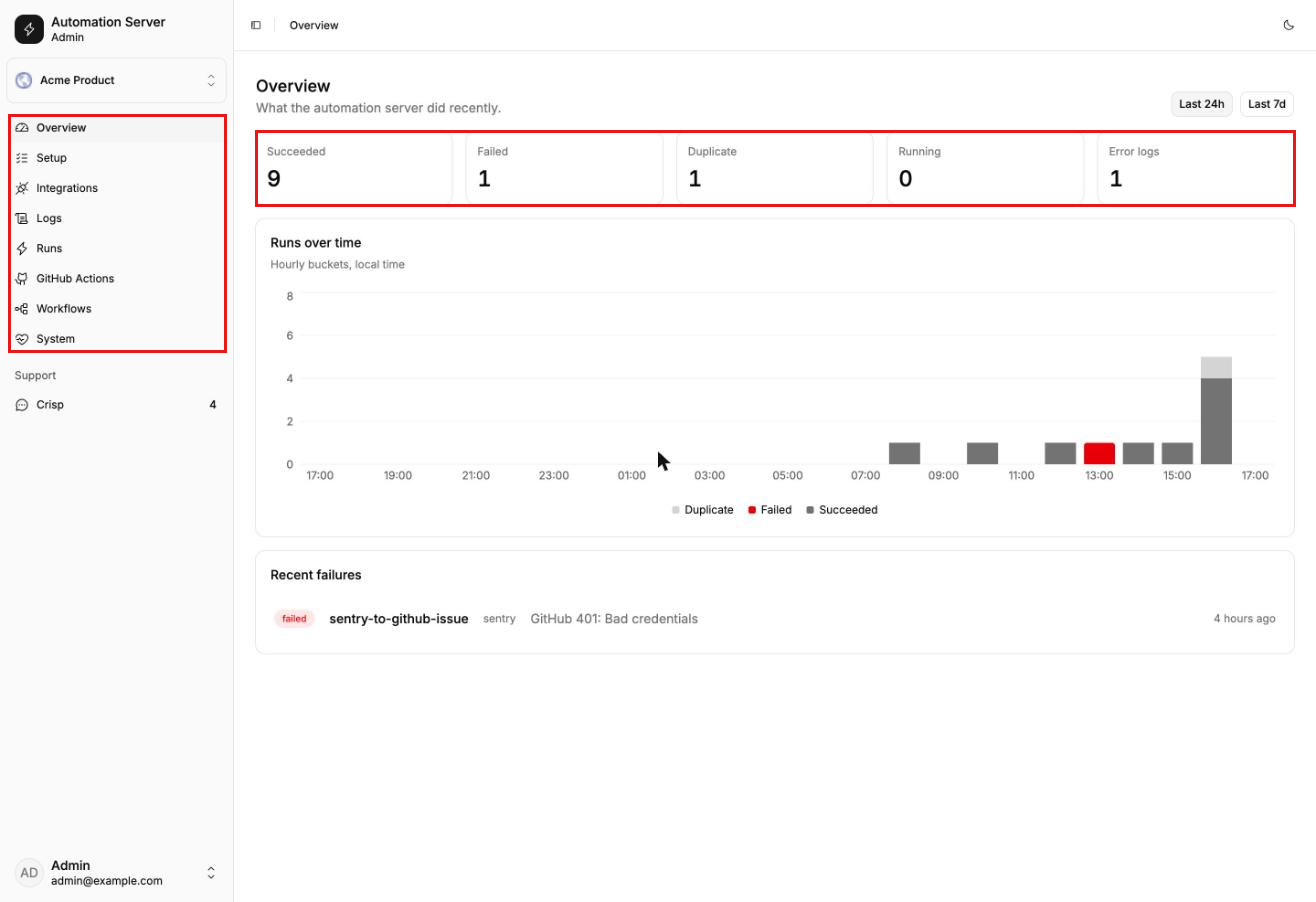
- Setup is a checklist: GitHub token, repositories, services, workflows. It ticks each step as you finish it.
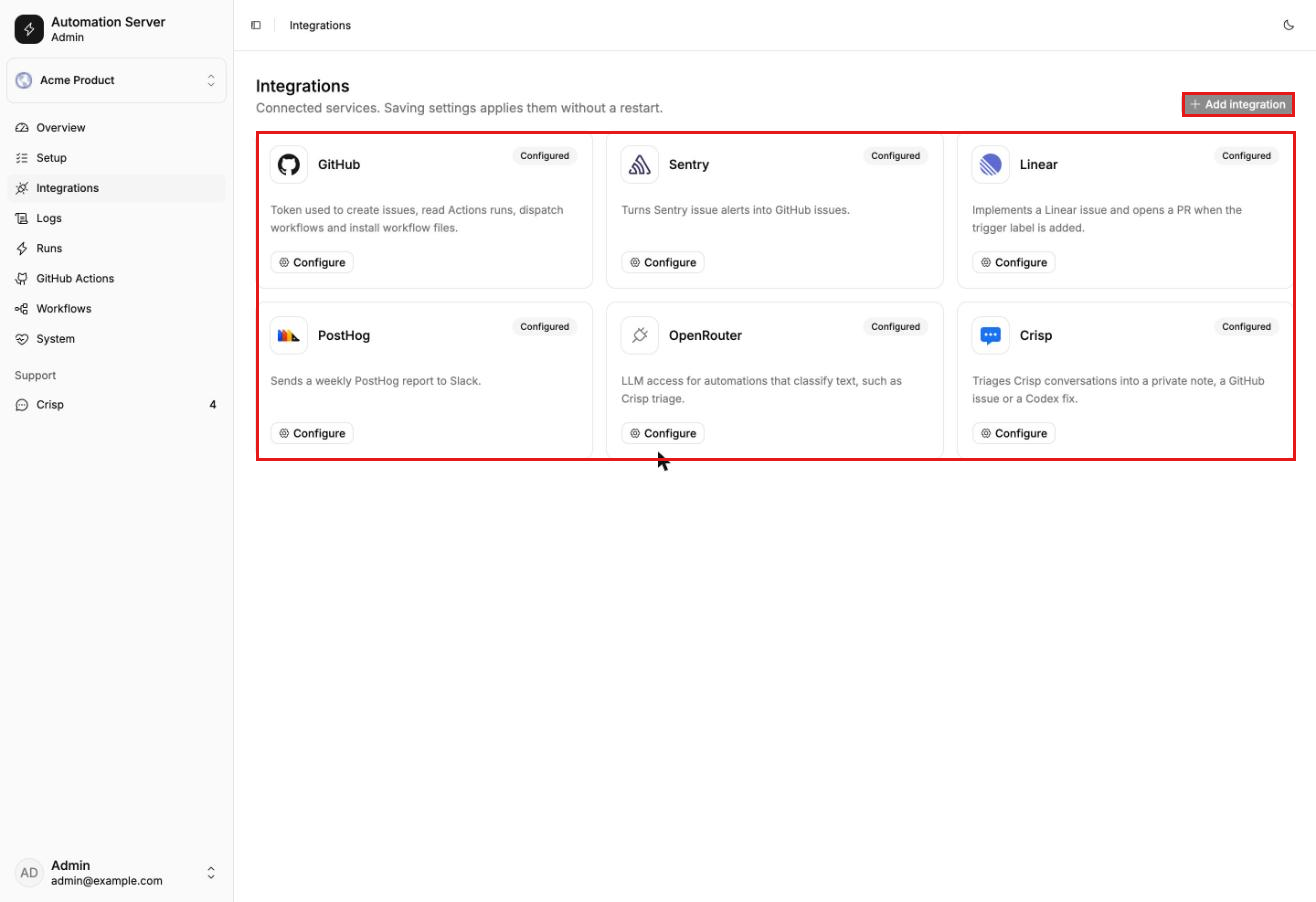
- Integrations has 1 card per service. Every token from this guide goes there.
- Workflows installs the Codex workflows into your repository.
3. Give the server a GitHub token
| Permission | Access | Why |
|---|---|---|
| Issues | Read and write | Sentry and Crisp create issues |
| Actions | Read and write | Linear and Crisp start workflows, the admin shows runs |
| Contents | Read and write | The admin installs workflow files |
| Pull requests | Read and write | Installing in pull request mode opens a PR |
| Workflows | Read and write | GitHub requires it for any change in .github/workflows/ |
owner/name and click Test connection.4. Log Codex in with your ChatGPT plan
- On your laptop, run
codex loginand finish the login in the browser. This writes~/.codex/auth.json.
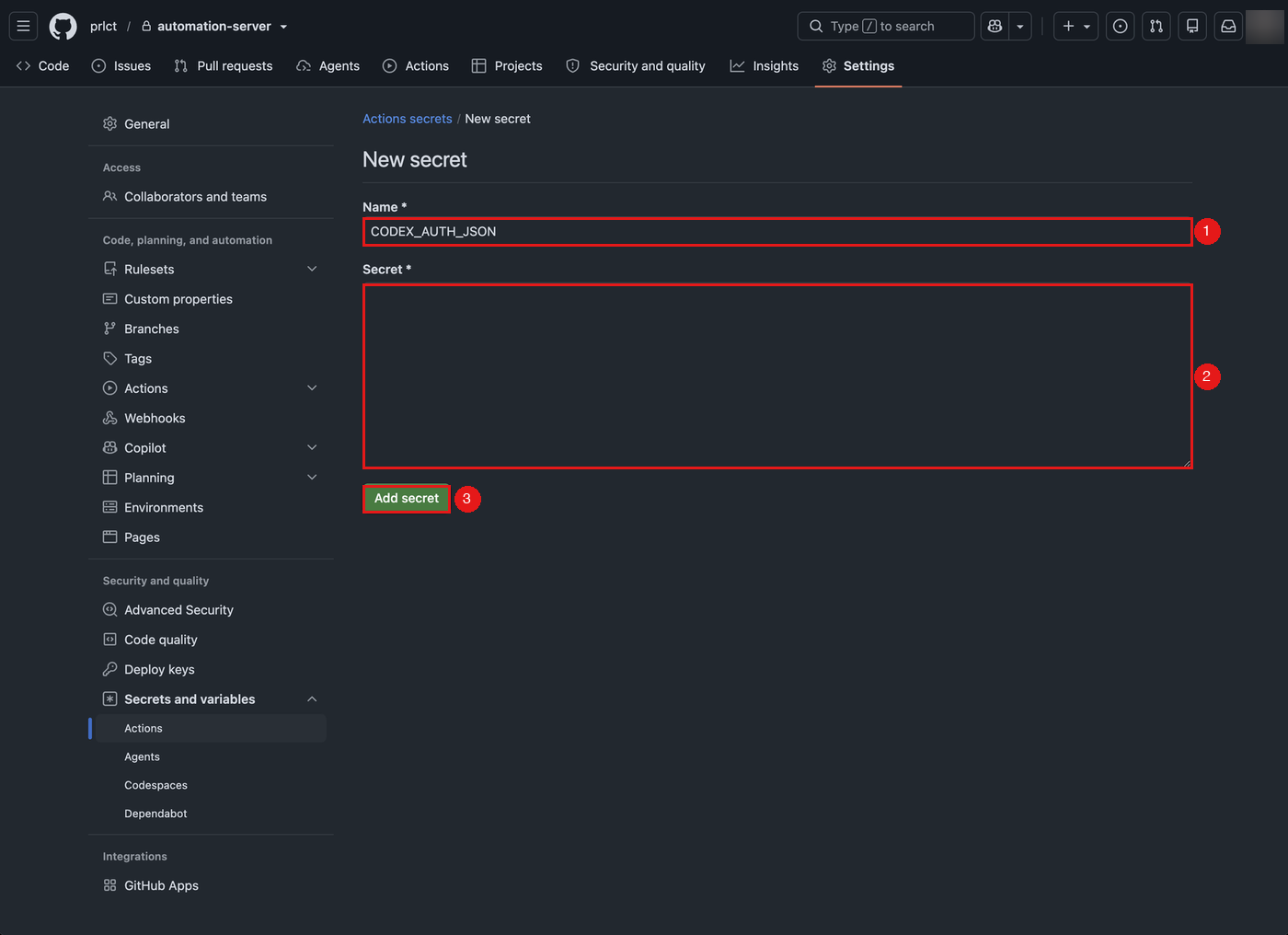
- Open your repository, then Settings → Secrets and variables → Actions → New repository secret.
- Name it
CODEX_AUTH_JSONand paste the whole file. On a Mac,pbcopy < ~/.codex/auth.jsoncopies it.
GH_PAT_FOR_SECRET_WRITE: a fine-grained token with Secrets: Read and write on this repository. The workflow then saves the new login back after each run.- Private repositories only. The workflow stops with an error in a public one.
- 1 Codex run at a time. All workflows share 1 queue, because 2 runs in parallel would each rotate the same login.
- Never paste
auth.jsoninto an issue, a pull request or a screenshot. The workflow also refuses to open a PR whose text contains a value from it.
CODEX_REASONING_EFFORT to high or leave it unset (the default is high). Without an explicit effort, Codex can run with reasoning turned off. CODEX_MODEL picks the model.OPENAI_API_KEY instead, which works in public repositories too. The issue fix and Linear workflows need CODEX_AUTH_JSON.5. Install the Codex workflows from the admin
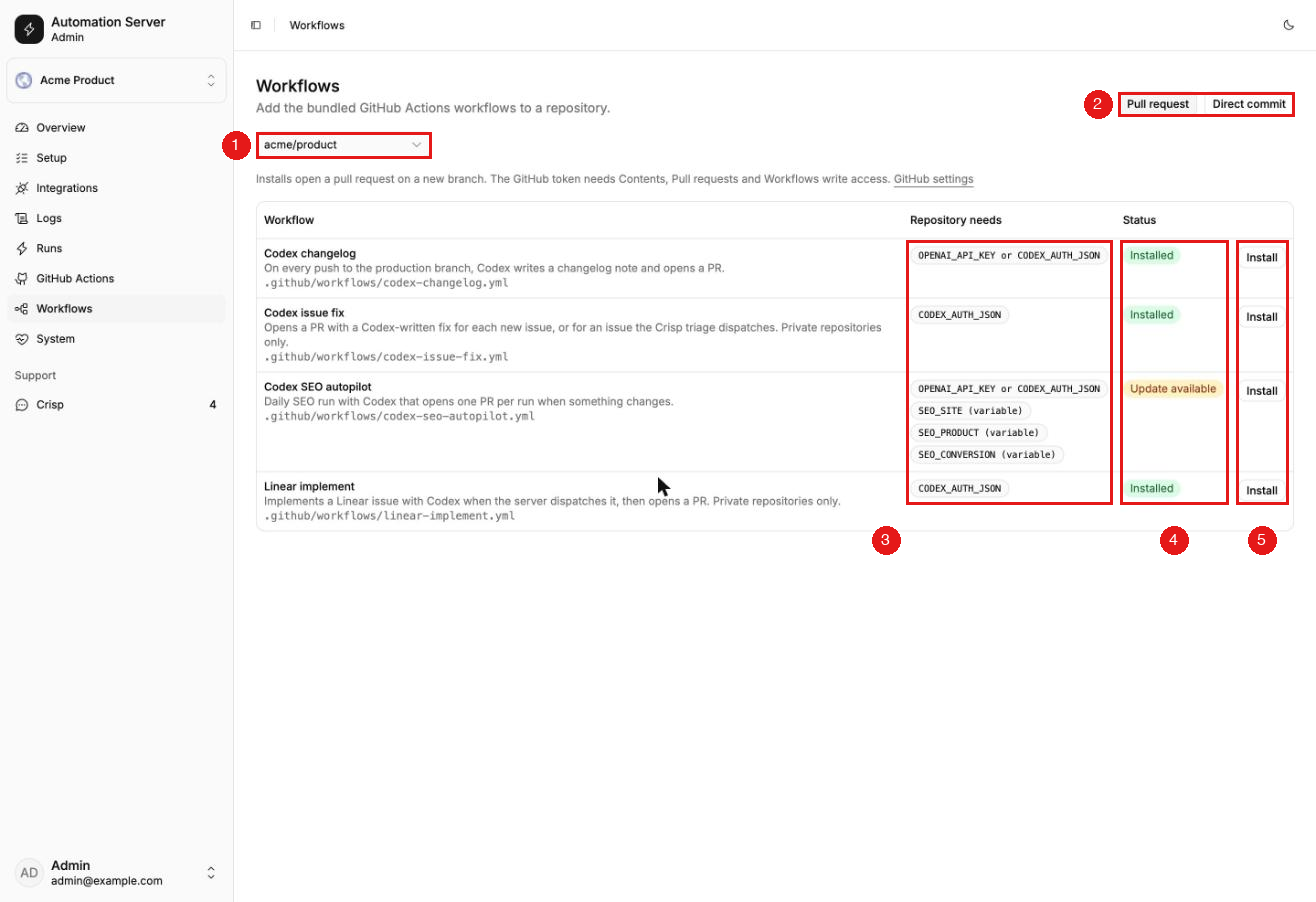
| Workflow | Starts when | You get |
|---|---|---|
codex-issue-fix.yml | A team member opens an issue or starts it by hand, or Crisp triage finds a bug | A draft PR with a fix and a regression test |
linear-implement.yml | The server sees the trigger label on a Linear task | A PR ready for review, attached to the task |
codex-changelog.yml | A push to your production branch | A PR with a changelog note |
codex-seo-autopilot.yml | Once a day, on GitHub's schedule | A PR with SEO fixes and a report |
.agents/skills/ that tells Codex how to do the job. The same Install button adds it. In pull request mode, merge the PR the admin opened: GitHub only runs a workflow once it's on the branch it starts from.fix-issue came from another project and names that project's check commands (npx tsc --noEmit, npx vitest run, npm run lint). Swap in your own, or Codex will run the wrong checks.The bundled skills come from another project. We rewrite them for your stack, your checks and your conventions, so Codex runs the right tests and writes PRs your team would merge.
6. Turn on each automation: Sentry, Linear, Crisp, PostHog, SEO, changelog
Sentry: new errors become GitHub issues
- In Sentry, open Settings → Developer Settings and create an internal integration.
- Paste the webhook URL from Integrations → Sentry in the admin and turn on Alert Action.
- Save, copy the Client Secret and paste it into the admin.
- Create an issue alert with the trigger A new issue is created and the action Send a notification via your integration.
- Click Send Test Notification. A GitHub issue labelled
sentryappears.
error and fatal events become issues. Set SENTRY_ENVIRONMENTS=production to skip staging noise. A repeat alert for the same Sentry issue doesn't open a second GitHub issue.Linear: 1 label hands a task to Codex
- In Linear, create a label, for example
codex.
- Open Settings → API, add a webhook with the URL from the admin and keep only Issues checked.
- Copy the signing secret into Integrations → Linear, along with the label name and the repository that gets the PRs.
- Connect Linear's GitHub integration, so the PR shows up on the task.
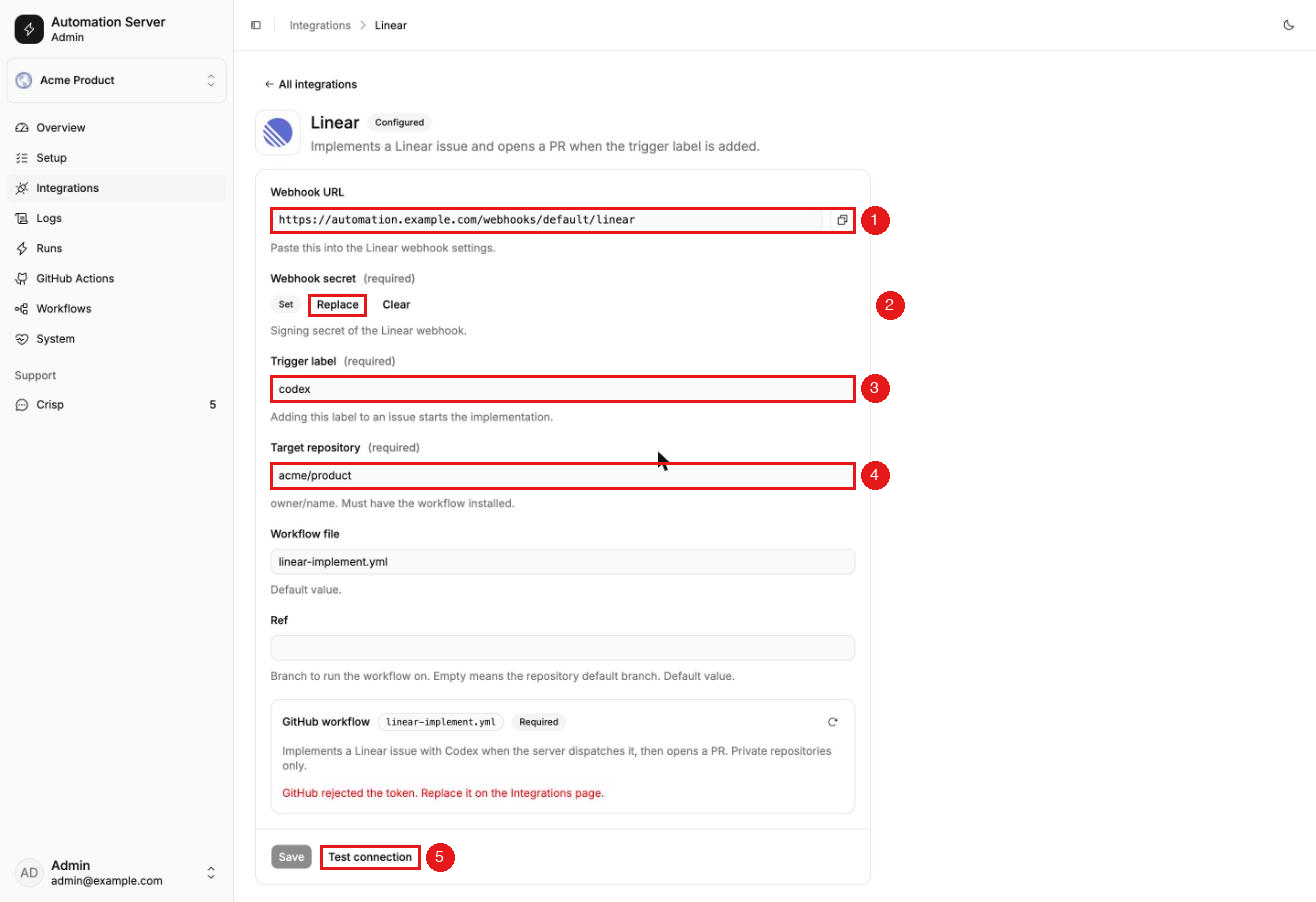
ENG-42: ...), so Linear attaches it. Running it again for the same task updates the same PR.Crisp: Claude sorts chats into bugs, requests and questions
triage segment. Start in shadow mode, which only writes a private note with the verdict. Switch to issue to open GitHub issues for bugs, or fix to start Codex on them too. A free Crisp plan can't receive private notes over the API, so use issue mode there. Personal data is stripped before the model sees the chat, and the customer never gets a message from the server.PostHog: last week's numbers land in Slack
SEO autopilot: Codex works on your site once a day
| Variable | Example |
|---|---|
SEO_SITE | https://example.com |
SEO_PRODUCT | What you sell, in 1 sentence |
SEO_CONVERSION | The action that counts, like a signup |
SEO_COMPETITORS | Optional. Leave it empty and Codex finds them |
OPENAI_API_KEY secret instead of CODEX_AUTH_JSON. The ChatGPT login only runs in private repositories.seo/ folder in your repo: the site context, a keyword map, a backlog, competitor snapshots and a report per run. From that memory it decides whether today is a light daily pass, a weekly review or a monthly one. The workflow downloads the skill pinned to 1 commit and checks its hash, so a change upstream can't change what Codex runs.seo/ only counts once it's on the default branch, so while a previous SEO PR is open, the daily run skips. Start it from the Actions tab with force to override.robots.txt, the home page and the footer, and we merged it the next day.Changelog: every production push gets a release note
write-changelog skill ships with the workflow, and the same Install button adds both. On each push to your production branch, Codex reads the commits in that push and writes 1 note for the people who use your product. It leaves out refactors, dependency bumps, CI and tests. If nothing in the push is visible to users, it writes nothing and no pull request opens.title, description and date. The PR body lists the commits it left out and anything you should double-check.| Variable | Default | Set it to |
|---|---|---|
PRODUCTION_BRANCH | production | The branch you deploy from, often main |
CHANGELOG_DIR | changelog | The folder your site reads release notes from |
- The workflow isn't on the production branch. A push runs the workflow from the pushed commit, so the workflow file and
.agents/skills/write-changelog/have to be on that branch, not only on the default one.
- Your site doesn't read that folder. On Fireprompts the first note landed in
changelog/as MDX while the site rendered its changelog from a JSON file. Codex flagged it in the PR, but pointCHANGELOG_DIRat the right place before the first run.
- Notes come without images. The run can't start your app or upload screenshots, so add a cover by hand if your notes use one.
7. Follow every event in Runs, Logs and GitHub Actions
200. So the server records every run (1 automation handling 1 event) and every log line, and the admin shows both. Run 1 real event through each automation and follow it:- Overview first: successes, failures and duplicates for the last 24 hours or 7 days, and the latest failures.
- Logs: search for the event's ID (a Sentry issue ID,
ENG-42, a Crisp session). You seewebhook receivedand every line of every run it started. Turn on Live while you send a test webhook.
- Runs: click the run ID in a log line to see its status, its error and its lines in order.
- GitHub Actions: if the run started a workflow, find the Codex run there by its time, with its status, target and duration.
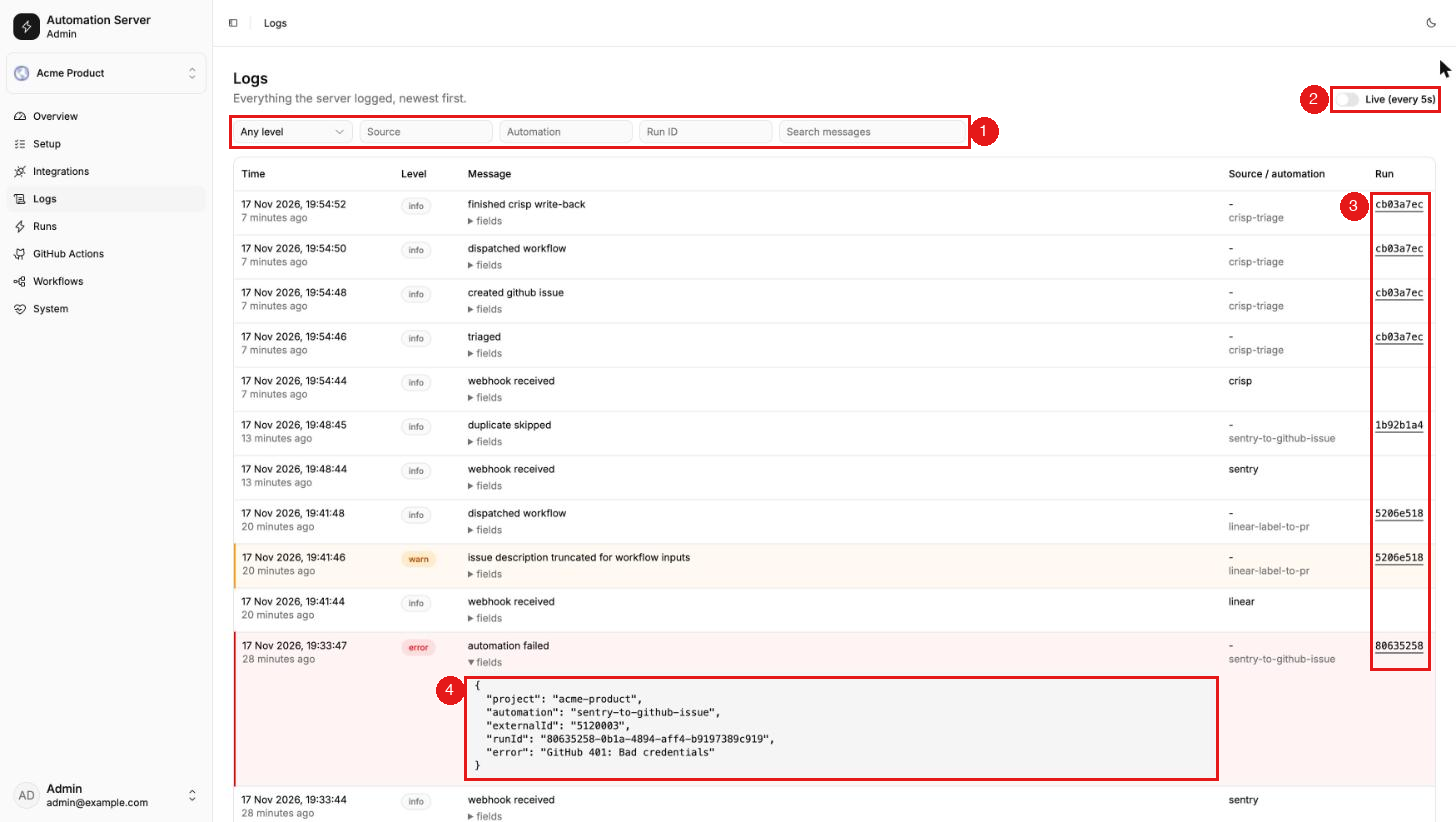
| Status | Means |
|---|---|
running | Working now. If the server restarts mid-run, it becomes failed with interrupted by server restart |
succeeded | Finished without an error. It may have done nothing on purpose, like skipping a staging error. The log says |
failed | Threw an error. The message usually names the fix: a token, a permission, a missing workflow |
duplicate | The event was already handled, so it was skipped. Normal when a sender redelivers |
succeeded only means the workflow started. Whether Codex opened a pull request shows on the GitHub Actions page.LOG_RETENTION_DAYS).Get alerts without opening the admin
docker logs and any log collector see it. Wire 3 checks into the monitoring you already have:- Uptime:
GET /healthon the webhook domain returns{"status":"ok"}.
- Failures: alert on lines with
"message":"automation failed"or"message":"job failed".
- Secrets after a deploy: a burst of
webhook signature rejectedmeans a secret didn't reach the new server.
Fix the 5 errors you'll most likely hit
| You see | Fix |
|---|---|
401 or 403 from GitHub | The token lacks a permission from step 3, or it expired |
404 when starting a workflow | The workflow isn't merged into the branch yet, or the token can't see the repo |
| The run fails on gh pr create | Actions aren't allowed to create pull requests yet |
CODEX_AUTH_JSON is not set | The secret is missing or sits in another repository |
| Sentry webhook rejected | The client secret in the admin doesn't match the integration. Copy it again |
8. Vibe-code integrations for Stripe, Vercel or any webhook
- A source receives the webhook. It checks the signature on the raw request body and turns the payload into an event. It lives in
packages/sources/src/./
- An automation decides what to do with the event: open an issue, start a Codex workflow, post to Slack. It lives in
packages/automations/src/.
apps/server/src/integrations//index.ts , and add the fields the admin should show to packages/settings/src/spec.ts. Once someone fills them in the admin, the webhook goes live at /webhooks// without a restart. The Sentry integration is the smallest complete example to copy.Stripe, Vercel, Intercom, Zendesk or your own app: we build the source and the automation, with signature checks, tests and safe retries, and send it to you as a pull request.
Give Claude Code or Codex this prompt
Loading editor...
Read docs/adding-an-integration.md, then the Sentry integration in
packages/sources/src/sentry and apps/server/src/integrations/sentry.

Add a Stripe integration the same way:
- verify the Stripe-Signature header on the raw body
- parse invoice.payment_failed events
- add an automation that opens a GitHub issue labelled stripe
  with the customer ID and the amount, and no email addresses
- add the webhook secret and target repository to the admin settings

Follow the checklist at the end of the doc. Add test fixtures,
then run bun run test and bun run check-types until both pass.
- The signature check. It must run on the raw body and compare in constant time. A source without one lets anyone on the internet trigger your automations.
- The logs. No tokens or payload bodies, only IDs and decisions.
- Retries. If the run fails halfway and the sender redelivers, it mustn't open a second issue.
- The prompt. Text from a webhook becomes Codex's instructions. If outsiders can write it, have a person start the Codex run, the way the Sentry integration does.
Deploy your fork with the same script
main as ghcr.io// , and the deploy script pulls the image of whatever repository it cloned. Point it at your fork:Loading editor...
curl -fsSL https://raw.githubusercontent.com/<you>/automation-server/main/scripts/deploy-vps.sh \
  | sudo REPO_URL=https://github.com/<you>/automation-server.git bash
Workflow PRs skip your CI, and 4 other limits
- PRs opened by a workflow don't start your CI. GitHub doesn't trigger workflows from the job token. Push an empty commit or reopen the PR, or switch the push step to a GitHub App or PAT token.
- Scheduled runs start late. GitHub queues cron jobs when it's busy. On Fireprompts the SEO run set for 06:00 UTC starts between 13:00 and 16:00 UTC. Don't schedule anything that has to happen at an exact time.
- Keep tasks small. Codex makes no change when a Linear task is too vague, and says what's missing. Write the task the way you'd write it for a new hire.
- Keep
SETTINGS_ENCRYPTION_KEYstable. Change it and every secret saved in the admin becomes unreadable.
- Use a VPS, not a platform without a disk. On DigitalOcean App Platform the run history and duplicate checks reset on every deploy.
We deploy the server, connect your repo, Sentry and Linear, and tune the Codex skills to your checks, so the first pull requests are ones you'd merge.
Ship faster than
your competition
Focus on customers and sales while we handle product delivery. Hire a dedicated AI maker or a whole product team.


